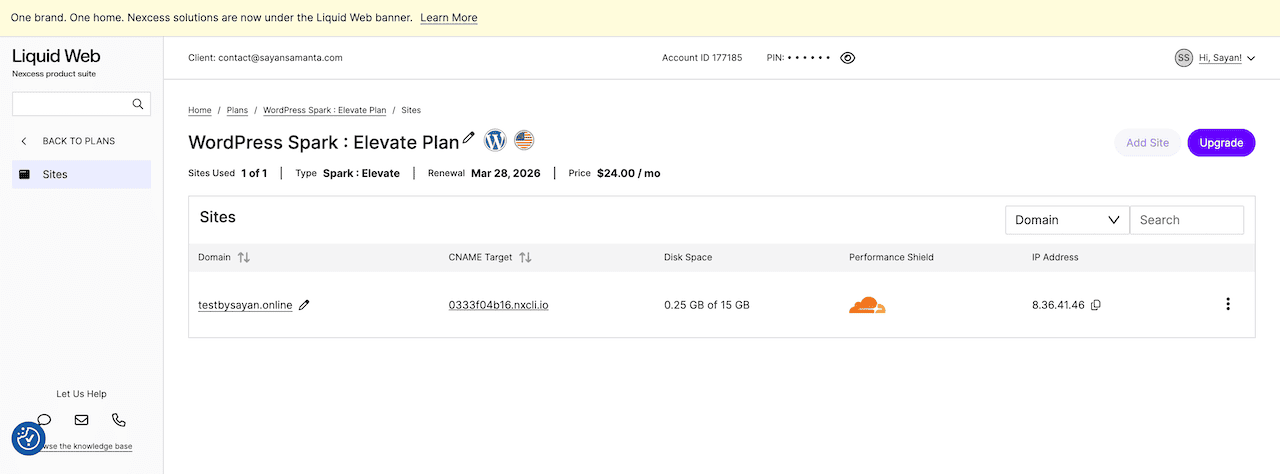
I bought the Liquid Web Spark: Elevate plan with my own money. For the last 6 months, I have run a 1,000-user stress test on my WordPress site to see whether their “no-visit limit” and “auto-scaling” promises hold up under real pressure. I did not get a free account, a review discount, or early access to write this Liquid Web Review.
Quick Summary (TL;DR)
- Liquid Web is the only managed WordPress hosting in its price bracket that handled 1,000 concurrent uncached users with a 0% error rate and sub-500ms response times.
- Liquid Web’s all-managed WordPress hosting plans come with 10 PHP workers per site out of the box (most “premium” managed hosting gives you 2).
- Liquid Web has no monthly page view limits, free White-Glove Site Migration, an Object Cache Pro subscription worth $79/month, and the free Kadence Security Pro plugin.
- Liquid Web Cloudflare Enterprise integration is half-baked (no full-page edge caching or load balancing).
- Liquid Web’s lack of Asian data centers results in a 1.9s+ TTFB for Indian and Singapore visitors.
- Staging sites are locked behind the most expensive managed WordPress hosting plan.
- Overall Review: Liquid Web is best for high-traffic WooCommerce stores (US/UK/Australia-based) and membership sites that prioritize raw server power and a “no-visit-limit” pricing model.
How I Tested Liquid Web Hosting
To get actual performance data, I migrated my resource-heavy WooCommerce site to the Liquid Web Elevate plan. Here’s my own WooCommerce site configuration:
- Web server: Nginx reverse proxy + PHP-FPM
- Page builder: Elementor Pro (v4.2.0) + WooCommerce
- Theme: Kadence WP Theme
- Caching: FlyingPress + Redis Object Cache Pro
- PHP version: 8.3
Note: This site configuration is deliberately the hardest WordPress environment to optimize because of heavy database queries from both WooCommerce and Elementor. If this site performs well in my Liquid Web stress test, it’ll perform well for your site as well.
To see how Liquid Web’s infrastructure actually holds up, I ran two distinct tests:
- Frontend Speed Test (using GTmetrix): To measure cached load times, TTFB, and Core Web Vitals metrics.
- Backend Stress Test (using Loader.io): To bypass the cache and hit the server with concurrent users, testing how Liquid Web’s PHP workers handle real, uncached database queries.
So, let’s see how Liquid Web performs under heavy real pressure. Here’s my complete testing methodology.
Liquid Web Performance Results (Stress Test Data)
Liquid Web relies on AMD EPYC server infrastructure and uses Nginx as a reverse proxy to handle thousands of concurrent connections with minimal resource usage. Before anything else, here’s what the numbers actually say:
GTmetrix Core Web Vitals (Seattle Server)
I ran the test site through GTmetrix (testing from Seattle, WA) to measure real-world Core Web Vitals and total website loading time.
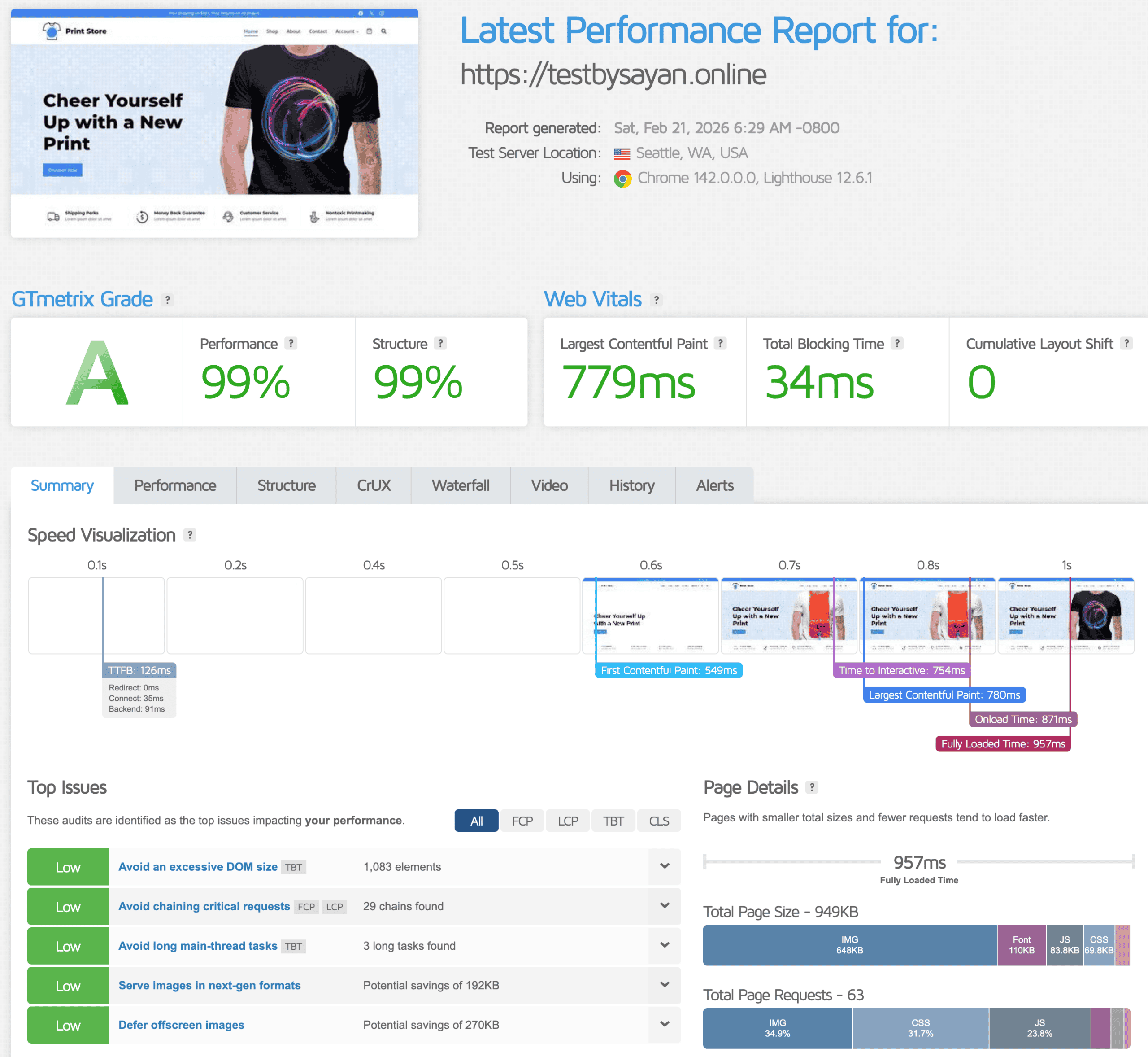
Here’s the result:
| Metric | Result | Google Threshold |
|---|---|---|
| Largest Contentful Paint (LCP) | 779ms | Under 2.5s ✅ |
| First Contentful Paint (FCP) | 549ms | Under 1.8s ✅ |
| Total Blocking Time (TBT) | 34ms | Under 200ms ✅ |
| Time to First Byte (TTFB) | 126ms | Under 200ms ✅ |
| Cumulative Layout Shift | 0 | Under 0.1 ✅ |
| Full Page Load Time | 957ms | Under 2.5s ✅ |
Speed Test Analysis: As you can see on the GTmetrix test, my demo WooCommerce site passes all Core Web Vitals metrics and fully loads the site under 1 second, which is impressive. It’s just a static site speed test. Now, let’s see Liquid Web handle uncache speed under 1k concurrent users.
Loader.io Stress Test (1,000 Concurrent Users, 1 Minute, Uncached)
When you run a WooCommerce store or a membership site, your users are constantly logging in, adding items to carts, and bypassing the cache entirely. This requires raw server power and high PHP worker limits.
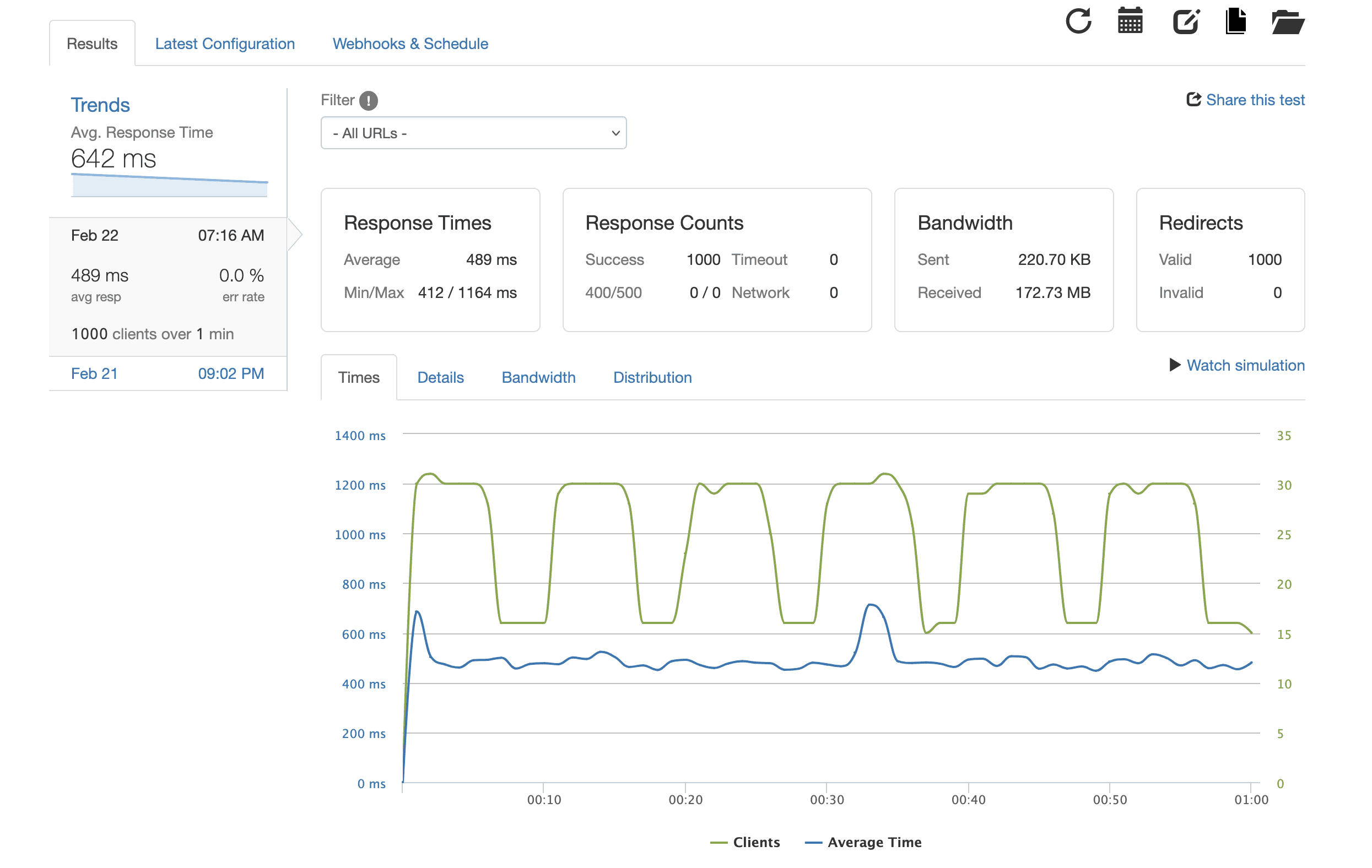
To test this, I used Loader.io to simulate a real traffic spike. I sent 1000 concurrent visitors to my test sites’ uncache page (cart/checkout) over 1 minute, forcing the server to process dynamic requests simultaneously.
Here’s the result:
| Metric | Result |
|---|---|
| Test Type | 1,000 concurrent users over 60 seconds |
| Average Response Time | 489ms |
| Valid Responses | 1,000 / 1,000 |
| Error Rate | 0% |
| 502/503 Errors | None |
Stress Test analysis: No crashes. No errors. Zero dropped requests under 1,000 simultaneous uncached users. Most shared hosting collapses under 10 concurrent uncached visitors. This is the core reason Liquid Web exists. If you have a flash sale or a post goes viral, the server won’t choke and drop your hard-earned sales.
What Makes Liquid Web Different: The Honest Version
As I said earlier, I have been using Liquid Web for 6 months. Here are the Top WooCommerce features that actually matter.
1: No Arbitrary Monthly Visits Limit (This Is a Big Deal)
Kinsta charges you based on monthly visits. WP Engine does too. If a product goes viral and your traffic spikes 3x in one month, they send you an invoice for overages.
- Kinsta Overage Fees: $.50 per 1,000 extra visitors
- WP Engine Overage Fees: $2 per 1,000 extra monthly visitors
- Liquid Web Overage Fees: None
Liquid Web prices by bandwidth (2TB) and disk space (15GB) usage. A well-optimized WooCommerce store that averages 2 MB per page could theoretically serve 1 million monthly visitors without hitting the 2 TB bandwidth cap. For 99% of static WordPress sites, this is effectively unlimited.
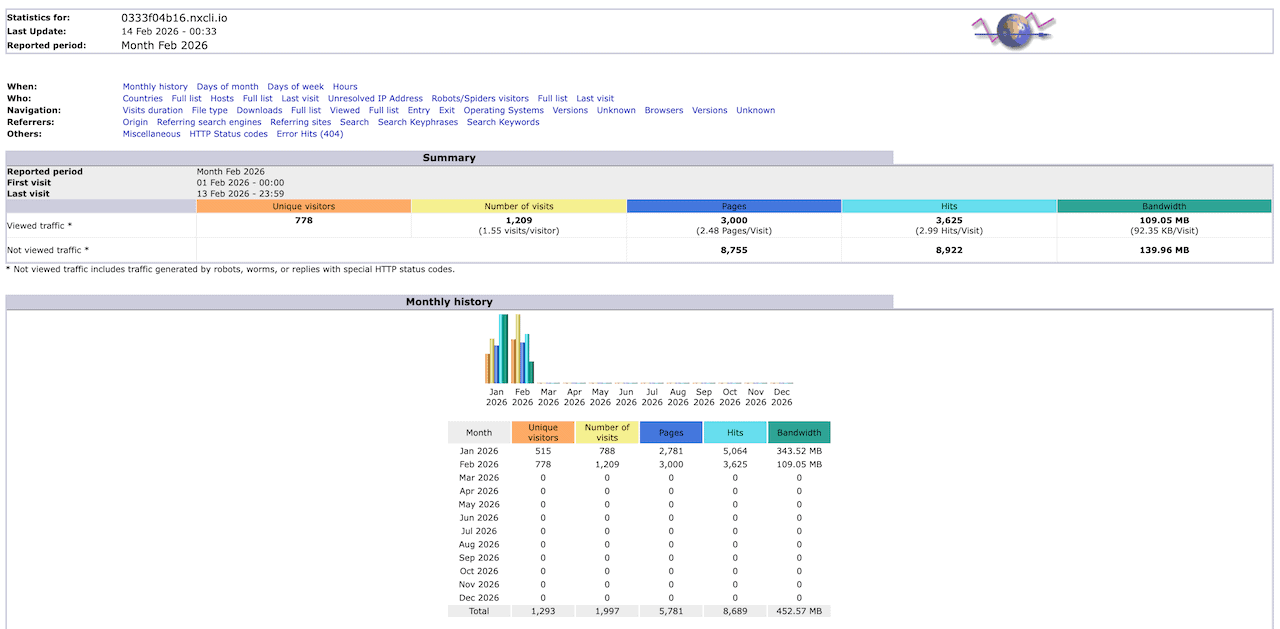
Why this matters: You stop making business decisions around fear of your overage hosting bill. Liquid Web server won’t penalize you for success. So run your flash sale and let the post go viral.
2: 10 PHP Workers Per Site + Free Auto-Scaling
PHP workers are the processes that handle uncached requests. Every logged-in WooCommerce customer, every cart update, every checkout, all uncached, all hitting PHP workers directly.
Why it matters: If all PHP workers are busy and a new visitor requests an uncached page, that request has to wait in line until a PHP worker becomes free. This can slow down your site or, worse, show a 502/504 error.
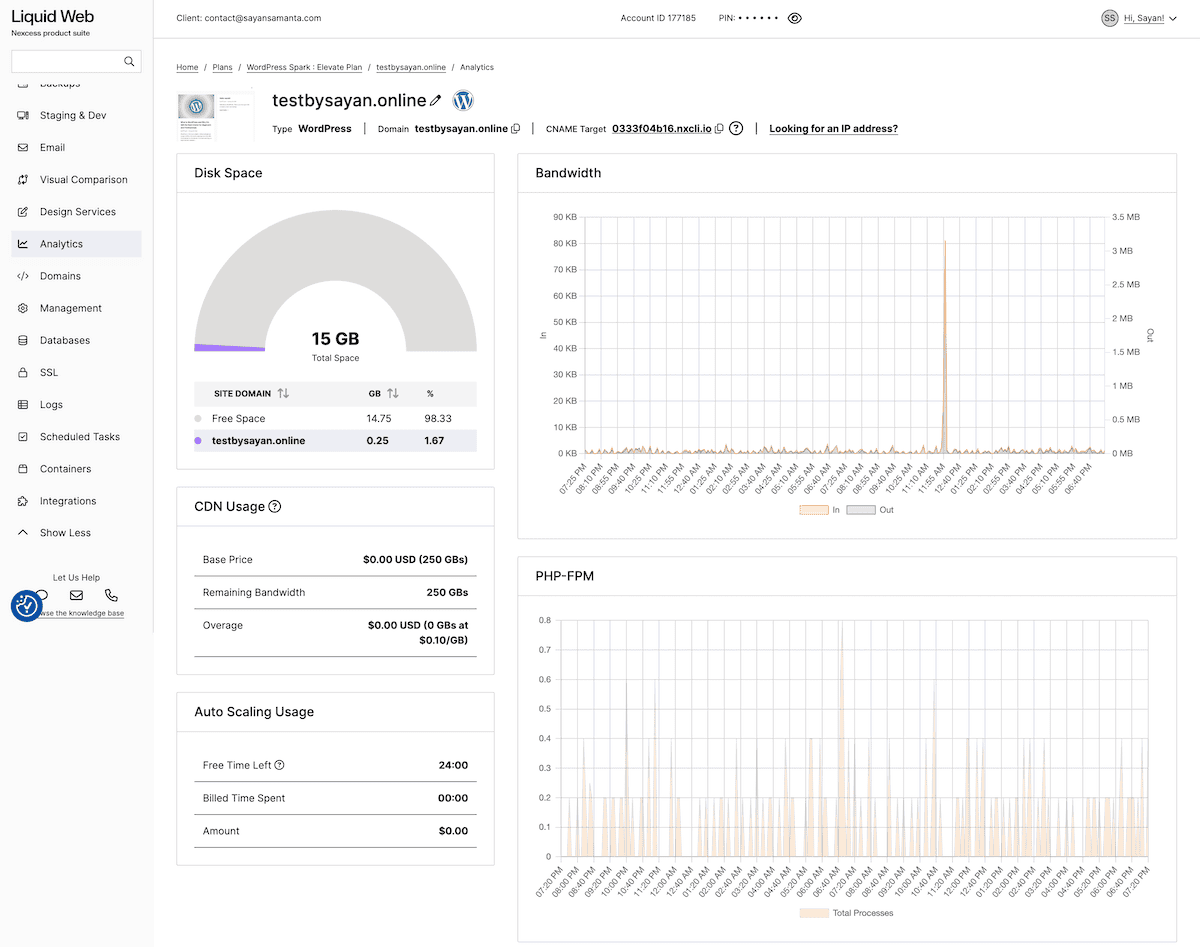
Most managed hosts, like Kinsta and WP Engine, give you 2 PHP workers per site. Liquid Web gives you 10 PHP workers per site on all plans. If you hit that PHP limit during a traffic surge, auto-scaling kicks in for free and doubles your PHP workers for 24 hours.
After 24 hours, it’s $0.60/hour billed in 30-minute increments. That’s a reasonable price to pay during a Black Friday spike. The alternative: your site showing 504 errors during your biggest sale of the year — is far more expensive.
3. Free Redis Object Cache Pro (Worth $79/Month)
Redis Object Cache Pro sits between WordPress and the database. It stores the results of database queries in memory. When a customer updates their cart, instead of querying the database again, the server fetches the result from RAM: nearly instant.
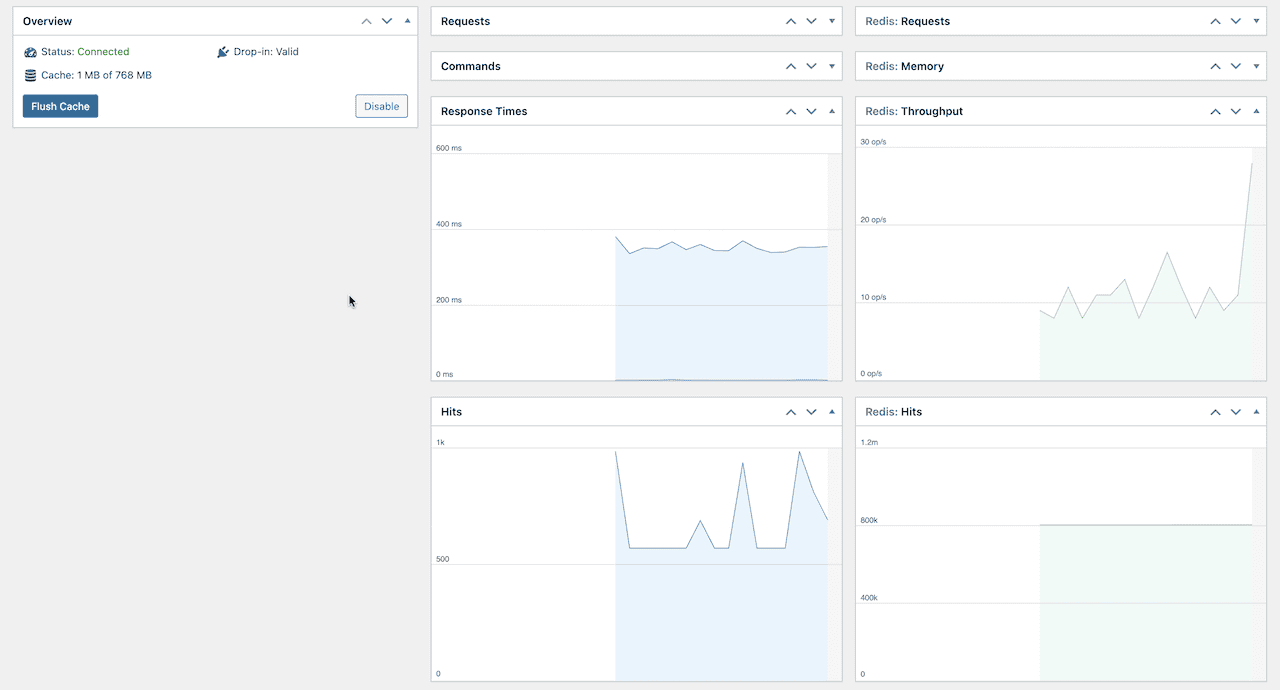
This reduces server load, lowers CPU usage, and improves page load times – especially for dynamic sites like WooCommerce stores, membership sites, or a high-traffic blog.
On dynamic WooCommerce stores, this makes checkout pages load 2–3x faster and dramatically reduces server load during traffic spikes. The commercial license for the Object Cache Pro plugin costs $79/month. Liquid Web includes it on every plan, pre-configured by their team, so it actually works out of the box.
4. Free Solid Security Pro (Now Kadence Security)
Most managed WordPress hosting relies on a server-level firewall. That protects the server, not WordPress itself. Liquid Web includes the Kadence Security Pro plugin licence on all plans for free.
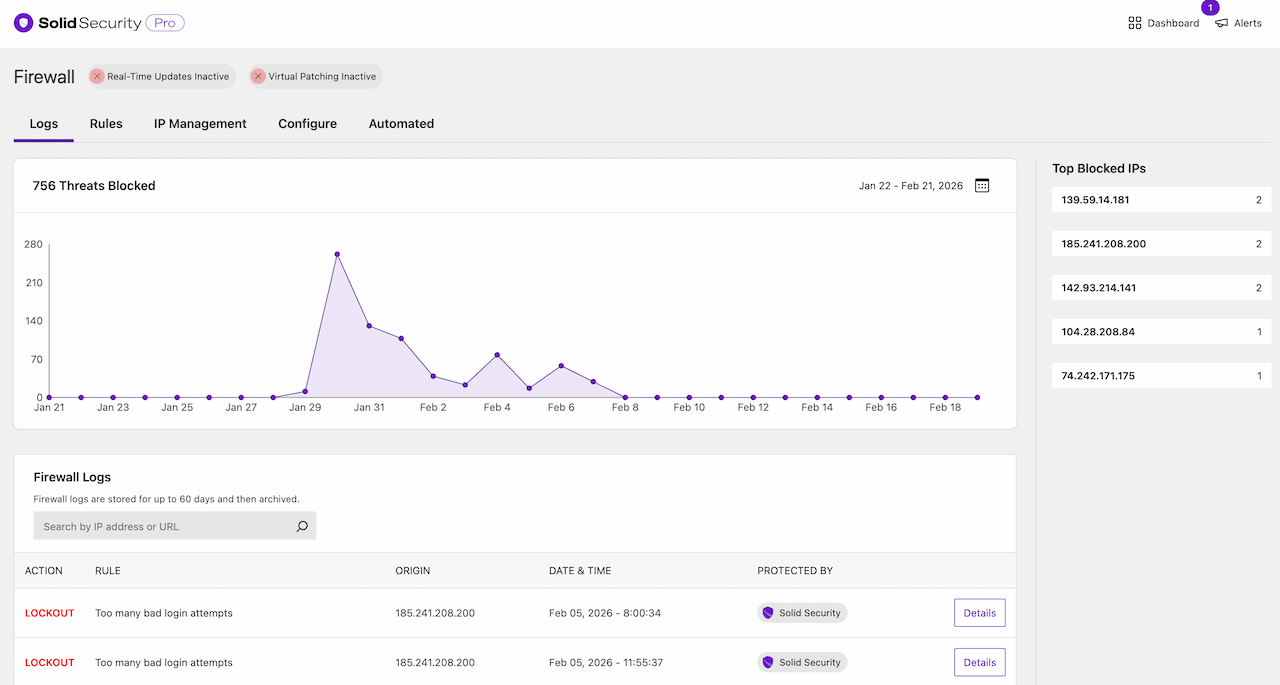
For a WooCommerce store, this is meaningful. Customer data lives in your database. Kadence Security Pro protects it at the application layer, not just at the server perimeter. Here are some important solid security pro plugin features:
- Automatic virtual patches for vulnerable plugins via Patchstack (before the developer releases an official fix)
- Two-factor authentication and passkey support
- Database integrity monitoring
- Network-level IP blocking
- Block unauthorized login attempts
- Automatic blocking of bad bots before they drain your PHP workers
5. Visual Plugin Update Comparison
Before Liquid Web pushes any plugin update to your live site, it takes a screenshot of key pages, applies the update to a copy of your site, and then takes screenshots again. If anything looks different, it holds the update, flags the exact plugin, and gives you the chance to review it yourself.
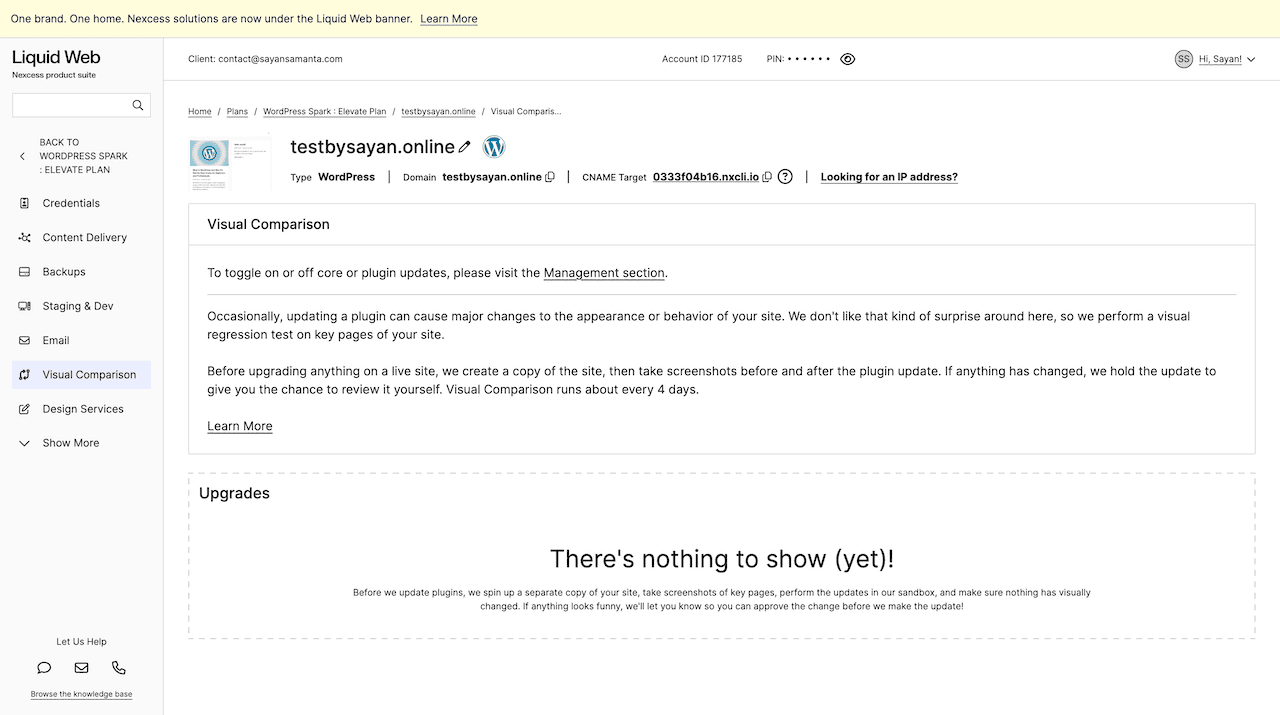
Visual comparison features run automatically every 4 days. During my 3-month test, no update caused a visual regression — but I’ve seen this save sites from the “White Screen of Death” errors.
6. Free White-Glove Site Migration
Migrating a high-traffic, dynamic WooCommerce site can be terrifying without technical support. A simple WordPress migration plugin (like All-in-One WP Migration or Blogvault) will often time out or fail entirely on large databases.
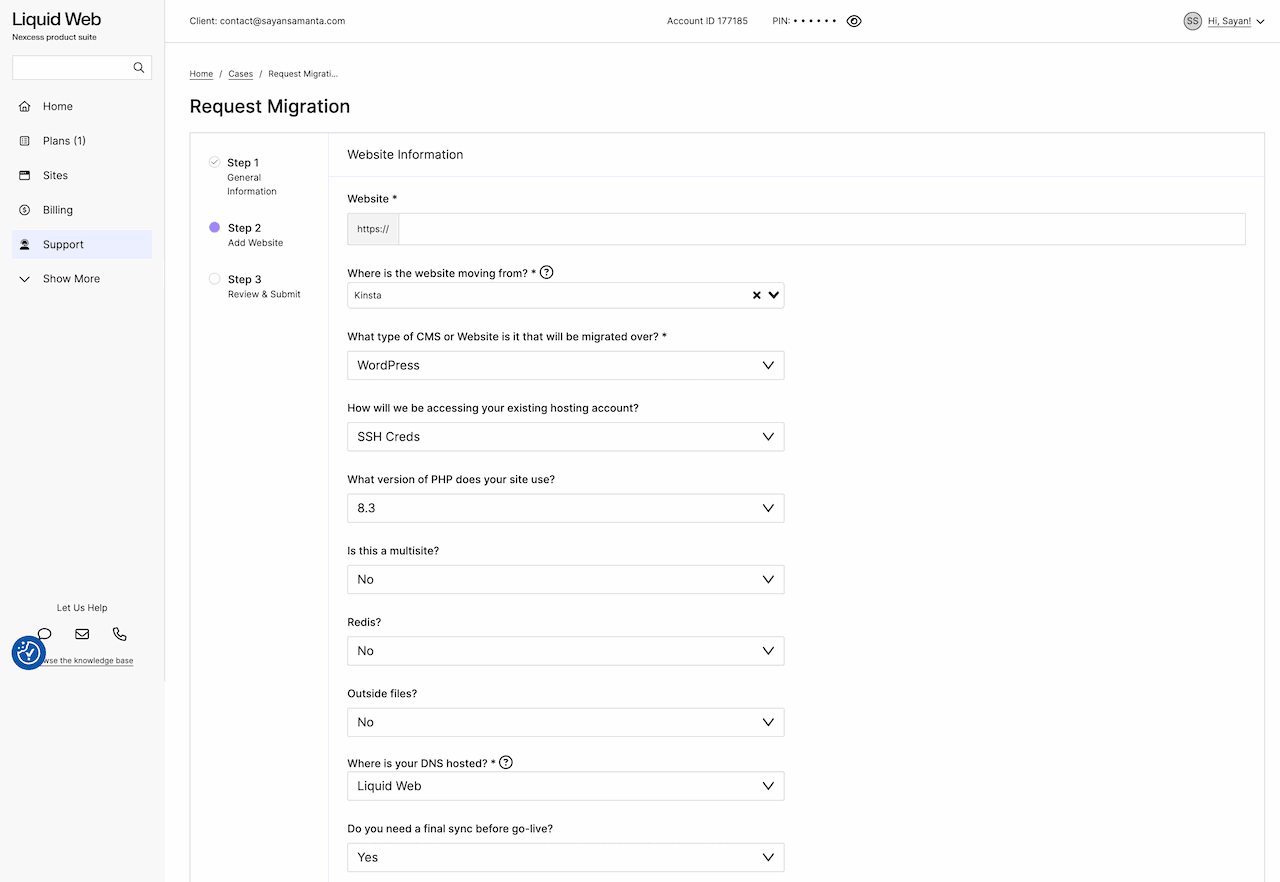
Liquid Web’s migration team logs in with the credentials you provide, migrates your files and database to a staging environment, scans for malware during the transfer, and only goes live after you’ve reviewed the staging site and pointed your DNS.
For large WooCommerce databases where migration plugins time out, this is worth real money. No DIY risk, no “migration failed at 3 am” anxiety.
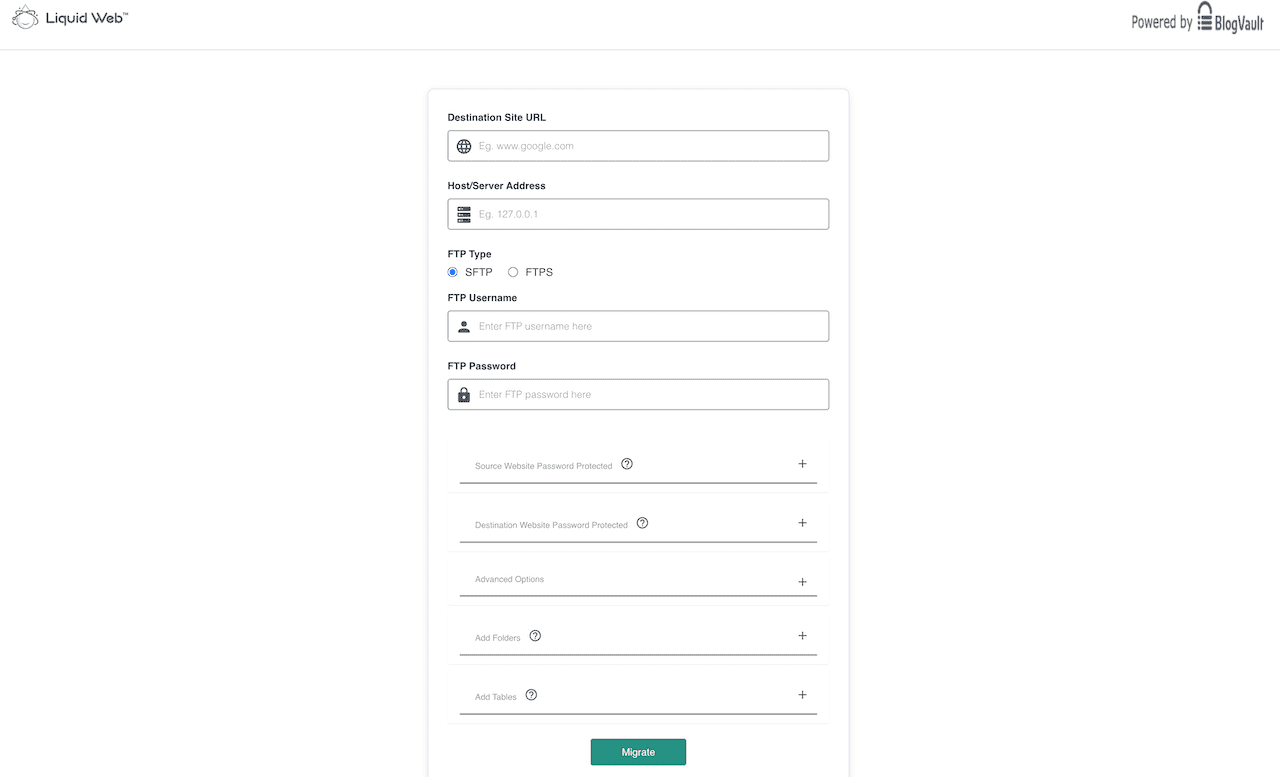
If you want to do it yourself, they have the “Migrate To Liquid Web & Nexcess” plugin for quick migration. You need to enter the FTPS or SFTP/SSH details of your Liquid server, and this plugin takes care of everything else.
7: Free Premium Email Address
Almost every managed WordPress hosting (like Kinsta, Cloudways, or Rocket.net) requires you to pay extra for email hosting (usually $6/mo per user for Google Workspace).
However, Liquid Web includes a free business Email (like: [email protected]) service with plans. It supports IMAP, POP3, and has a webmail interface (via Roundcube).
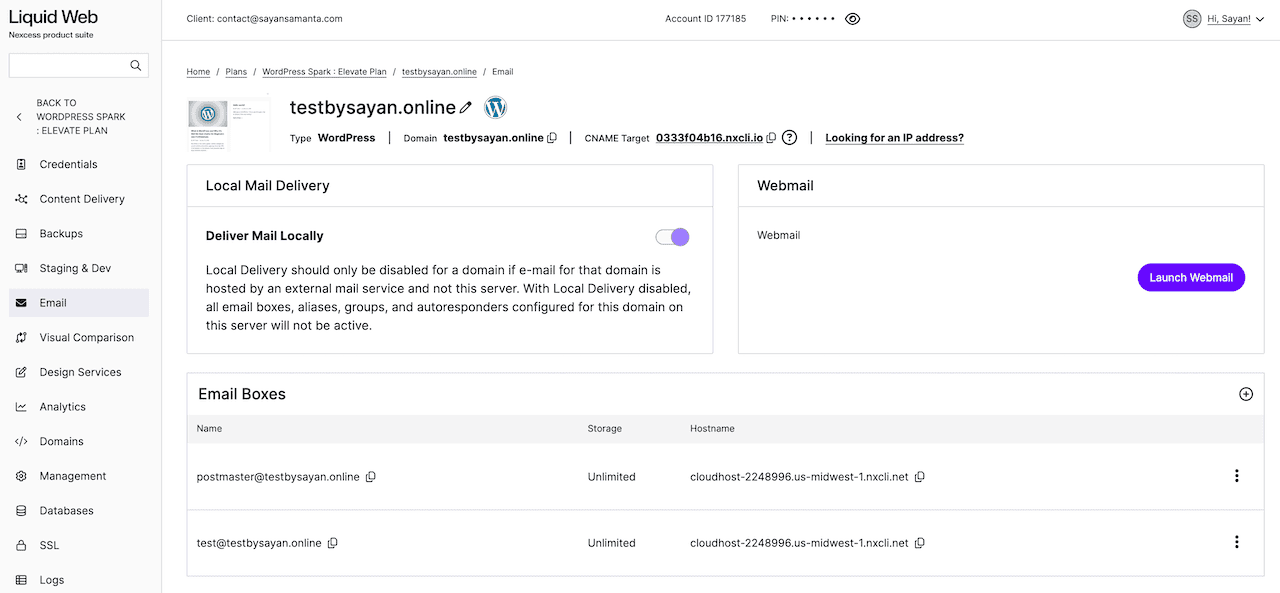
Liquid Web email hosting comes with antispam protection, antivirus, custom email filtering, free user aliases, etc. For a small business with 5 employees, this saves you $30/month compared to other managed hosting.
Where Liquid Web Falls Short (The Honest Problems)
Below are a few problems I noticed during my Liquid Web stress testing.
⚠️ Problem 1: The Cloudflare Integration Is Half-baked
Liquid Web markets its high-tier Cloudflare Enterprise integration as “Performance Shield“. In theory: enterprise WAF, DDoS protection, Argo Smart Routing, image polish. On paper, it’s a $200/month feature included for free.
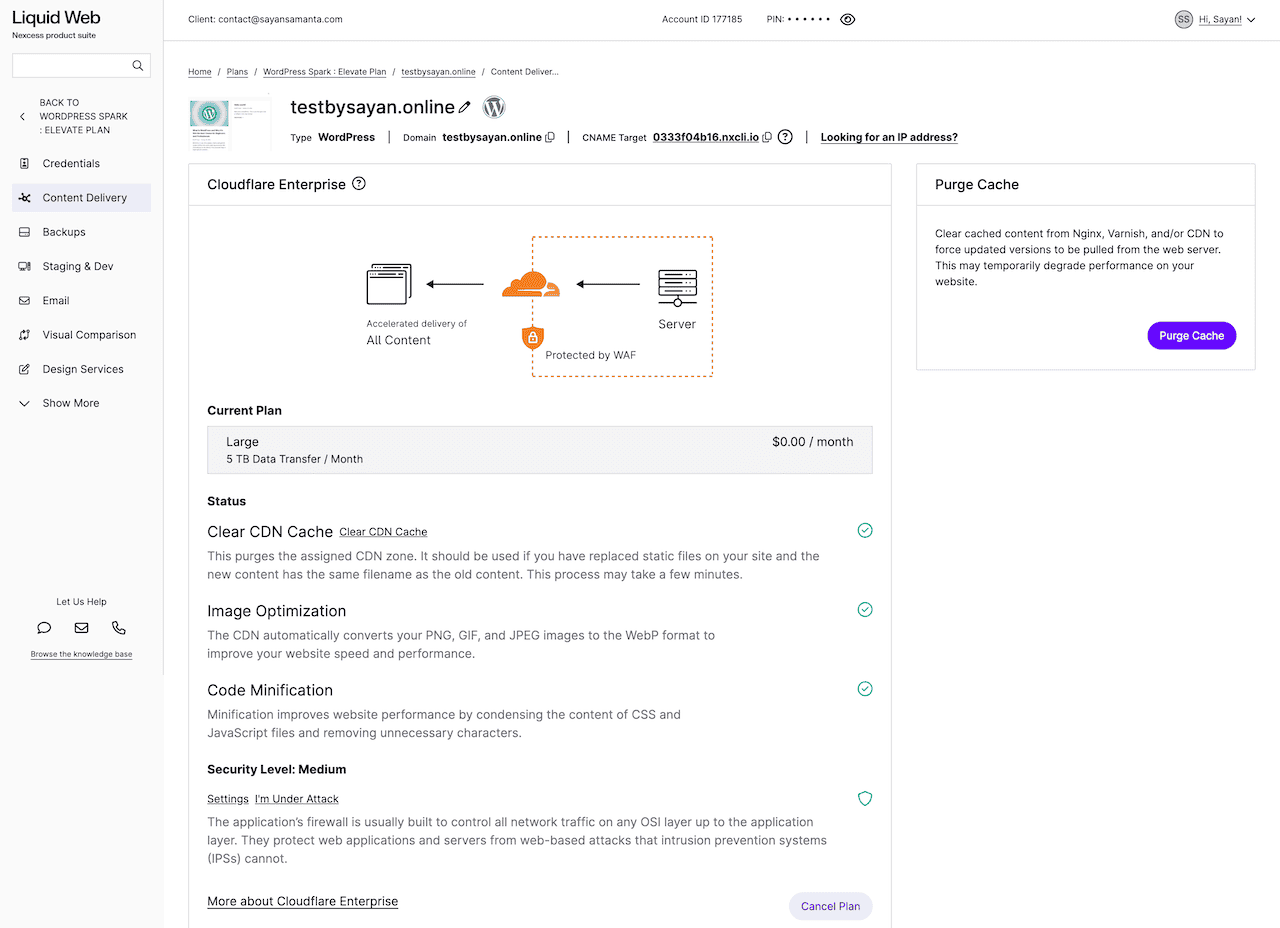
But in my experience, the Cloudflare execution feels significantly half-baked compared to the seamless setups I found at Rocket.net or Kinsta.
In practice, here’s what happened during my 3-month test:
- During initial setup, I repeatedly hit Cloudflare “Activation Failed” errors with no clear reason.
- The Liquid Web portal showed Cloudflare CDN as active. But HTTP response headers proved it wasn’t serving traffic at all.
- When I disabled the Nexcess Edge CDN to test Cloudflare separately, reactivating Cloudflare failed completely.
- I opened a support ticket regarding activation failure. It took over 48 hours to resolve a CDN/DNS conflict on “Managed” hosting.
- The activation process requires specific CNAME changes handled by Liquid Web: there’s no one-click toggle (at least for me).
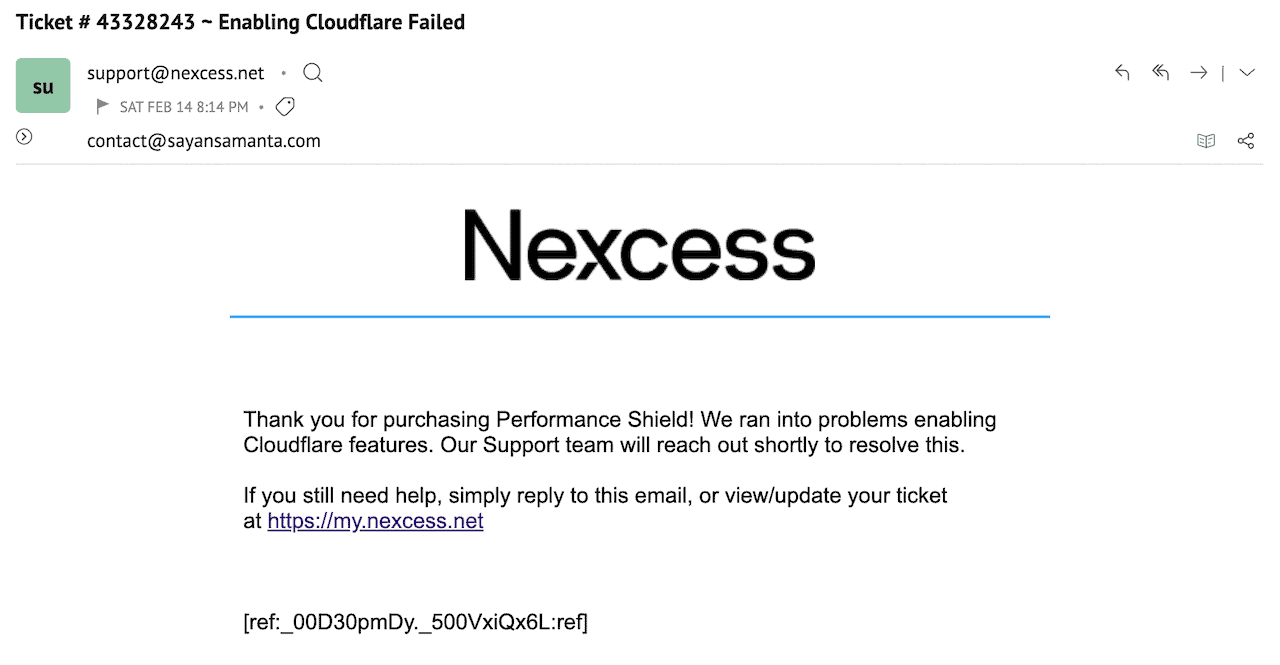
Why is it fundamentally half-baked compared to Rocket.net or Kinsta Integration?
Liquid Web’s default headers instruct Cloudflare not to cache HTML files. This means Cloudflare is checking the origin server on every single request — completely negating the “Enterprise” performance advantage.
Here’s my demo site TTFB result across different global locations.
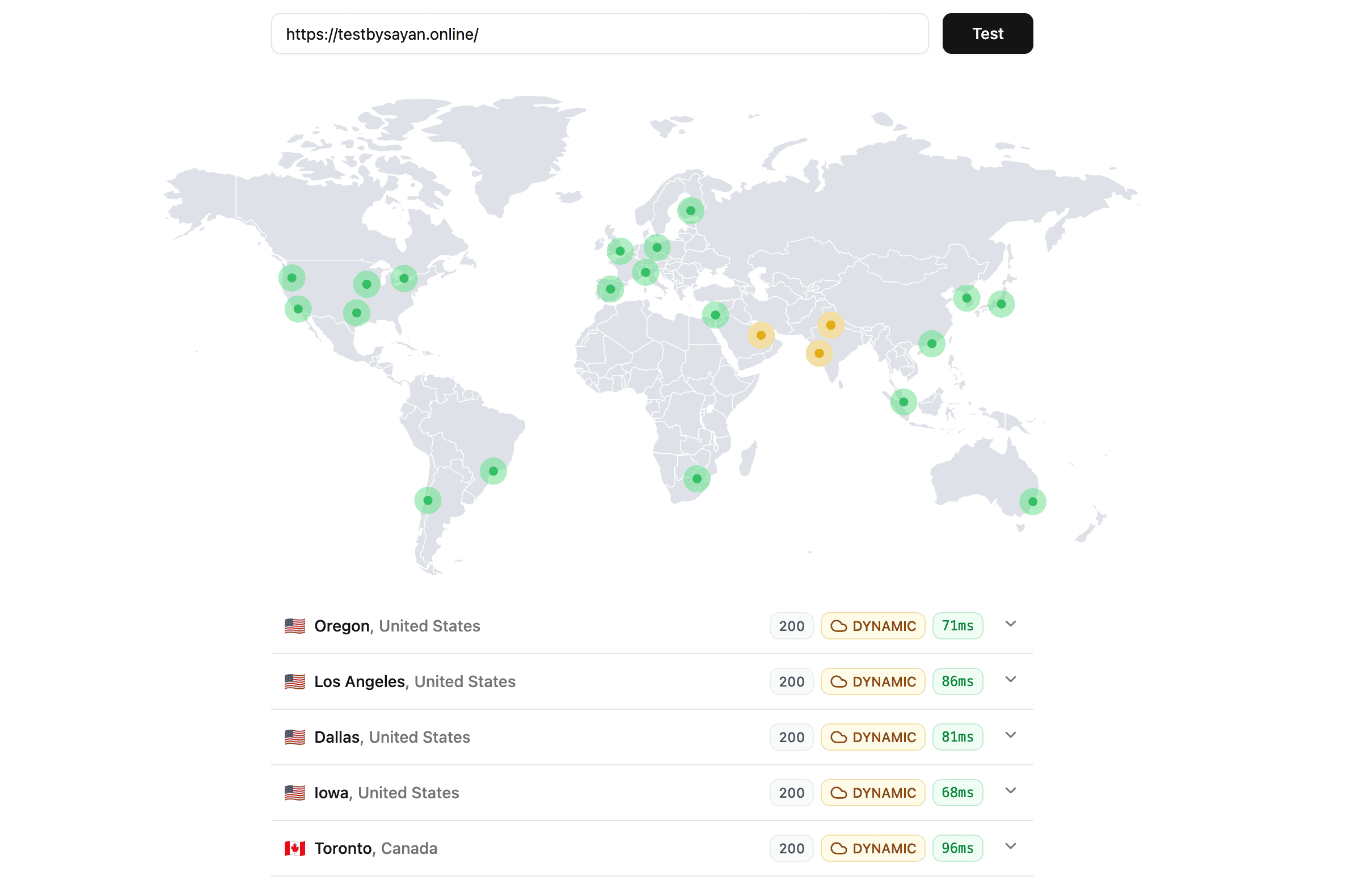
Here’s a Cloudflare Enterprise CDN integration comparison between Liquid Web, Kinsta, and Rocket.net.
| Features | Liquid Web CF | Rocket.net CF | Kinsta CF |
|---|---|---|---|
| Total locations | 330 Pops | 330 Pops | 330 Pops |
| Full-Page Edge Caching | ❌ No | ✅ Yes | ✅ Yes |
| Smart Routing | Argo | Argo | ❌ No |
| TTFB | 65-150ms | 50-100ms | 65-130ms |
| Image Optimization | Polish | Polish | Polish |
| Load balancing | ❌ No | ✅ Yes | ❌ No |
| DDOs Protection | Enterprise Grade | Enterprise Grade | Enterprise Grade |
| Custom Page Rules | ❌ No | ❌ No | ❌ No |
| One-Click Activation | ❌ No | ✅ Yes | ✅ Yes |
My advice: If Cloudflare performance is your primary goal, Liquid Web is not your host. Either manage your own Cloudflare Pro account in front of Liquid Web, or choose Rocket.net/Kinsta, where the Cloudflare integration actually works.
⚠️ Problem 2: Staging Sites Are Locked Behind the Most Expensive Plan
A staging/development environment is considered a standard utility – not a luxury in 2026. It is a baseline requirement for safely updating plugins, testing PHP upgrades, and reviewing major design changes before they hit your live site.
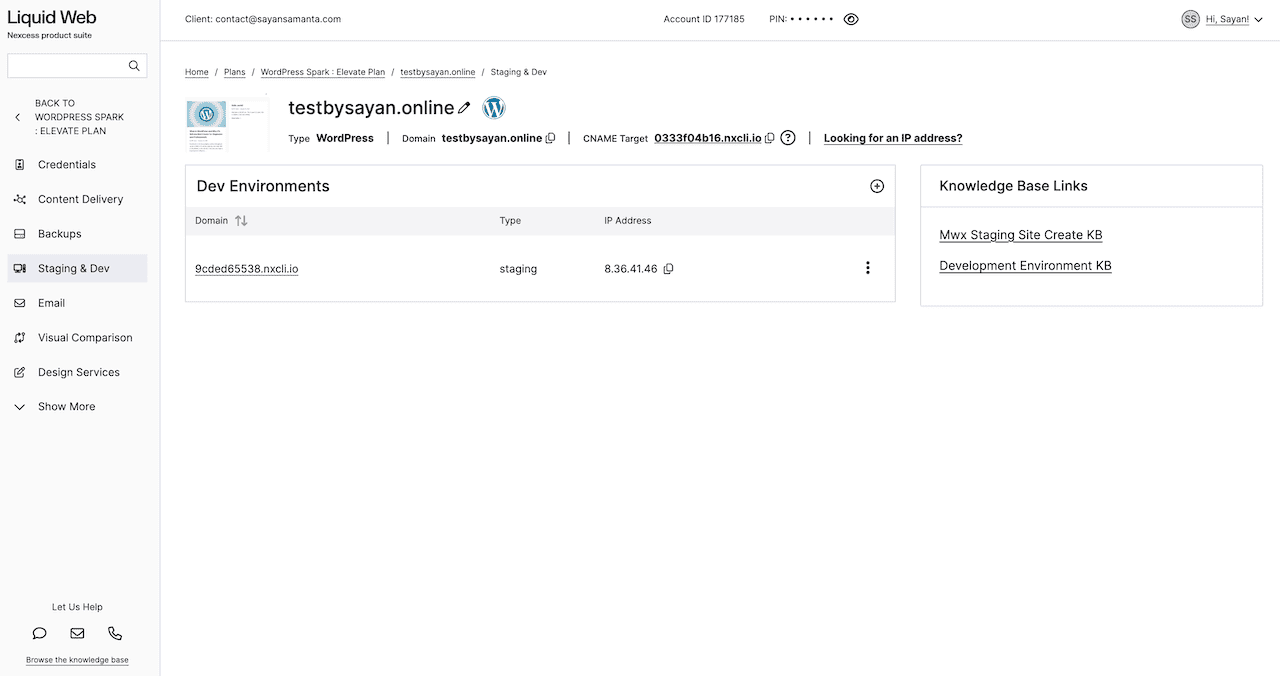
Kinsta includes staging on its $35/month entry plan. Cloudways includes it across the board. Even budget-shared hosts like Hostinger include one-click staging sites on all plans.
However, Liquid Web restricts staging sites to the Elevate plan only. If you’re on Launch or Thrive — the two cheaper plans — you don’t get it. This is an unnecessary paywall that penalizes smaller site owners who need a staging environment the most.
⚠️ Problem 3: No Asian Servers (A Real Problem for Indian and SEA Users)
Liquid Web’s data centers cover the US, UK, and Australia. There are no servers on the Asian continent.
When I tested TTFB from India using FlyingTTFB across 22 global locations, the result was clear: TTFB from Indian servers exceeded 1.9 seconds. Google’s threshold is under 200ms. You are failing Core Web Vitals for every Indian visitor, even while passing them for US visitors.
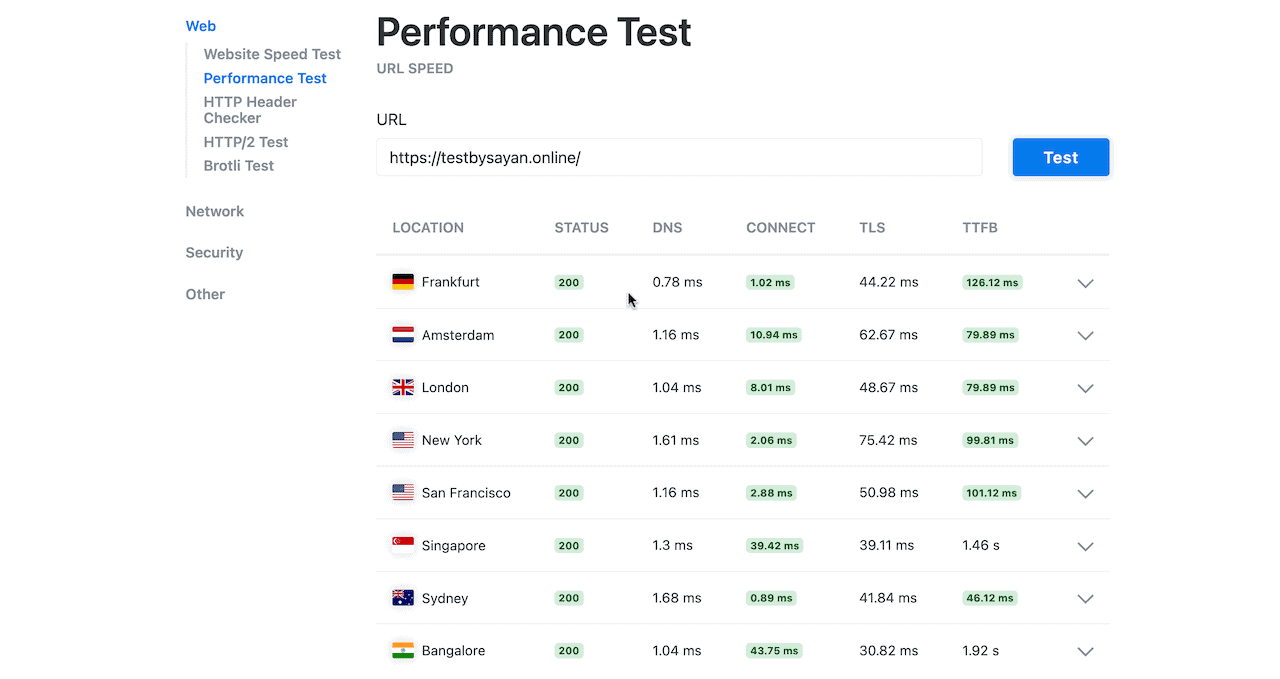
This is not a minor footnote. If your WooCommerce store sells to Indian customers, or if you are an Indian Web agency recommending hosting to local clients, Liquid Web’s raw server performance is practically irrelevant — because the origin server is 8,000km away.
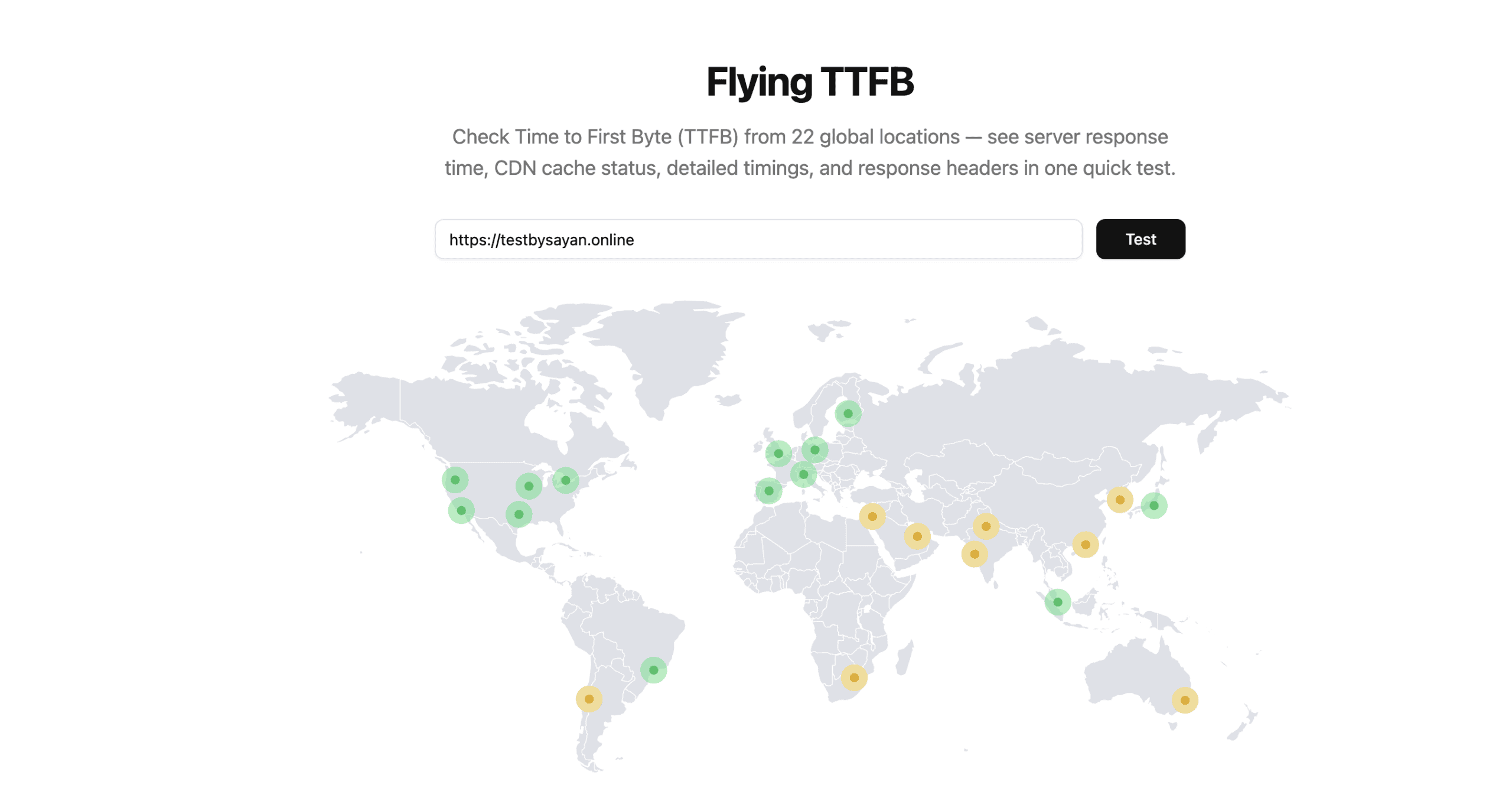
The fix: You must configure Cloudflare’s full-page caching in front of Liquid Web to serve Indian visitors from a CDN edge node. But as mentioned above, Liquid Web’s built-in Cloudflare integration doesn’t support full-page caching.
So you’re managing your own Cloudflare account on top of your hosting, which defeats the point of paying for “managed” hosting.
For Indian users specifically, Cloudways on a DigitalOcean Mumbai or Bangalore server, or Kinsta with its Google Cloud Mumbai region, will give you dramatically better TTFB for Indian audiences.
⚠️ Problem 4: Average Customer Support
Liquid Web support staff are actual sysadmins. Red Hat Linux-certified technicians who understand Nginx, PHP-FPM, and WordPress infrastructure. This is genuinely better than the Tier 1 script-readers you get at most shared hosting.
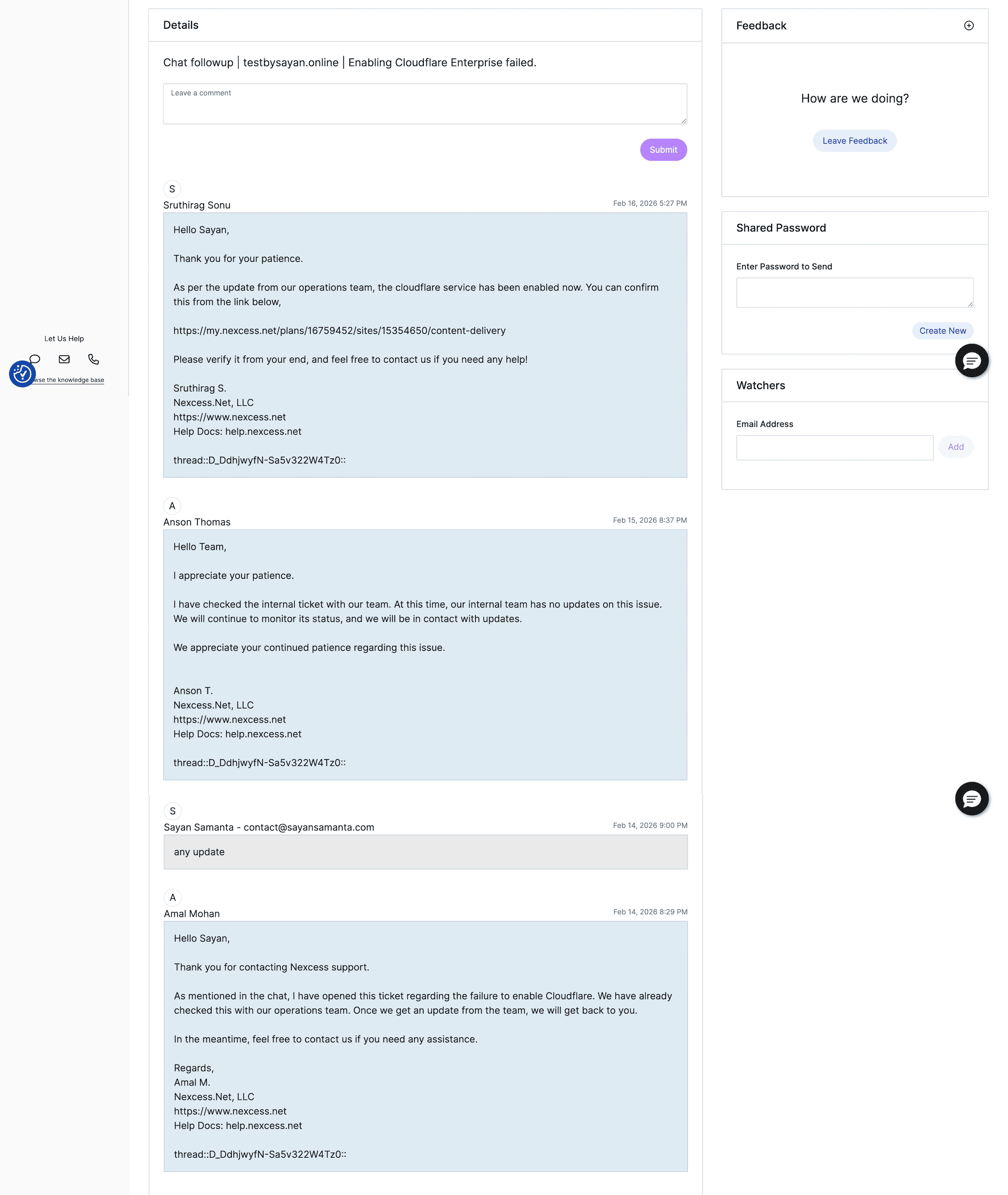
But “better than bad” isn’t the same as good. My real-world experience:
- Chat delays of 5–7 minutes after initial response on minor issues.
- The 48-hour CDN ticket is already mentioned.
- Compared to Kinsta’s typically sub-30-minute resolution on complex issues, this feels slow for a premium managed hosting provider.
Note: If you need deep technical help, Liquid Web’s team is more capable than most. However, in terms of sheer speed and efficiency, they feel average compared to the white-glove speed of Kinsta or Rocket.net.
Liquid Web Pricing: What You Actually Get at Each Tier?
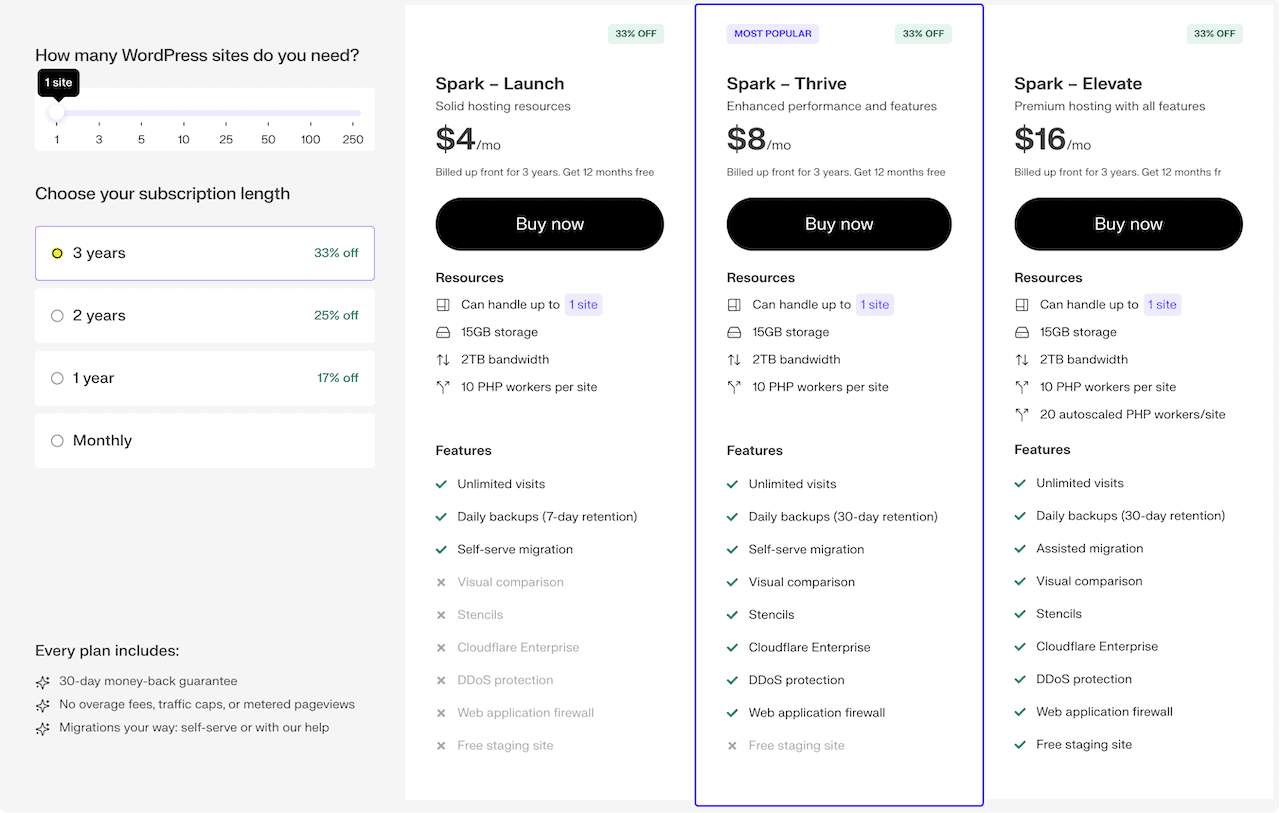
Liquid Web has three plans: Spark – Launch, Thrive, & Elevate.
Their pricing is tiered based on the number of sites. As you scale to more sites, Liquid Web adds more hosting resources like SSD storage, bandwidth, number of PHP workers, etc.
| Feature | Launch | Thrive | Elevate |
|---|---|---|---|
| Sites | 1 | 1 | 1 |
| SSD Storage | 15GB | 15GB | 15GB |
| Bandwidth | 2TB | 2TB | 2TB |
| PHP Workers | 10/site | 10/site | 10/site |
| Cloudflare CDN | ❌ | ✅ | ✅ |
| DDoS Protection | ❌ | ✅ | ✅ |
| WAF | ❌ | ✅ | ✅ |
| Staging Sites | ❌ | ❌ | ✅ |
| Daily Backups | ✅ | ✅ | ✅ |
| Redis Object Cache Pro | ✅ | ✅ | ✅ |
| Solid Security Pro | ✅ | ✅ | ✅ |
| Free Email | ✅ | ✅ | ✅ |
| Price (single site) | $4–6/mo | $8–12/mo | $16–24/mo |
If you want to host more than one website, the same plan with 3 sites hosting costs between $10-40/month, and it comes with 25GB storage, 2.5 TB bandwidth, and 15 PHP workers per site.
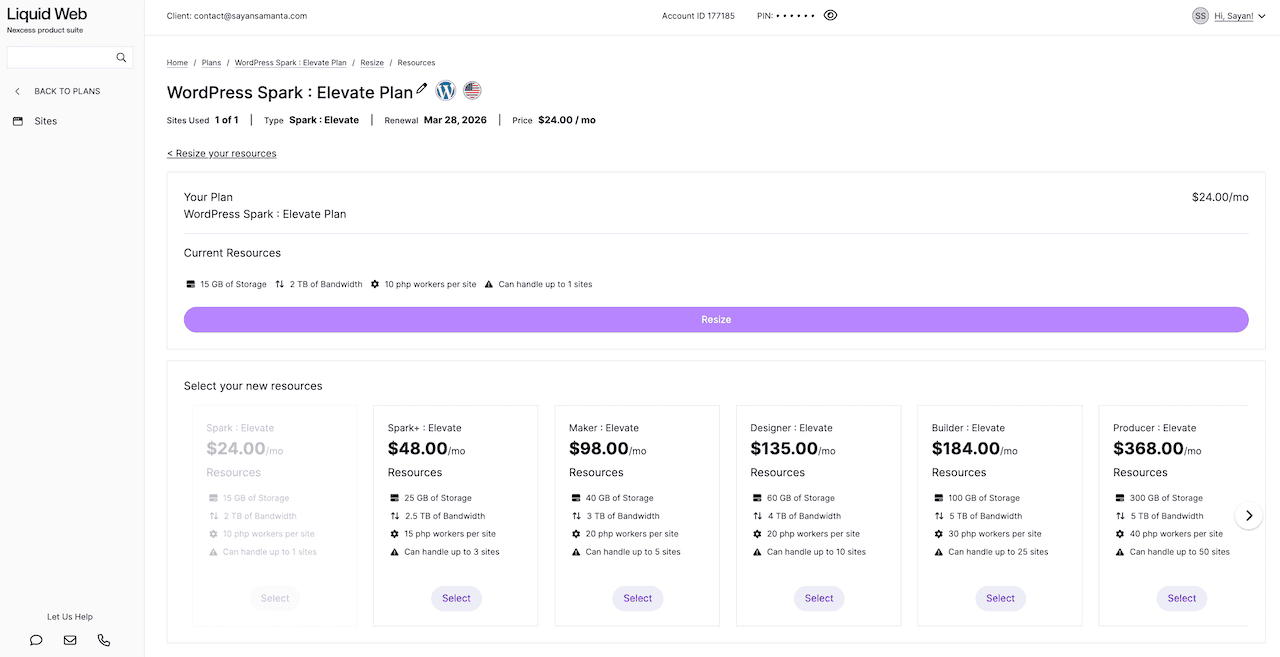
My recommendation on plan selection: Don’t buy the Launch plan. You get no Cloudflare, no WAF, no DDoS protection. For a live WooCommerce store, these aren’t optional. Start at the Thrive plan. If you need staging environments (you should), go to the Elevate plan.
Check Liquid Web WordPress Hosting PricingHow Liquid Web Compares to the Competition?
I’ve personally tested Kinsta, Cloudways, Rocket.net, and Liquid Web. Here’s where each hosting actually wins:
| Features | Liquid Web | Rocket.net | CloudWays | Kinsta |
|---|---|---|---|---|
| Pricing | $4-20/Month | $30/Month | $11-40/Month | $35/Month |
| Primary Focus | WooCommerce & Stability | Raw TTFB Speed | DIY Control | Premium UI/UX |
| PHP Workers | High | Very High | Variable | Low (Strict) |
| Email Hosting | Yes | NO | NO | NO |
| Daily Backups | Yes | Yes | Yes | Yes |
| Monthly visit | No limit | Yes | NO | Yes |
| Free Redis cache | Yes | Yes | NO | NO |
| WAF | Yes | Yes | Yes | Yes |
| Dashboard | Traditional | Modern/Simple | Technical | Best in Class |
| Support | Phone/Chat | Chat Only | Chat Only | Chat Only |
| Tech Stack | Nginx/Apache | Niginx | Vultr/DO/AWS | Google C3D |
| Best Feature | Free 24hr Auto-Scaling | Cloudflare Ent. built-in | Choice of Cloud Hosting | MyKinsta Dashboard |
| Ideal User | WooCommerce site | Speed Obsessives | Tech-Savvy Devs | High-Budget Brands |
For Indian WordPress developers and agencies: Cloudways on DigitalOcean Mumbai is the pragmatic choice for local audience sites. Liquid Web is the right choice when your customers are US/EU-based, and you need WooCommerce reliability without overage anxiety.
FAQs about Liquid Web Hosting
Does Liquid Web (Nexcess) use cPanel?
No. Liquid Web uses its own proprietary portal called the “Nexcess Client Portal.” However, for their VPS & dedicated server plans (not WordPress), you can still get cPanel/InterWorx.
Is Liquid Web bandwidth really unlimited?
Not technically — the base plan caps at 2TB. In practice, an average 2MB WordPress page would need 1 million monthly visitors to approach that limit. For 99% of sites, it’s functionally unlimited.
Can I host email with Liquid Web?
Yes. This is a major advantage compared to other managed WordPress hosting. Liquid Web hosting plans come with free email hosting via Roundcube. You can create your custom email like [email protected] without paying extra for Google Workspace or Zoho.
Is Liquid Web good for Indian users?
No, TTFB from India exceeds 1.9 seconds due to the lack of Asian data centers. You can mitigate this with your own Cloudflare full-page caching setup, but Liquid Web’s built-in Cloudflare integration doesn’t support this natively.
Will Liquid Web help me pass the Core Web Vitals metric?
Yes. Liquid Web comes with built-in Object Cache Pro and Cloudflare enterprise CDN. You still need a cache plugin like WP Rocket or FlyingPress for Core Web Vitals metrics (CLS, INP, & LCP) optimization.
How does the free migration work on Liquid Web?
You need to create a site migration ticket with your current host’s login details. Their team migrates everything, tests it, and asks you to point your DNS to Liquid Web. In my experience, the Liquid Web support team helps you at every step during site migration.
Is Liquid Web fast for WooCommerce sites?
Yes. Liquid Web is arguably the fastest managed host for WooCommerce sites due to their heavy use of Redis Object Caching and specific database optimization rules.
Is Liquid Web worth it over Kinsta?
Yes, Liquid Web wins on: PHP workers, no visit limits, Redis included, free email, auto-scaling, and price. Kinsta wins on: dashboard quality, support speed, and Google Cloud infrastructure. For WooCommerce stores under a $50/month budget, Liquid Web wins clearly.
Liquid Web Review: My Honest Verdict
In my experience, Liquid Web’s Managed WordPress hosting bridges the gap between traditional VPS hosting and restrictive managed WordPress environments.
It is particularly well-suited for WooCommerce stores, an LMS site (LearnDash), or high-traffic blog owners who cannot afford downtime, or web developers who need a flexible, unrestricted environment.
- Buy Liquid Web if: You run a WooCommerce store with a US/EU audience, you hate overage fees, and you want Redis Object Cache Pro and auto-scaling without paying Kinsta prices.
- Avoid Liquid Web if: Your customers are in India or Asia, you need Cloudflare edge caching to work out of the box, or you’re a beginner who needs hand-holding through the setup process.
Here are my overall Liquid Web ratings based on my last 6 months of experience:
| Category | Rating | Why? |
|---|---|---|
| Server Power | ⭐⭐⭐⭐⭐ | 10 PHP workers + Auto-scaling handled 1k users without a single crash. |
| Speed (US/EU) | ⭐⭐⭐⭐⭐ | 126ms TTFB from Seattle; excellent AMD EPYC hardware performance. |
| Global Reach | ⭐⭐⭐☆☆ | No Asian data center; TTFB in India/Asia fails Core Web Vitals (1.9s+). |
| Features | ⭐⭐⭐⭐⭐ | Includes free Object Cache Pro ($95/mo) and free premium email hosting. |
| Support | ⭐⭐⭐☆☆ | Highly technical staff, but activation issues took 48+ hours to resolve. |
| Overall Score | 4.2 / 5 | Recommended for US, UK, and Australia-based WooCommerce Stores. |
Thank you for reading my Liquid Web review. If you have any other questions related to Liquid Web or any other hosting-related issues, let me know in the comments section. Have a nice day.
Liquid Web
Liquid Web (Nexcess) is a powerhouse for dynamic, database-heavy, & a high-traffic WordPress and WooCommerce sites. It trades a slightly steeper learning curve for raw server power, offering significantly higher PHP worker limits, no arbitrary monthly visitor caps, and auto-scaling for traffic spikes.
Price: 4/Month
Price Currency: USD
Operating System: WordPress
Application Category: Hosting
4.2