Quick Overview: Imagify is a cloud-based image optimization plugin that compresses images on its own servers and converts them into next-gen formats (WebP/AVIF). It is incredibly user-friendly and integrates flawlessly with the WordPress ecosystem. However, its free tier is almost useless for active sites; the 20MB limit will be gone before you finish uploading a few high-res images.
Key Findings from my 6-Month Test:
- Performance Impact: 9/10 (Great at reducing page weight and boosting Core Web Vitals)
- The “Free” Problem: The 20MB free tier is practically useless for modern high-res images.
- Storage Warning: It stores original images on your server, which can double your disk usage over time.
- Ease of Use: 9.5/10 (Practically foolproof; excellent “set-and-forget” automation)
If you want to rank your WordPress site, you already know that heavy images are the ultimate enemy of Core Web Vitals. Unoptimized images destroy your Largest Contentful Paint (LCP) and bloat your server’s initial response times (TTFB).
Imagify, built by the WP Media team (the same folks behind WP Rocket, RankMath), promises to fix core web vitals issues with “Smart Compression“. But after 7 years of optimizing WordPress sites, I’ve learned never to trust standard marketing claims.
I put the Imagify plugin through a rigorous stress test to see if it actually delivers on its promises, or if it’s just another plugin eating up your server resources. Here is my brutally honest Imagify Review based on real performance data.
How I Tested Imagify Plugin?
To get accurate, untainted data, I didn’t just install Imagify on an existing messy site. I set up an isolated testing environment to test Imagify plugin’s true impact on core web vitals.
- The Stack: A clean WordPress site with a minimalist GeneratePress theme and GenerateBlocks. No heavy page builders, just lean, native block code.
- The Hosting: A standard Shared Hosting environment (I’m using ScalaHosting)
- The Payload: I uploaded 50 high-resolution, unoptimized stock photos (averaging 2MB to 5MB each) to create a heavily bloated media gallery.
Testing Metrics: I measured the site’s core web vitals and total loading time using Google PageSpeed Insights (Chrome Performance tab for INP) and WebPageTest. I am strictly tracking Imagify compression impacts on Time to First Byte (TTFB), Largest Contentful Paint (LCP), and Interaction to Next Paint (INP).

Imagify Performance: Core Web Vitals Impact
The only thing that matters is how the plugin moves the needle on real-world performance metrics. Here is the raw demo data from my staging site before and after running Imagify’s bulk optimization.
| Metric | Before Imagify | After Imagify | Net Improvement |
|---|---|---|---|
| Total Page Size | 6.4 MB | 2.1 MB | – 32% |
| LCP (Mobile) | 7.1 seconds (Fail) | 2.3 seconds (Pass) | – 4.8 seconds |
| TTFB | 753 ms | 775 ms | + 23 ms |
| CLS (Mobile) | 0.112 (Pass) | 0.023 (pass) | – 0.089 |
| INP | 461 ms (Pass) | 295 ms (Pass) | – 166 ms |
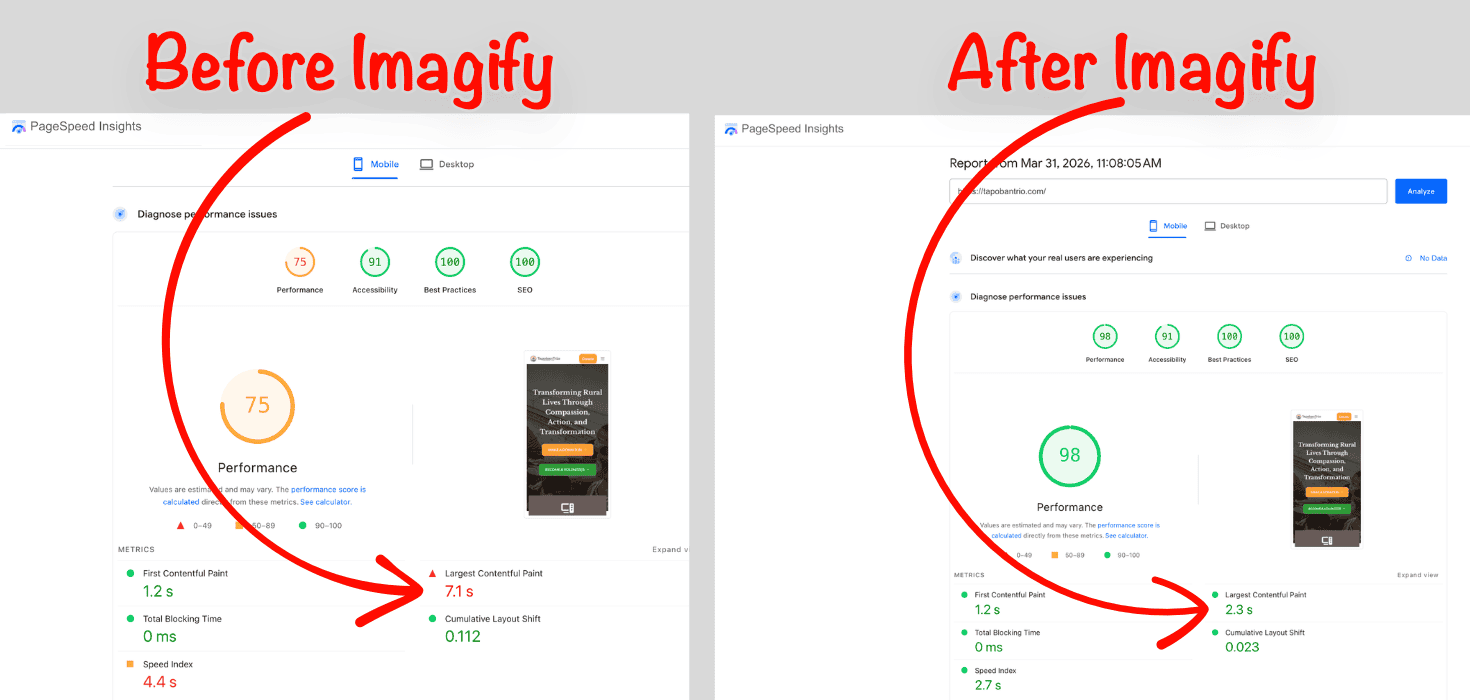
The Analysis: Imagify compression algorithm is undeniably effective. Slashing a 6.4MB page down to 2.1MB entirely fixed the LCP failure. However, note the slight bump in TTFB; it happens because the server now has to process .htaccess rules to serve the WebP images. It’s a minor trade-off for the massive LCP gain. As for INP, optimized images respond more quickly to user interactions, leading to a good INP score.
Imagify Key Features
Below are the only important Imagify features you need to know:
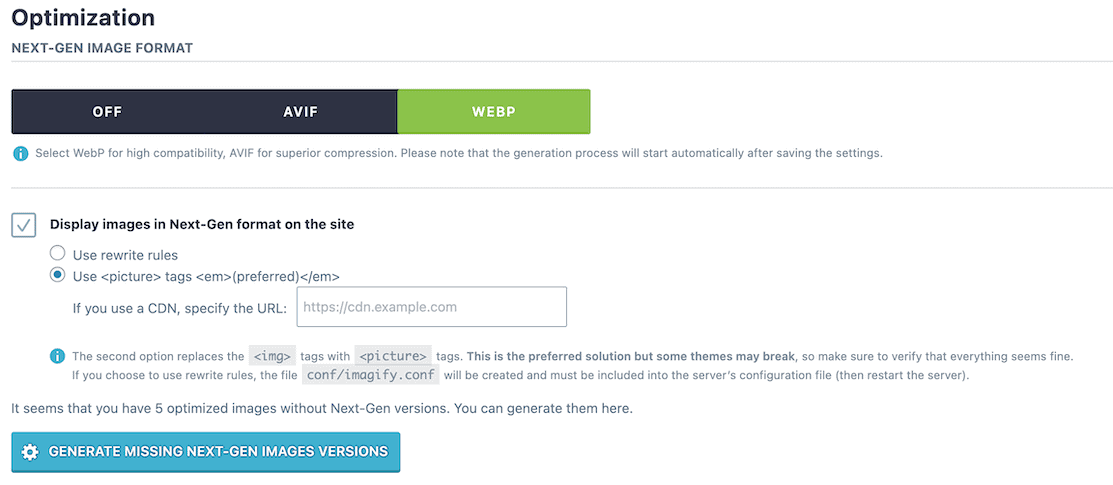
Smart Compression: Imagify killed off its granular “Normal, Aggressive, Ultra” compression settings in favor of a single “Smart Compression” toggle. It analyzes the image and applies the maximum compression possible without visible quality loss. For photography sites, lossless compression remains an option, but Smart Compression is the primary selling point of Imagify.
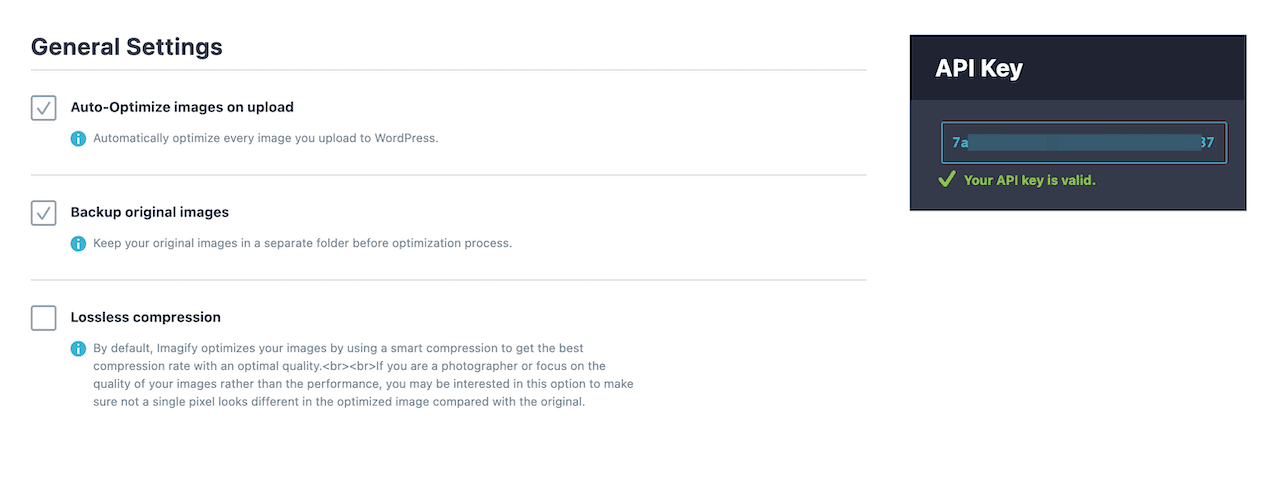
Next-Gen Format Conversion: Imagify automatically generates WebP and AVIF versions of your images and serves them to compatible browsers. This is a one-click fix for the annoying “Serve Images in Next-Gen Formats” warning in PageSpeed Insights.
Note: Use .htaccess Rewrite rules to serve images to the WebP or AVIF version. It’s safe and recommended option for 95% WordPress site users.
Asynchronous Bulk Optimization: You can optimize your entire existing media library with one click. Because Imagify compression happens on their servers rather than yours, it won’t crash a shared hosting plan during the bulk optimization process.
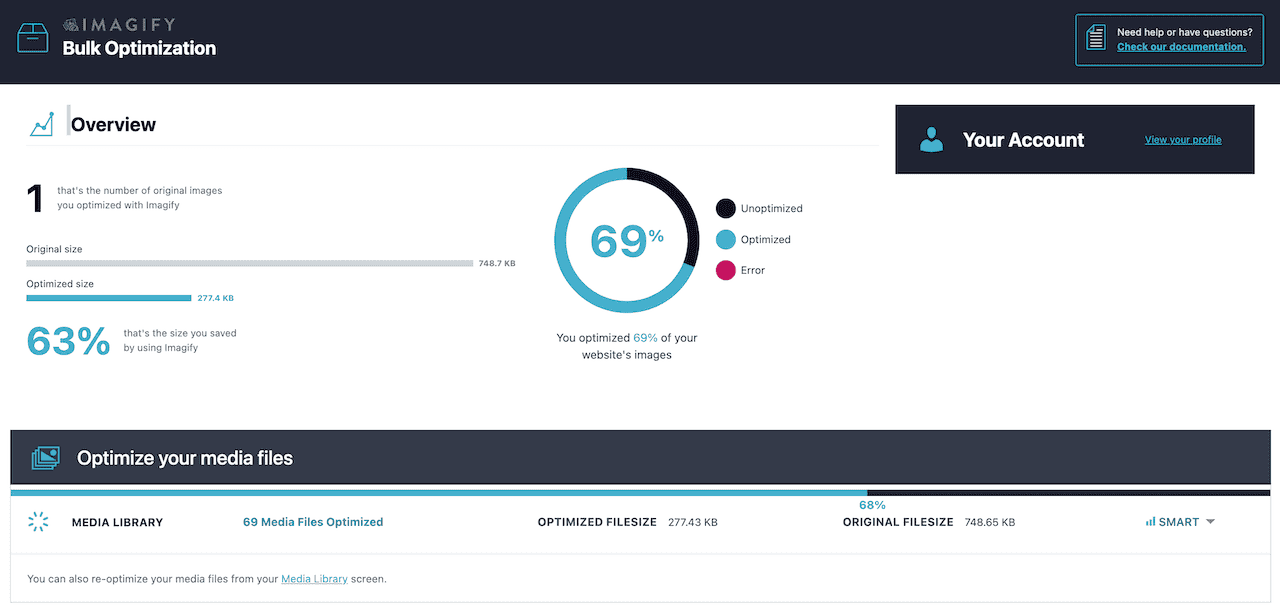
What’s Lacking (The Brutal Truth)
Here is where Imagify falls short during a technical audit:
The 20MB Free Plan is an Insult: In 2026, a single raw smartphone photo is 4MB. The Imagify free plan is only enough to optimize maybe 2 to 5 images. It’s a trial in disguise, not a true free tier.
Server Bloat: Imagify leaves your original, unoptimized images on your server as a backup. While this is a safeguard, if you upload 500MB of images, you are now storing the originals plus the WebP versions. This rapidly eats up disk space and inode limits on cheap hosting.
No Built-in CDN Delivery: Unlike ShortPixel, which can serve images directly from a global cloud CDN. Imagify optimizes the files and puts them back on your local server. You still need to pay for and configure a separate third-party CDN (like Bunny CDN) to deliver them globally.
Imagify Pricing Trap & Bandwidth Estimation
A massive misconception in the WordPress community is how image optimization limits actually work. Imagify’s 20MB free tier sounds like it could handle a few dozen images. It won’t. Here is the technical reality of the “pricing trap.”
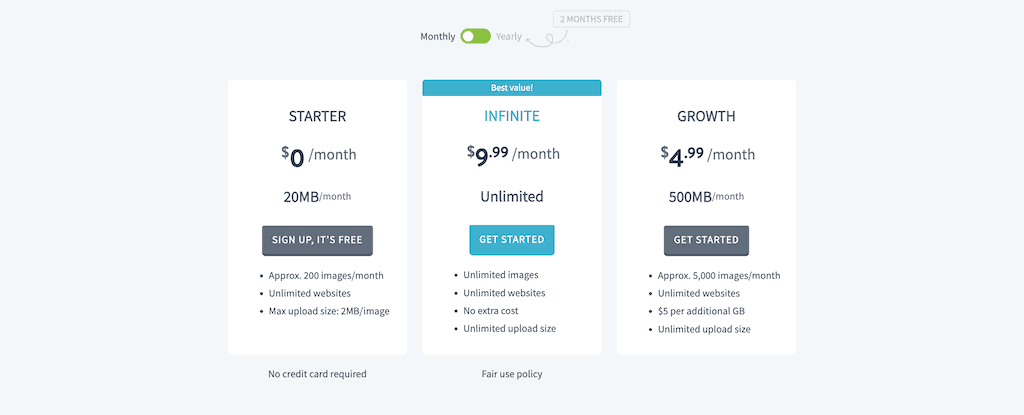
Whenever you upload a single image to WordPress, the CMS automatically generates multiple thumbnail sizes (Thumbnail, Medium, Large, Medium_Large, plus theme-specific sizes).
The Demo Estimation: Let’s say you upload one high-resolution hero image straight from Unsplash.
- Original Image: 3.5 MB
- WordPress Generated Thumbnails (x6): ~1.5 MB total
- Total Quota Consumed: 5.0 MB
With Imagify’s 20MB free plan, uploading just four high-quality images will completely exhaust your monthly quota. Furthermore, if you enable WebP conversion, Imagify processes those files too.
The free tier is not a functional plan; it is a highly restricted trial designed to aggressively push you into the Growth plan ($4.99/month) or the Infinite plan ($9.99/month).
In my experience, if you run a WooCommerce store that generates hundreds of product thumbnails, you will hit the 500MB ceiling faster than you think.
Deal Alert: You can get 30% discount on Imagify’s all plans using my exclusive coupon code “WPR30”. All you have to do is click on the button below to claim Imagify discount (My coupon code applied automatically; if not, enter my code manually).
Claim Imagify Discount (30% OFF)Pros & Cons Of Using Imagify Plugin
Pros:
- Foolproof, minimalist interface that requires zero technical knowledge.
- Bulk image compression happens on the Imagify server (saves your server resources).
- Flawless compatibility with WP Rocket & RankMath (WP Media plugins).
- Excellent visual quality retention with the Smart Compression algorithm.
Cons:
- Imagify’s 20MB monthly free limit is practically useless.
- Doubles your server storage usage by keeping unoptimized originals.
- No CDN integration available (Imagify relies on your local server for delivery).
The Best Imagify Alternatives (Data-Driven Comparison)
If Imagify’s local storage bloat or pricing model doesn’t fit your architecture, here is how the top competitors stack up.
| Feature | Imagify | ShortPixel | Optimole | Smush | EWWW Image Optimizer |
| Optimization Method | External API | External API | Cloud/CDN | External API | Local Server |
| Originals Stored? | Yes (Local) | Optional | No (Cloud Delivered) | Yes (Local) | Yes (Local) |
| WebP/AVIF Support | Yes | Yes | Yes | Pro Only | Yes |
| Free Tier Limit | 20 MB/month | 100 Credits/month | 5,000 Visits/month | Unlimited (Basic compression) | Unlimited (Local only) |
| Best Target User | WP Rocket Users | Technical Optimizers | Hands-off Cloud Users | Absolute Beginners | Unlimited Local Users |
Which Plugin is Best for What Scenario?
- ShortPixel: Best for a highly optimized, minimalist stack (like GeneratePress/GenerateBlocks). It offers the most granular control over lossy, glossy, and lossless compression without forcing a specific CDN on you.
- Optimole: Best for media-heavy sites on cheap shared hosting. Because it operates entirely via a cloud CDN, it completely offloads image processing and storage, saving your server’s disk space and inodes.
- Smush: Best for clients who refuse to learn technical settings. The free version only does basic, lossless crunching, but the UI is foolproof.
- EWWW Image Optimizer: Best for users with massive media libraries and highly capable VPS/Dedicated servers. You can use your own server’s CPU to crunch unlimited images for free, avoiding third-party API limits entirely.
FAQs about ShortPixel Plugin
Does Imagify slow down the WordPress admin dashboard?
No. Because the actual image compression algorithm runs on Imagify’s external servers. Your WordPress backend remains fast and responsive during bulk optimizations.
Will I lose my images if I uninstall Imagify?
No. Your optimized images remain on your server. However, you will lose the ability to automatically serve WebP versions if you rely on Imagify’s rewrite rules rather than your theme’s native picture tags.
Is it better than cloud-based optimizers?
It depends. If your shared hosting has strict storage/inode limits, a cloud-based image optimizer is a safer bet. If you have plenty of storage, Imagify is an excellent choice; you don’t have to rely on third-party servers.
Why is Imagify using up all my server disk space?
By default, Imagify keeps a backup of your original images on your hosting server. This means if you upload 1GB of images, your server now stores the 1GB original plus the optimized WebP/AVIF versions. To fix this, you need to manually delete the backup folder. Warning: Doing so prevents you from “restoring” or re-optimizing those images later.
Imagify vs. ShortPixel vs. Optimole: Which is best for image-heavy sites?
Use Imagify if you want the simplest UI and are already using the WP Rocket cache plugin. Use ShortPixel if you want complete compression settings and CDN integrations. Use Optimole if you are on cheap shared hosting, and it serves images from its own cloud CDN instead of your server.
Final Verdict: Is Imagify Worth Buying?
Yes, if you are already using WP Rocket and want a seamless, set-it-and-forget-it optimization stack, Imagify is a fantastic tool.
Imagify’s smart compression algorithm strikes a near-perfect balance between visual fidelity and file size reduction, proving highly effective at fixing Core Web Vitals errors.
However, if you are a technical user who needs complete image compression control, running a massive WooCommerce store, Imagify’s backup files eventually cause storage headaches. In those cases, cloud-delivery alternatives like ShortPixel or Optimole might be a smarter, long-term architectural choice.
Download Imagify Plugin (Save 30%)That’s all for now. If you have any questions related to Imagify or any other image optimization plugins, let me know in the comments section.
Read more about:
Thank you. Have a nice day.
Imagify

Imagify is a smart image optimization plugin that compresses images on its own servers and converts them into next-gen formats like WebP and AVIF. Imagify is incredibly user-friendly and integrates flawlessly with the WordPress ecosystem. You install it, activate "Smart Compression," and let it work in the background.
Price: 9.99
Price Currency: USD
Operating System: WordPress
Application Category: Plugin
4.6