Quick Verdict: FlyingPress delivers the best Core Web Vitals score based on the Chrome UX report, outperforming WP Rocket by a wide margin. For high-traffic WooCommerce or Elementor-based sites, FlyingPress is the only cache plugin I recommend.
FlyingPress offers Cloud-based CSS optimization (which prevents HTML bloat), built-in free real-user core web vitals monitoring, Image optimization, and “Lazy Render” technology that reduces DOM size by up to 60% – a feature that WP Rocket currently lacks.
Download FlyingPress Cache Plugin
In 2026, the choice between WP Rocket and FlyingPress is not about “Good vs. Bad.” It’s about how much effort you want to put into optimizing your website performance.
The core idea of FlyingPress is “Real User Speed” over “Lab PSI Scores”. While WP Rocket can give you a 100/100 on PageSpeed Insights, FlyingPress’ primary goal is to make your site feel instant for a human visitor.
This distinction is crucial, as Google’s ranking algorithms now weigh user experience data (from Chrome User Experience Report) heavily.
In this detailed FlyingPress review, I’ll explain every important feature, run performance comparisons, and explain exactly why FlyingPress has become the new “Gold Standard” for WordPress cache plugins in 2026.
FlyingPress vs WP Rocket: Which one should you use?
I’ve been using WP Rocket on my websites for 7 years now. To test FlyingPress against WP Rocket, I installed it on a live sandbox site to test its speed, ease of use, and check Core Web Vitals optimization features.
Here’s a quick comparison between FlyingPress and WP Rocket.
| Feature | FlyingPress | WP Rocket | Winner |
|---|---|---|---|
| Primary Focus | Real-world Speed & Core Web Vitals | Ease of use & Core Web Vitals | FlyingPress |
| User Interface | Minimalist & Clean interface | Colorful & dashboard-style (with basic documentation) | Tie |
| Caching | Works Perfectly | Works Perfectly | Tie |
| LCP Optimization | Auto-detects above-fold images to preload them. | Requires manual entry of filenames to exclude from lazy load. | FlyingPress |
| Remove Unused CSS | Loads as a separate file (Cloud-Generated, Highly accurate) | Inline CSS (Server-based, increases HTML size, can be resource-heavy) | FlyingPress |
| Lazy Render HTML | Yes (speed up the initial “above-the-fold” content rendering, reduce page weight) | Not available (Relies on “Delay JS” to achieve main-thread savings) | FlyingPress |
| Fonts Preload | Automatically self-hosts Google Fonts | Automatically self-hosts Google Fonts | Tie |
| Image Optimization | Yes, you can convert images to AVIF and WebP formats. | No, Image optimization (You need a separate plugin like Imagify) | FlyingPress |
| Bloat Removal | Built-in (Disable XML-RPC, Emojis, etc.) | Not available (Requires extra plugin) | FlyingPress |
| JavaScript Delay | Smart Delay (Includes a “timeout” to load scripts) | Delay All (Manual exclusion is needed) | FlyingPress |
| Core Web Vitals Tracking | Yes, free automatic monitoring (last hour, 24h, 7d, 30d) | Yes, with Rocket Insights ($4.99/month) | FlyingPress |
| CDN Integration | FlyingCDN (Cloudflare Enterprise) | RocketCDN (BunnyCDN) | FlyingPress |
| WooCommerce | Excellent compatibility | Excellent compatibility | Tie |
| Database optimization | Yes | Yes | Tie |
| Pricing | $59/year | $59/year | Tie |
| Unlimited site usage | Yes ($249/year) | No (50-site cap on the $299/year plan) | FlyingPress |
| Support | Direct from Developer/Experts | Ticket-based Support Team | Tie |
As you can see, FlyingPress is currently the superior choice for users who prioritize Core Web Vitals and real-world performance metrics (INP, CLS, & LCP).
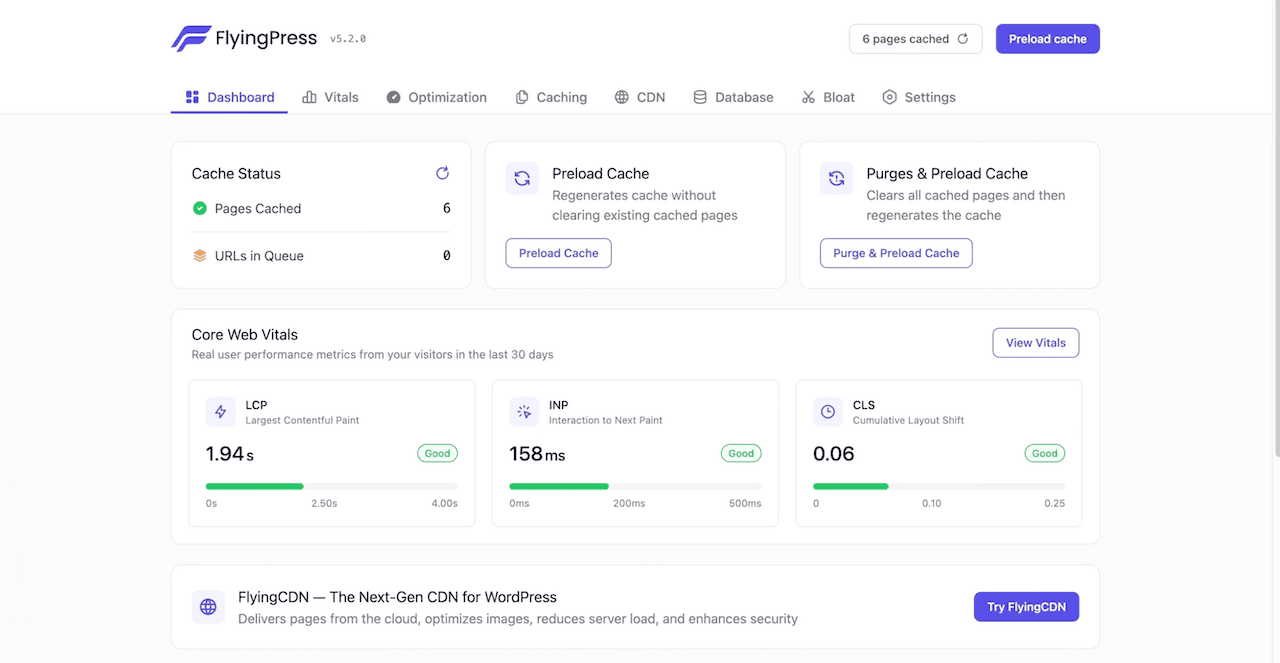
While WP Rocket remains the “easiest caching solution” for WordPress beginners. However, FlyingPress offers better value by including advanced features like “Lazy Render HTML” (For INP), “Bloat Removal” (saving the cost of extra plugins like Perfmatters), and offering a high-performance Cloudflare Enterprise add-on (FlyingCDN).
The “Remove Unused CSS” Nuance
The biggest technical difference between WP Rocket & FlyingPress is how they handle Unused CSS files.
When you enable “Remove Unused CSS” in WP Rocket, it processes on your hosting server, and it uses CSS as an Inline CSS file (Bloats HTML files). If you are using a cheap shared hosting server (Bluehost, GoDaddy, or HostGator), this process can time out, fail, or slow down your admin panel.
On the other hand, FlyingPress adds used CSS in a separate file, which is faster for real users and doesn’t bloat HTML files. It sends your unused CSS to their own powerful servers, generates the file, and sends it back. This makes FlyingPress more stable and scalable for cheap hosting environments.
Who Should Use FlyingPress?
While I recommend FlyingPress instead of using WP Rocket, specific user profiles benefit most:
- Page Builder Users: If you are still using Page builders (like Elementor, Divi) instead of Block Builder (like GenerateBlocks, kadence Blocks), use FlyingPress. Page builders usually generate a lot of unused CSS, and FlyingPress is arguably the best plugin for cleaning up the CSS mess.
- Agencies & Freelancers: Since WP Rocket has removed its unlimited plan and made a 50-site cap on the $299/year plan. If you run an agency or are a freelancer, it’s better to use FlyingPress unlimited plan at $249/year.
- Core Web Vitals Failure: If you are using WP Rocket and still facing “LCP issues” or “INP issues” on PageSpeed Insights, switching to FlyingPress is the most logical step.
Tips: In 2026, if you’re still using Page Builders like Elementor or Divi. It’s time you switched to Block Builder. The biggest drawback of using page builders is “Bloatted code.”
They load massive CSS and JavaScript files on every page, even if you aren’t using those features. This significantly slows down your site and negatively impacts your Core Web Vitals scores.
Use Block Builder, it’s native to WordPress, and it only loads the specific styles needed for the blocks present on that page. Making it super fast and Core Web Vitals friendly.
If you are concerned about the design of your WordPress site, you can use Block Builder plugins like GenerateBlocks or Kadence Blocks. On this site, I’m using GenerateBlocks with the GeneratePress theme for core web vitals.
FlyingPress Performance Test: Is it Better than WP Rocket?
To provide an accurate FlyingPress review, I installed FlyingPress & WP Rocket on a live sandbox site using two distinct website profiles that represent 95% of WordPress users.
One with a “heavy” Elementor-based WooCommerce site and another with a GeneratePress Block-based regular site. We tested both plugins on the same hosting environment to ensure fair results.
I didn’t use the LiteSpeed server for this testing. If your hosting is using a LiteSpeed server, then use the LiteSpeed cache plugin; it performs better than WP Rocket & FlyingPress.
Demo Site Test Environment:
- Hosting: ScalaHosting (Shared Hosting)
- Server Configuration: Apache with PHP v8.3
- Testing Tools: PageSpeed Insights, GTMetrix (Seattle, USA Server), and WebPageTest.
- Metric Focus: Core Web Vitals (LCP, CLS, INP, & TTFB).
- Plugins: WP Rocket (v3.20.3) or FlyingPress (v5.3.3)
Performance Test 1 (Heavy Website):
For this test, I use a complex WooCommerce store built with Elementor Pro page builder. The problem with the site was Massive CSS bloat, heavy JavaScript execution, and slow initial rendering. I try to fix those issues with both WP Rocket & FlyingPress recommended settings. Here’s the result.
| Test | NO Plugin | WP Rocket | FlyingPress |
|---|---|---|---|
| Mobile Score on PSI | 34/100 | 91/100 | 99/100 |
| Desktop Score on PSI | 51/100 | 100/100 | 100/100 |
| LCP (Largest Contentful Paint) | 4.6s | 2.2s | 1.4s |
| INP (Interaction to Next Paint) | 480ms | 150ms | 60ms |
| Cumulative Layout Shift (CLS) | 0.281 | 0.08 | 0.003 |
| TBT (Total Blocking Time) | 1.95s | 271ms | 10ms |
| Page Size | 3.9 MB | 928 KB | 709 KB |
| Requests | 112 | 28 | 16 |
Performance Analysis: As you can see, WP Rocket & FlyingPress both plugins did a great job optimizing this complex site.
In the case of WP Rocket, you can see HTML Document size increased to 120KB because of WP Rocket’s “Remove Unused CSS” feature. This slight HTML bulk delayed the “Total Blocking Time” (TBT) by 200ms.
However, FlyingPress achieved a 10ms Total Blocking Time because its “Smart Flying Scripts” engine is slightly more aggressive and effective.
Winner: FlyingPress (By a wide margin on heavy WooCommerce sites).
Performance Test (Light-Weight Site)
For this test, I installed GeneateBlocks plugin with the GeneratePress theme. Then I imported a full site demo from GeneatePress site library. This site is already fast, but it needs to be instant loading for users. Here’s the result with default WP Rocket & FlyingPress settings.
| Test | NO Plugin | WP Rocket | FlyingPress |
|---|---|---|---|
| Mobile Score on PSI | 76/100 | 100/100 | 100/100 |
| Desktop Score on PSI | 89/100 | 100/100 | 100/100 |
| LCP (Largest Contentful Paint) | 1.9s | 1.1s | 0.6s |
| INP (Interaction to Next Paint) | 264ms | 90ms | 25ms |
| Cumulative Layout Shift (CLS) | 0.12 | 0.002 | 0 |
| TBT (Total Blocking Time) | 0.9s | 27ms | 0ms |
| Page Size | 1.2 MB | 212 KB | 103 KB |
| Requests | 78 | 13 | 7 |
Performance Analysis: As you can see, both WP Rocket & FlyingPress achieve a perfect Core Web Vitals score on PSI. However, only minimal difference I can see is Cumulative Layout Shift & Total Blocking Time. Still, FlyingPress is technically faster, but real-world usage is identical
Winner: FlyingPress (almost tied)
My Own Website Performance
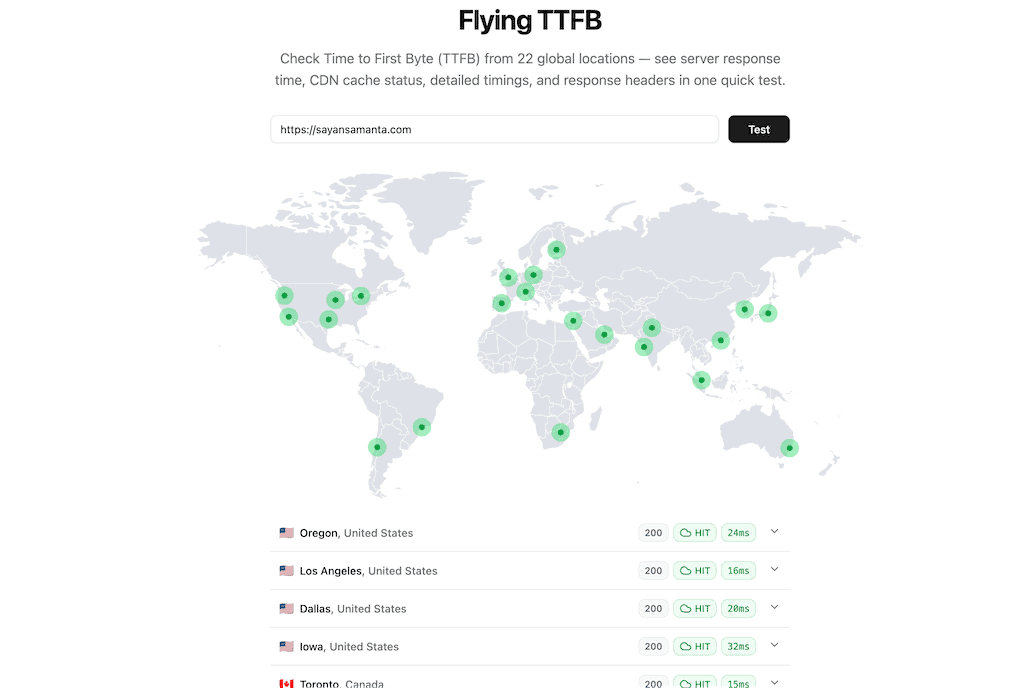
As for my own website, I also use the GeneratePress theme with GeneateBlocks plugin to design my website with FlyingPress cache plugin. As for my hosting, I use ScalaHosting with PHP 8.4 for this testing.
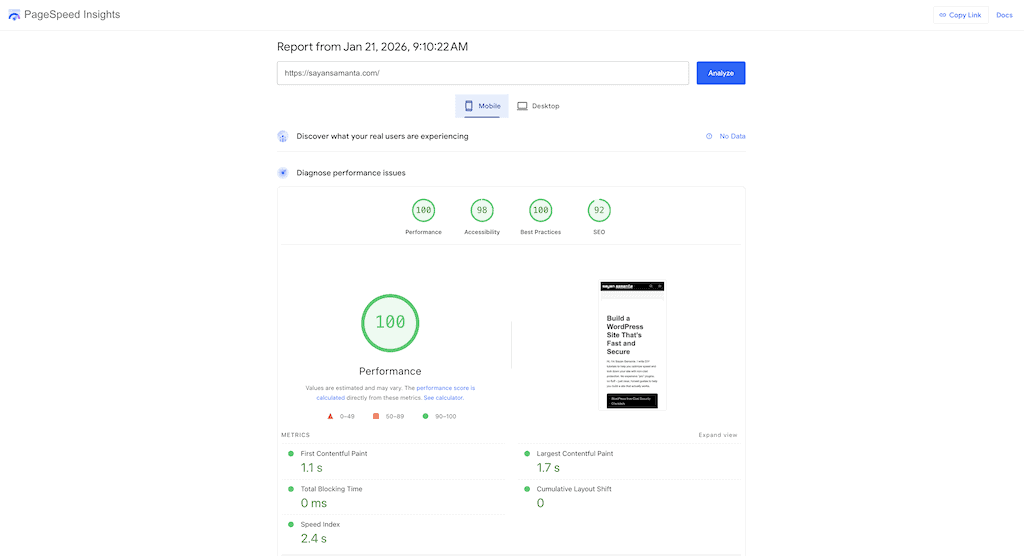
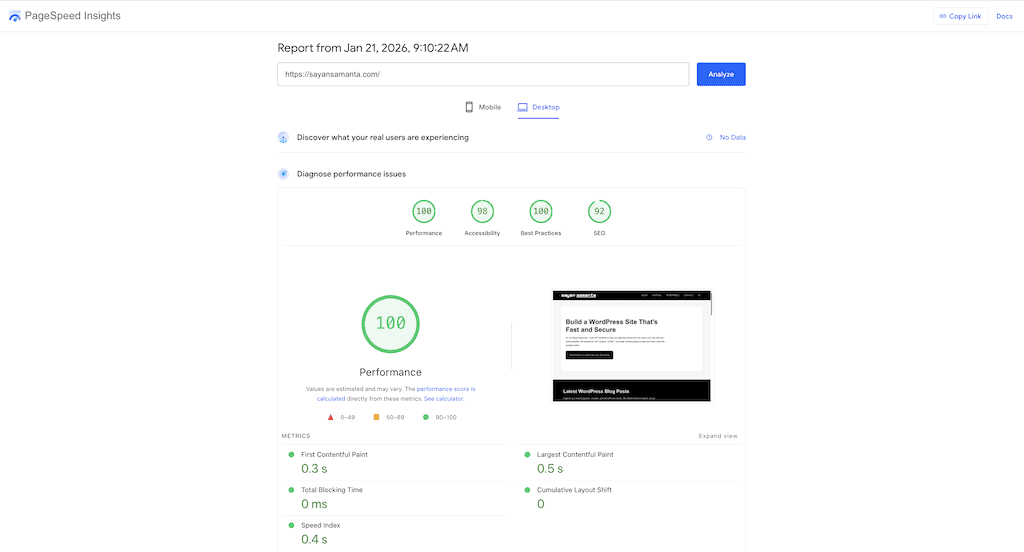
Here’s my website TTFB from 22 global locations, to see server response time, CDN cache status, detailed timings, and response headers.
Here’s my website’s Core Web Vitals performance on different testing tools like GTmetrix, PSI:
- Mobile score on PSI: 100/100
- Desktop score on PSI: 100/100
- Largest Contentful Paint (LCP): 1.3s
- Interaction to Next Paint (INP): 101ms
- Cumulative Layout Shift (CLS): 0
- Total Blocking Time (TBT): 0ms
How FlyingPress Solved My INP & LCP Issues?
Core Web Vitals metrics like Largest Contentful Paint (LCP) & Interaction to Next Paint (INP) are difficult to solve because they often contradict each other.
LCP score fails when the main content (usually a Hero image or H1 tag) takes too long to appear. And INP fails when a user clicks a button, and the site takes too long because the browser is overworked running third-party JavaScript codes (usually Google Analytics/AdSense). To fix these issues, FlyingPress uses some smart techniques.
Here’s how FlyingPress fixes my LCP score:
- Preloading Critical Images: FlyingPress automatically identifies the LCP image (even if it’s a background image in CSS) and adds an HTML tag. This forces the browser to download that image before it even processes CSS & JS files. It also excludes “Above the Fold” images from lazy loading, ensuring the hero image renders instantly.
- HTML cache on the Edge (via FlyingCDN): FlyingPress uses FlyingCDN to cache the entire HTML document on Cloudflare’s servers (Edge Caching). It not only decreases server load but also drops TTFB globally (from 500ms to 30ms).
Here’s how FlyingPress fixes my INP score:
- Delay JavaScript: When someone opens your site, FlyingPress delays essential JavaScripts (like Google Analytics, Facebook Pixels, or heavy Chat widgets) and only loads them after the user interacts with the page. This keeps the Main Thread idle during the initial time and only loads when users click or scroll.
Note: Only FlyingPress or WP Rocket alone can’t pass your website at Google Core Vitals metrics. You need a good hosting, a CDN, a light-weight WordPress theme, and a good image optimization plugin to get a better result at GTmetrix & PageSpeed Insights.
My Recommendation:
- For low-budget Hosting: ChemiCloud, ScalaHosting, or Hosting.com
- For high-budget hosting: Kinsta, Liquid Web, or CloudWays
- CDN: Cloudflare, FlyingCDN
- Theme: GeneratePress, Astra, Or KadenceWP
- Image Optimization Plugin: ShortPixel or Imagify
FlyingPress Key Features For Core Web Vitals Optimization
To understand why I’m saying FlyingPress is “WP Rocket Killer,” we must look beyond the feature checkboxes and understand how it handles features differently.
Here is the technical breakdown of the most important FlyingPress speed optimization features and how they compare to WP Rocket in 2026.
1: CSS Optimization (For LCP & CLS)
Core Web Vitals (specifically LCP, CLS) results are often ruined by heavy CSS files. Both plugins optimize CSS files, but they use fundamentally different methods to do it.
How FlyingPress does it: When you enable the “Remove Unused CSS” option, FlyingPress sends your URL to its own high-performance Cloud server. Their servers render your site in a real browser environment to detect, remove unused CSS files, and send minimal CSS files back.
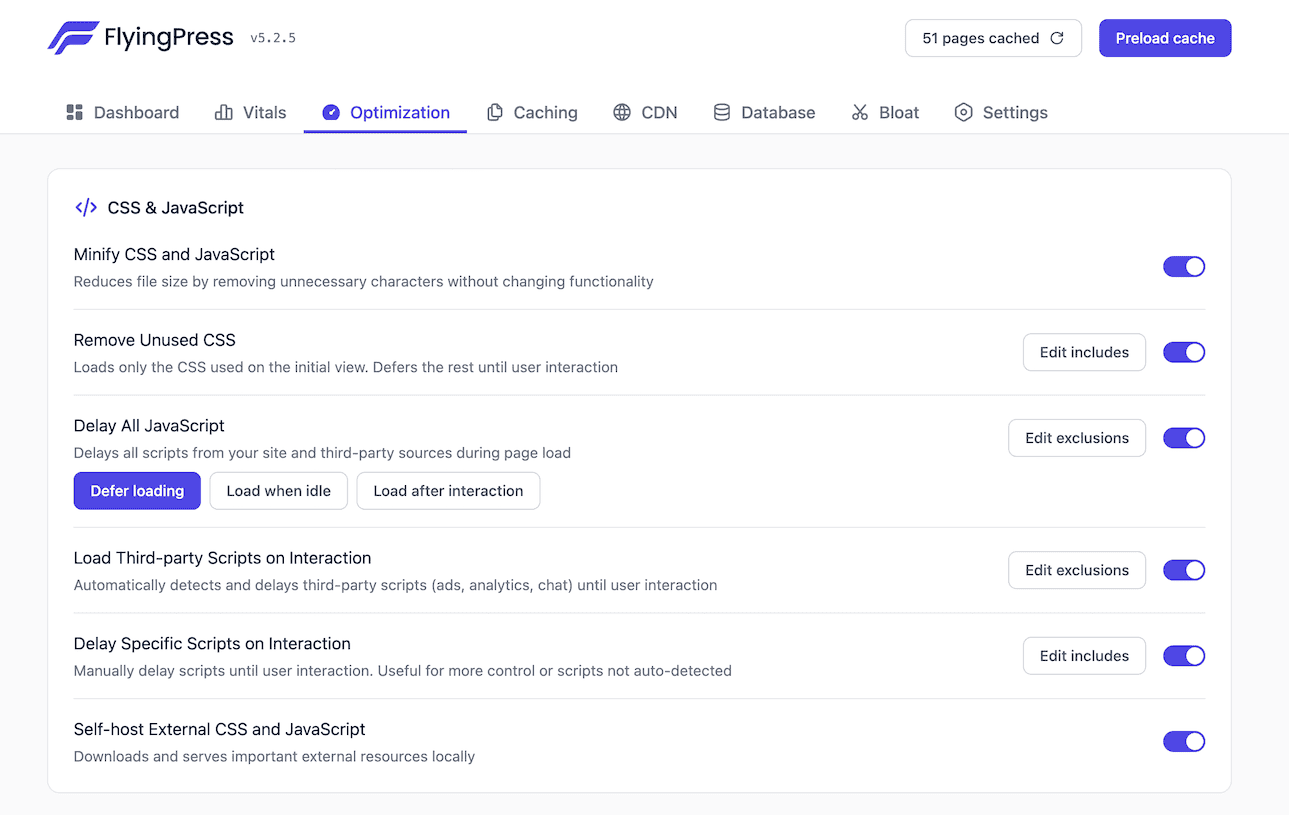
FlyingPress uses separate files to contain these CSS files. This keeps your stylesheets clean and lightweight, and doesn’t bloat your HTML files. This process does not use your server’s CPU resources, making it more scalable for cheap hosting environments.
How WP Rocket does it: WP Rocket uses your server resources to “Remove Unused CSS” from your Website. While this process is fast, WP Rocket uses an Inline CSS file, which is slower for users and increases HTML size.
If you are using shared hosting, this CPU-intensive process often times out or fails. Also, an increased HTML file size (sometimes by 100KB+) can slow down the Time to First Byte (TTFB).
Winner: FlyingPress.
2: “Lazy Render” HTML Elements (For TBT, LCP)
If your site has bloated DOM elements (heavy sidebar widget, a complex footer section, a comments section), it can increase the duration of style calculations and layouts.
With FlyingPress, you need a CSS selector (e.g., #comments or .footer-widget) and it will lazy-load entire HTML sections initially. As the user scrolls down near that section, FlyingPress injects the HTML instantly. As a result, it automatically reduces the DOM Size, and it can save up to 300-500 DOM nodes on complex pages.
With FlyingPress Gutenberg integration, you can select a block in the Gutenberg editor and select ‘Lazy Render’ directly to redece DOM size.
Currently, WP Rocket does not have this “Lazy Render” HTML Elements feature. However, relies on “Delay JS” to achieve similar main-thread savings.
Winner: FlyingPress.
3: Smart JavaScript Delay
Both WP Rocket and FlyingPress can “Delay JavaScript Execution” perfectly. This feature allows you to delay loading third-party heavy JS code (like Google Analytics, AdSense, Chat widgets, or Facebook Pixels) until user interaction (moves mouse/scrolls).
While WP Rocket delays all JS scripts, FlyingPress uses an Intelligent Flying Scripts engine. It separates “Delay” from “Defer” and also has a smart timer that automatically loads those JS scripts after some time.
Sometimes, users open your webpage and don’t scroll or move their mouse. In that case, WP Rocket might never load the Google Analytics/AdSense code, causing you to miss potential analytics data and revenue. FlyingPress uses a smart timer to prevent this issue.
Winner: Tie.
4: Bloat Removal
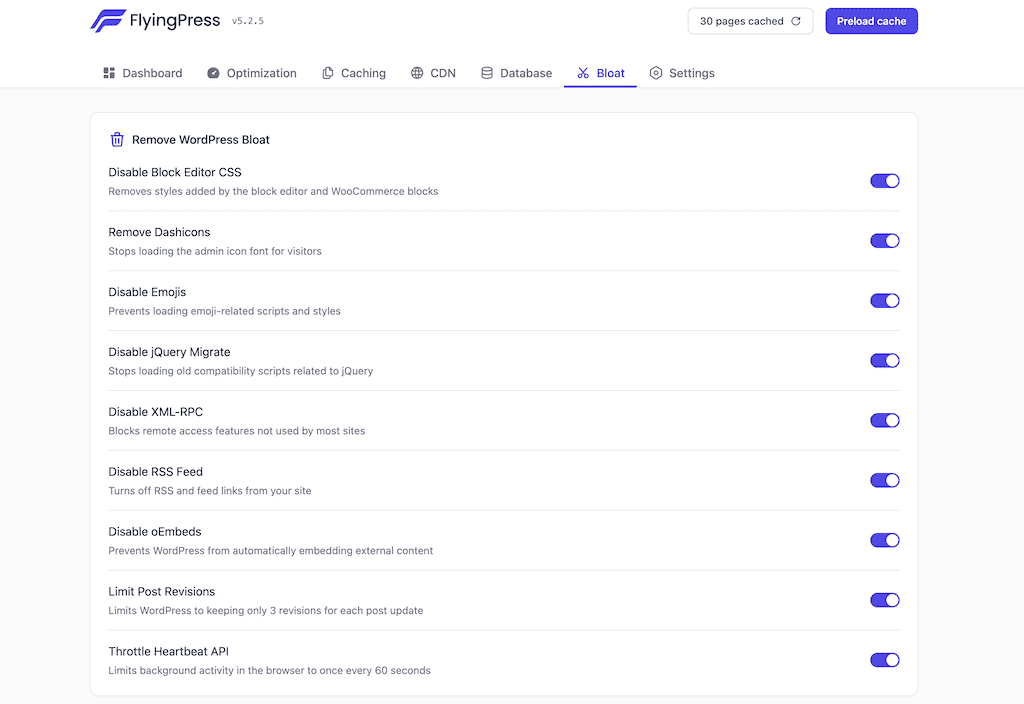
FlyingPress includes the functionality of the Perfmatters plugin for free. It offers a range of options that allow you to remove unnecessary elements from your website. These bloated elements are:
- Disable WooCommerce cart fragments, assets
- Disable XML-RPC
- Disable RSS feed
- Disable Block Editor CSS
- Disable oEmbeds, Emojis
- Disable WP Cron
- Disable jQuery Migrate
- Remove Dashicons
- Limit Post Revisions
- Control Heartbeat API
WP Rocket also has a very minimal bloat removal (mostly just database cleaning, & Heartbeat API). FlyingPress replaces the need for a second optimization plugin like Perfmatters.
Winner: FlyingPress.
5: FlyingCDN (Powered by Cloudflare Enterprise)
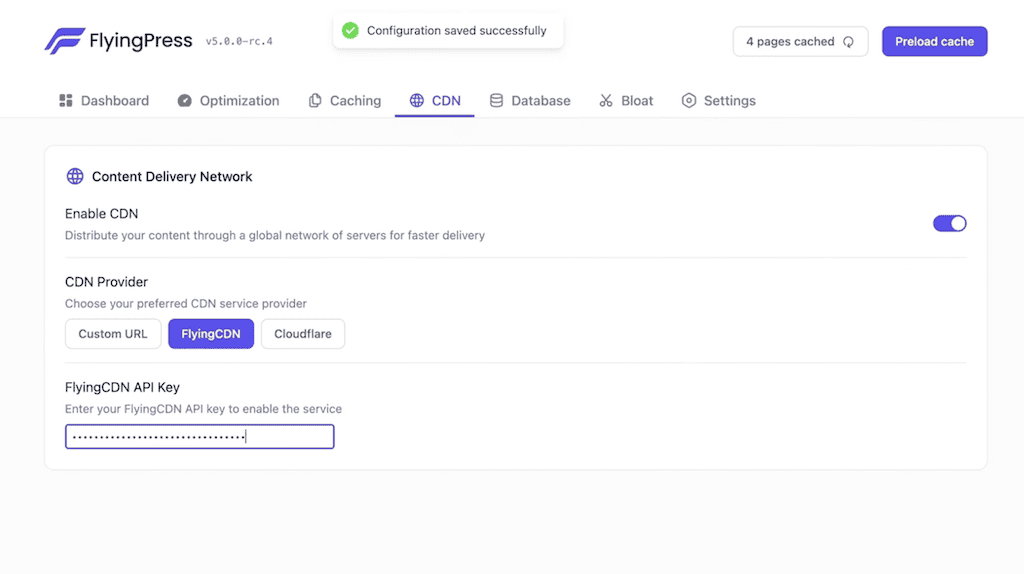
FlyingCDN (by FlyingPress) is built on Cloudflare Enterprise’s massive infrastructure for power users and performance-obsessed website owners. It has enterprise-grade features like Edge page caching, Argo smart routing, real-time image optimization, and, most importantly, Enterprise-grade Firewall & DDoS protection.
While Most CDNs like RocketCDN only store files in one place until requested, FlyingCDN replicates them across Cloudflare Cloud clusters before the first hit. Making it faster and superior to other CDNs. Here’s FlyingPress’s guide on FlyingCDN.
In comparison, RocketCDN (by WP Rocket) is built on BunnyCDN, purely for simplicity. With RocketCDN, there is absolutely no configuration to handle (just needs a CNAME). However, RockteCDN doesn’t offer full edge caching, no enterprise-grade security, or image optimization. Here’s WP Rocket’s guide on RocketCDN.
Here’s a basic comparison between FlyingCDN and RocketCDN.
| Feature | FlyingCDN | RocketCDN | Winner |
|---|---|---|---|
| Underlying Tech | Cloudflare Enterprise (Tier 1 Network) | BunnyCDN (High-performance Tier 2) | FlyingCDN |
| Pricing Model | $10/mo for 100GB bandwidth (Additional bandwidth costs $5 per 100GB) | $89/yr with Unlimited bandwidth (Fair Usage applies) | TIE |
| Key Performance Feature | Edge Page Caching (HTML is cached on the CDN, not from your server; it barely gets hit) | Static Asset Delivery (Serves images/CSS/JS from the edge, but HTML cache generation still hits your server) | FlyingCDN |
| Image Optimization | Yes (Real-time WebP/AVIF conversion and compression via Cloudflare Polish/Mirage) | None (You need a separate image optimization plugin like Imagify or ShortPixel) | FlyingCDN |
| Global PoPs | 300+ Locations (Massive global coverage, including deep penetration in China) | 120+ Locations (Excellent coverage in US/EU, decent elsewhere). | FlyingCDN |
| Routing | Argo Smart Routing (Finds the fastest route across the web while bypassing congestion) | Standard Anycast routing | FlyingCDN |
| CDN Domain | Same Domain | Separate domain | FlyingCDN |
| Setup Complexity | Moderate (Requires pointing DNS nameservers or API integration to reduce server load) | Easiest (Automatic configuration. No DNS changes required; it uses a CNAME) | RocketCDN |
| Security | Enterprise-grade WAF & DDoS protection (Includes Cloudflare’s enterprise-grade security rules) | Basic SSL and standard DDoS protection. | FlyingCDN |
| Ideal For | High-traffic sites, WooCommerce, or if you’re chasing perfect Core Web Vitals scores (LCP/INP). | Beginners, small-to-medium blogs, or users who want an easy solution. |
Winner: FlyingPress.
5: Other Key features
Auto-Exclude Above Fold: I mentioned this earlier, FlyingPress scans your web page and identifies the LCP element (the largest image at the top), and it automatically excludes this from Lazy Loading and adds fetchpriority=”high”. In comparison, WP Rocket doesn’t do that; you need to manually exclude LCP elements from Lazy loading.

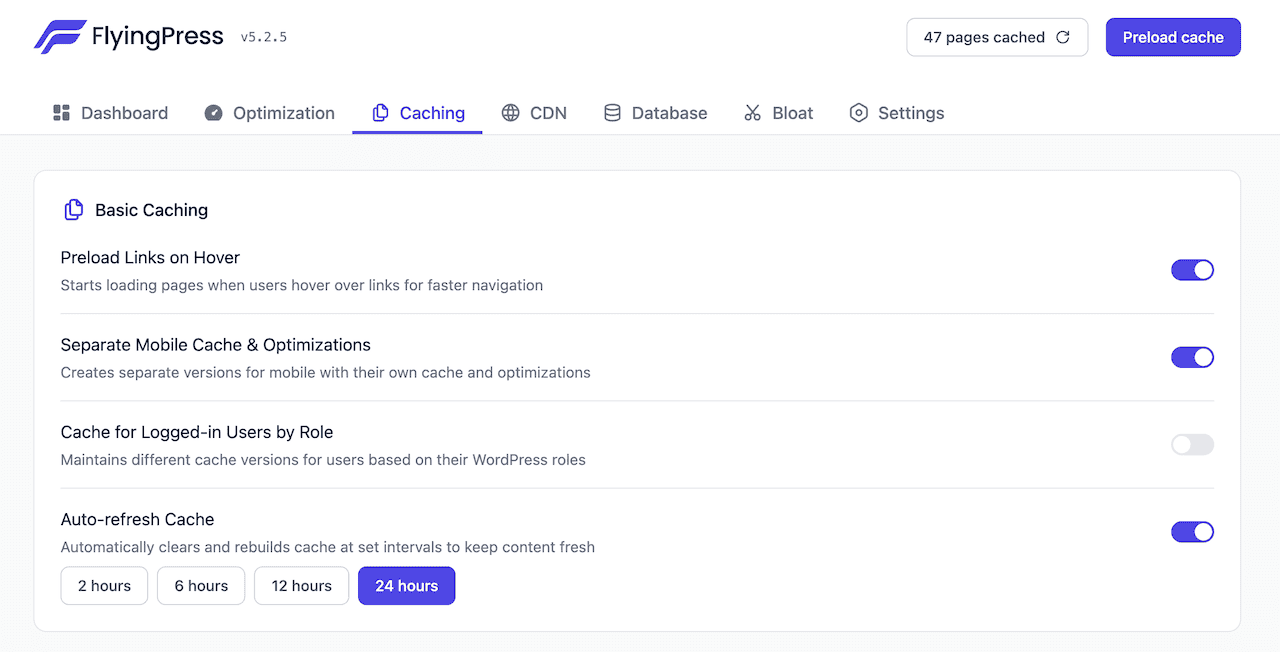
Link Preloading: When a visitor hovers over a link on your site, FlyingPress detects this intent and begins downloading in the background before the user clicks. Ensuring instant navigation for the website visitor. FlyingPress limits the number of simultaneous preloads (e.g., 2 requests per second) to keep your server from being overloaded.
Free Core Web Vitals Tracking: When you enable “Core Web Vitals Tracking”, FlyingPress records actual experience of real human visitors (not bots) in the background and stores it in its Cloud server.
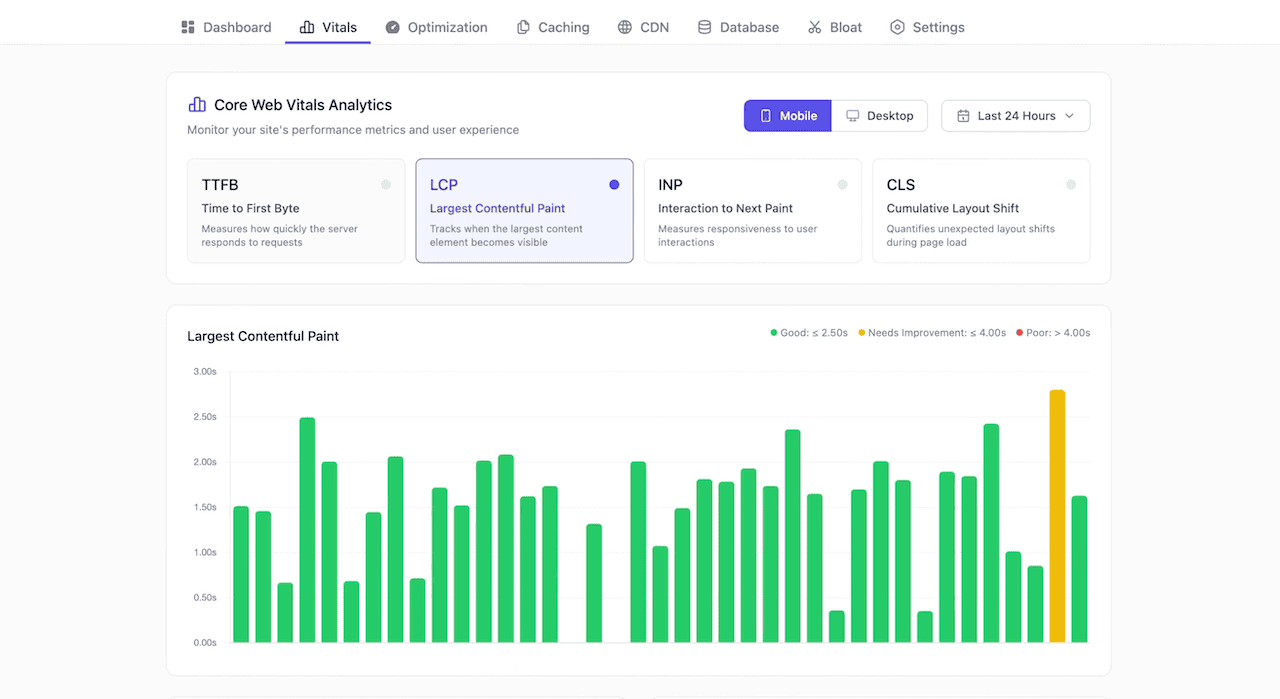
FlyingPress collects Core Web Vitals (CWV) from your visitors and turns them into clear, actionable insights inside your dashboard. You can also see TTFB, Page-level, and country-level breakdowns to pinpoint issues, and Mobile/Desktop filters. WP Rocket also has “Rocket Insights” for Core Web Vitals tracking; however, it costs $4.99/month for it.
Free Image Optimization: On the latest FlyingPress v5.3.0 version, they finally added free image optimization. You can now optimize your images directly from FlyingPress without paying extra money for a plugin (like Imagify, ShortPixel, or Optimole).
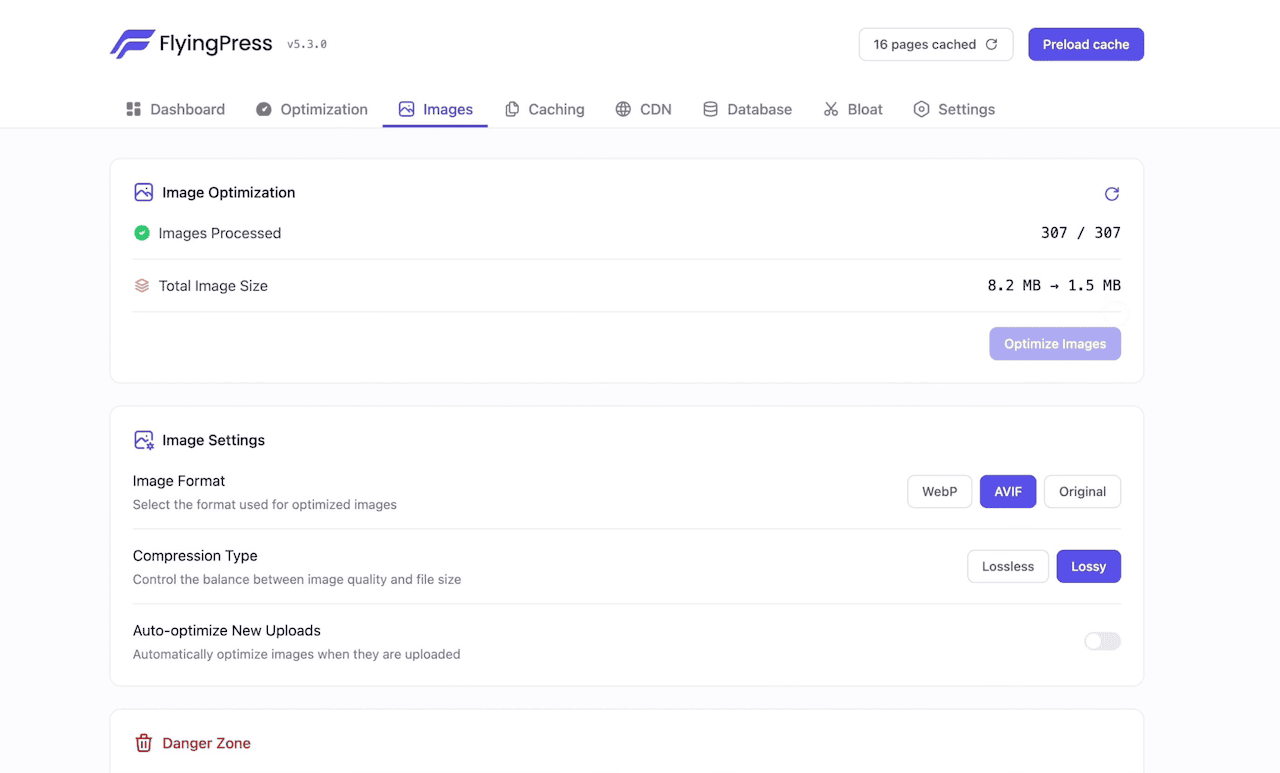
FlyingPress can convert all images to AVIF, WebP, or keep the original format. You can choose image compression type, Lossless or Lossy, to control image quality and file size. All image processing happens on FlyingPress cloud servers, not your hosting server (it saves your server resources & CPU limits).
You can restore original images anytime, and all image optimize on automatically on upload.
In comparison, WP Rocket doesn’t have image optimization features; they recommend using the Imagify plugin. And you need to pay an extra $9.99/month, while FlyingPress does it for free.
Winner: FlyingPress.
FlyingPress Pricing: Does FlyingPress offer a free trial?
Pricing is often a deciding factor. FlyingPress has 4 different plans, and the only difference between these plans is the number of sites that are supported. And the best part of FlyingPress is that you get a 14-day free trial.
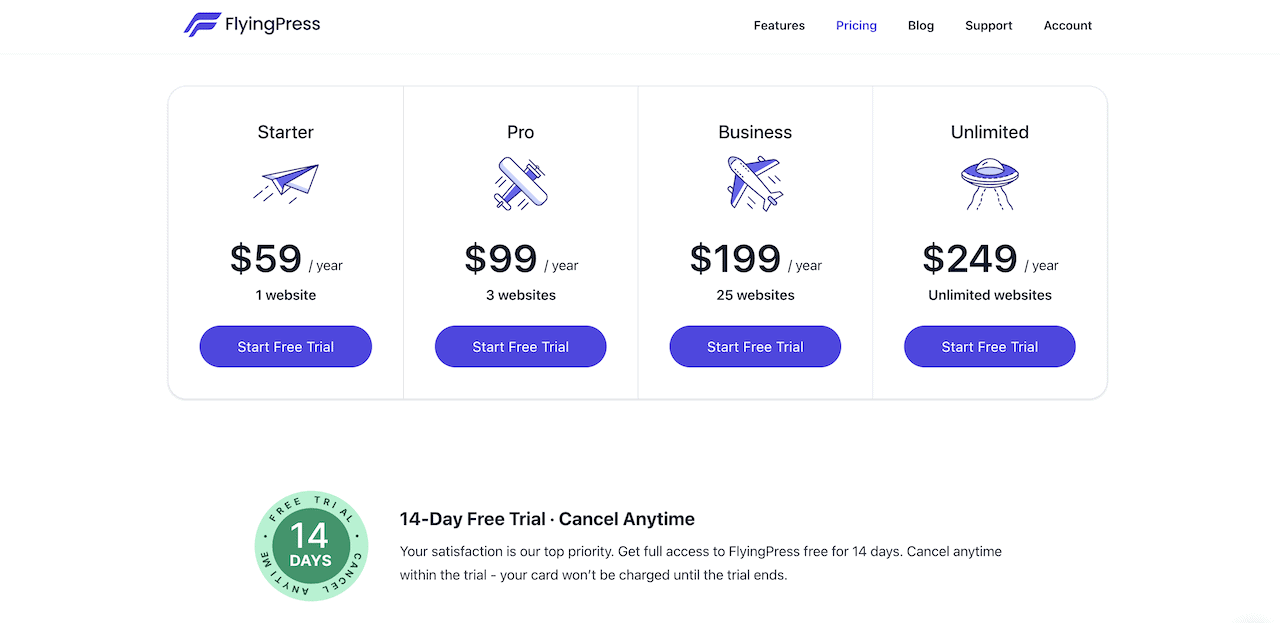
The Value Proposition: At first glance, WP Rocket & FlyingPress pricing looks identical ($59/year for a single site). However, WP Rocket doesn’t offer an unlimited site usage licence, and their 3 websites licence costs $199/year.
In comparison, FlyingPress costs less for a multiple-site licence, and you’ll also get the functionality of Perfmatters for free (valued at ~$30).
- WP Rocket Pricing: $59 (Cache Plugin) + $30 (Perfmatters) = $89/year
- FlyingPress Pricing: $59 (All-in-one) = $59/year
Winner: FlyingPress provides significantly better value for money.
Explore FlyingPress Pricing & PlansPros & Cons Of Using FlyingPress
For the last six months, I tested FlyingPress on a few websites. Here are the pros & cons of using FlyingPress, I noticed.
Pros:
Most of the FlyingPress advantages I already talked about. Here’s a quick list:
- Superior CSS Optimization
- Free Core Web Vitals Tracking (WP Rocket charges $4.99/month for it)
- Advance JS Optimization
- Free Bloat Removal
- Free image optimization
- Clean minimalist Interface
- Database cleanup & optimization
- Cloudflare Full Page Caching for faster TTFB across the globe (WP doesn’t do full caching)
- CDN Integration
- LCP Automation: Automatic detection of above-fold images for LCP optimization.
Cons:
In my testing, I didn’t find any major FlyingPress cons that can significantly affect your site’s performance. Here are a few areas where FlyingPress can improve.
- Cloud Server Dependency: FlyingPress’s “Remove Unused CSS” feature completely relies on their external server. If their high-frequency server goes down (rare, but possible), you can’t generate new CSS files (it’ll be replaced by the cached version).
- No Script Manager: Unlike Perfmatter, FlyingPress doesn’t have a Script manager. This allows you to disable specific scripts (plugins) on a per-post/page basis. For example, the “Contact Form 7” plugin loads itself automatically on every page and post. You can easily disable it everywhere and enable it only on your contact page.
- No Free version: Unlike the LiteSpeed Cache plugin, there is no free version. However, FlyingPress does offer a 14-day free trial on all plans (your card won’t be charged until the trial ends).
- FlyingCDN learning curve: Unlike other CDNs, FlyingCDN needs you to change your CName, add an A record, etc. Also, you need to disable the proxy (set DNS records to “DNS only”) for entries pointing to FlyingCDN. Which is difficult for non-techie users, however, FlyingPress does offer a step-by-step video guide.
FAQ’s about FlyingPress
Below are the most asked questions about the FlyingPress plugin.
Can I use FlyingPress with Autoptimize or Perfmatters Plugin?
Yes, you can. But I recommend you not to use any other performance or bloat removal plugin with FlyingPress. It can interfere with FlyingPress, since FlyingPress can do this for free.
Does FlyingPress offer Cloudflare Integration?
Yes, FlyingPress does offer Full Page Caching. It means you’ll get faster TTFB for visitors worldwide, plus reduced load on your server.
Will FlyingPress break my site layout?
Any plugin that optimizes CSS & JS can potentially break your site layout. However, FlyingPress uses a smart optimization architecture that hardly breaks any site design. Even if it breaks your design layout, you can easily exclude the specific file in the settings or contact support team to fix this.
Is FlyingPress Hard to configure?
No, it has a similar WP Rocket configuration setting, and the default settings are safe for 90% of websites. FlyingPress also has good documentation for each setting and step-by-step video tutorials.
Does FlyingPress offer a Free Trial?
Yes, FlyingPress all plans come with a 14-day free trial.
Does FlyingPress work on NGINX/Apache/LiteSpeed servers?
Yes, FlyingPress works on all types of servers you are using.
Verdict: Is FlyingPress Better Than WP Rocket?
Absolutely, FlyingPress is better than WP Rocket in every aspect.
WP Rocket remains a solid choice for absolute WordPress beginners who want zero configuration, reliable support, & ease of use. FlyingPress focuses on enhancing real-world experiences, aligned with Core Web Vitals metrics that actually matter to Google today (LCP, INP, & TBT).
If you are ready to future-proof your website’s performance, FlyingPress is the tool you should be using. Here’s my overall FlyingPress ratings:
| Metric | Ratings | Notes |
|---|---|---|
| Ease of Use | ⭐⭐⭐⭐⭐ (5/5) | Super clean minimalist interface |
| Performance | ⭐⭐⭐⭐⭐ (5/5) | Superior CSS, JS optimization with bloat removal |
| Support | ⭐⭐⭐⭐⭐ (5/5) | Direct support from Gijo Varghese (founder) |
| Value | ⭐⭐⭐⭐⭐ (5/5) | $59/year for a single site is completely fair. |
| OVERALL | 5.0/5.0 | Best WordPress Caching plugin in 2026 |
So, what are you waiting for? Try FlyingPress now. They offer a 14-day free trial. So, risks are involved.
Use FlyingPress Free For 14 DaysThat’s all for now. If you have any questions related to FlyingPress or WP Rocket, let me know. If you’re already using FlyingPress, share your experience with other users to finalize their decision.
Do you feel I left out some FlyingPress features & Core Web Vitals optimization information? Please let me know in the comments section.
Thank you for reading. Have a nice day.
FlyingPress

FlyingPress is an all-in-one WordPress caching plugin. It's a lightweight and easy to use speed optimization plugin to Boost your websites' Core Web Vitals in a few clicks.
Price: $59/Year
Price Currency: USD
Operating System: WordPress
Application Category: Plugin
5