Quick Overview (TL;DR)
- Cloudflare EmDash is a serverless TypeScript CMS, built on Astro v6.0. EmDash comes with true per-plugin sandboxing via Dynamic Workers, capability-based security manifests, and native x402 micropayments.
- EmDash solves WordPress’s biggest problem (plugin security) and delivers edge-native performance with scale-to-zero pricing.
- EmDash is not ready to replace WordPress. Zero ecosystem, no plugin/theme portability, heavy Cloudflare vendor lock-in for the killer security features, and a basic admin UI that feels like “WordPress 2005 with Tailwind CSS.”
- Site Migration is content-only; everything else (theme, plugins) requires a full rewrite.
Bottom line: For 99% of sites, stick with WordPress for its massive, mature ecosystem, hosting freedom, and non-technical usability. Use EmDash only if you’re starting a fresh project, live in the TypeScript/Astro world, and want to experiment with modern CMS architecture.

On 1st April, 2026, Cloudflare dropped EmDash — It’s real, not an April Fools joke. It’s the most architecturally coherent CMS launch I’ve seen since the early days of headless WordPress.
Cloudflare CTO Dane Knecht called it the WordPress “spiritual successor“. The launch post name-drops WordPress 52 times. The hype machine spun hard: “We fixed the plugin security nightmare that plagues 96% of WordPress vulnerabilities.”
Some called it a home run, others (rightly) smelled April Fools’ vaporware at first. However, it’s real (has v0.1.0 beta preview) — rough, incomplete, and nowhere near ready to dethrone the 43% of the web that runs on WordPress. Check the EmDash playground yourself.
I’m not a hardcore dev, but I run a few small sites, and I’ve been frustrated with WordPress plugin security for years. So I decided to test it myself — no hype, no theory.
I spent the whole afternoon spinning it up, digging through the public GitHub rep, playing in the playground, running the create command, and even trying a tiny site migration.
Here’s my honest, brutal compilation of every major point of view from the X firestorm (including the threads from @dok2001 and @syedbalkhi), plus the official claims, early reviews, and cold reality.
How Cloudflare Actually Built EmDash? (The Astro Acquisition)
Cloudflare didn’t “fork Astro and slap a CMS on top.” In January 2026, they acquired the entire Astro Technology Company (the team behind astro.build). This wasn’t just marketing — it gave them full control over the framework roadmap and source.
Key technical moves they made
- Astro 6.0 rebuilt dev server on workerd: The official Astro dev server now runs natively inside Cloudflare’s open-source V8 isolate runtime (
workerd). This eliminates the traditional “local Node vs production Workers” mismatch. You runnpm run dev, and it’s literally the same isolate that will serve production traffic. - @astrojs/cloudflare adapter v6+: The adapter now exposes Cloudflare-specific bindings (D1, R2, KV, Queues, Durable Objects) as first-class Astro integrations. SSR and on-demand rendering happen at the edge with zero cold-start penalty for static islands.
- End-to-end TypeScript + content layer: EmDash is 100% TS. Content is managed via Astro’s Content Collections plus a thin EmDash wrapper that adds CRUD + versioning on top of D1 SQLite (edge-deployed) or any Postgres-compatible DB. Media lands in R2 with automatic image optimization via Cloudflare Images.
How I Tested Cloudflare EmDash?
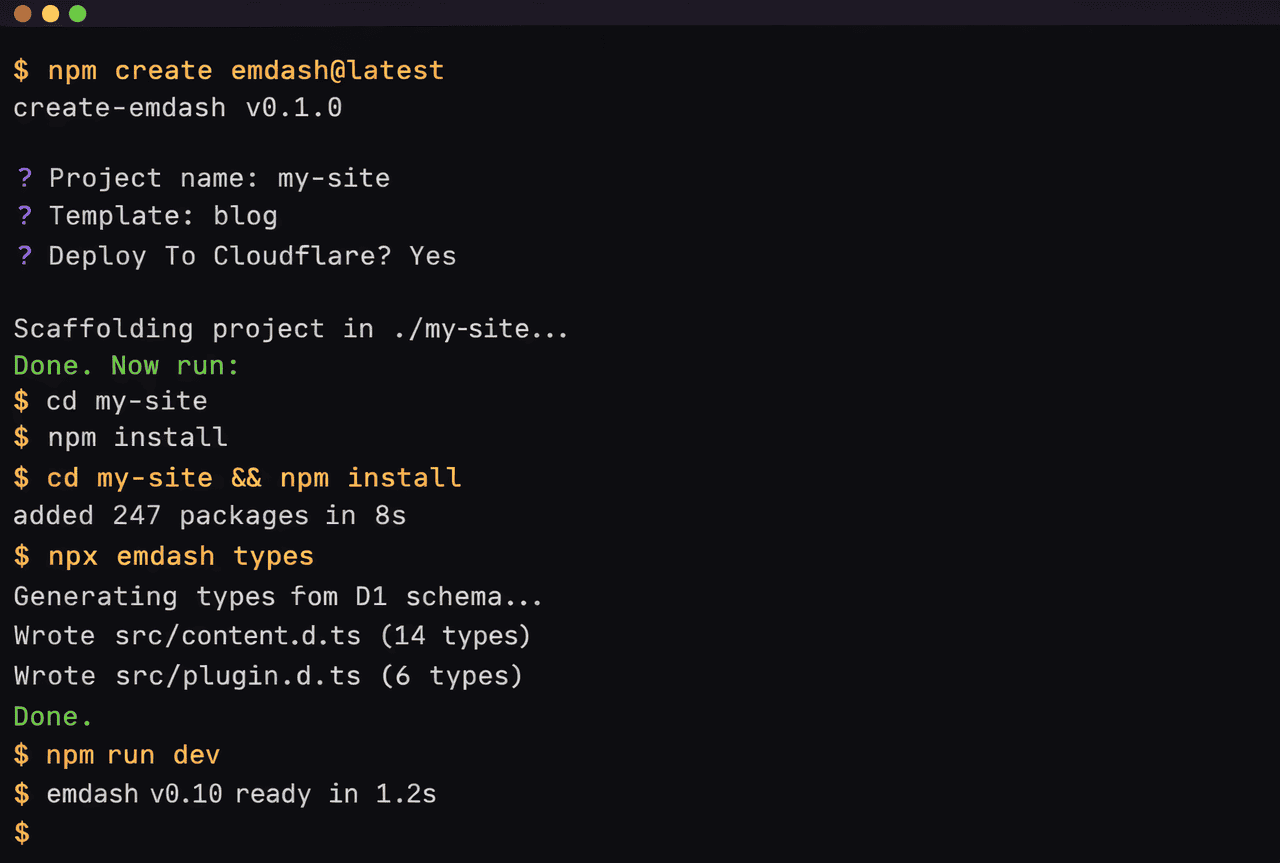
I started simple. I already had Node.js installed, so I opened my terminal and typed exactly what the docs said:
npm create emdash@latest
It took less than 60 seconds. It scaffolded a full project with Astro 6, the admin panel, and everything ready to go. I ran npm run dev And the test site was live on localhost. The dev server felt buttery smooth because Cloudflare rebuilt Astro’s dev environment to run on the same workerd engine that powers production.
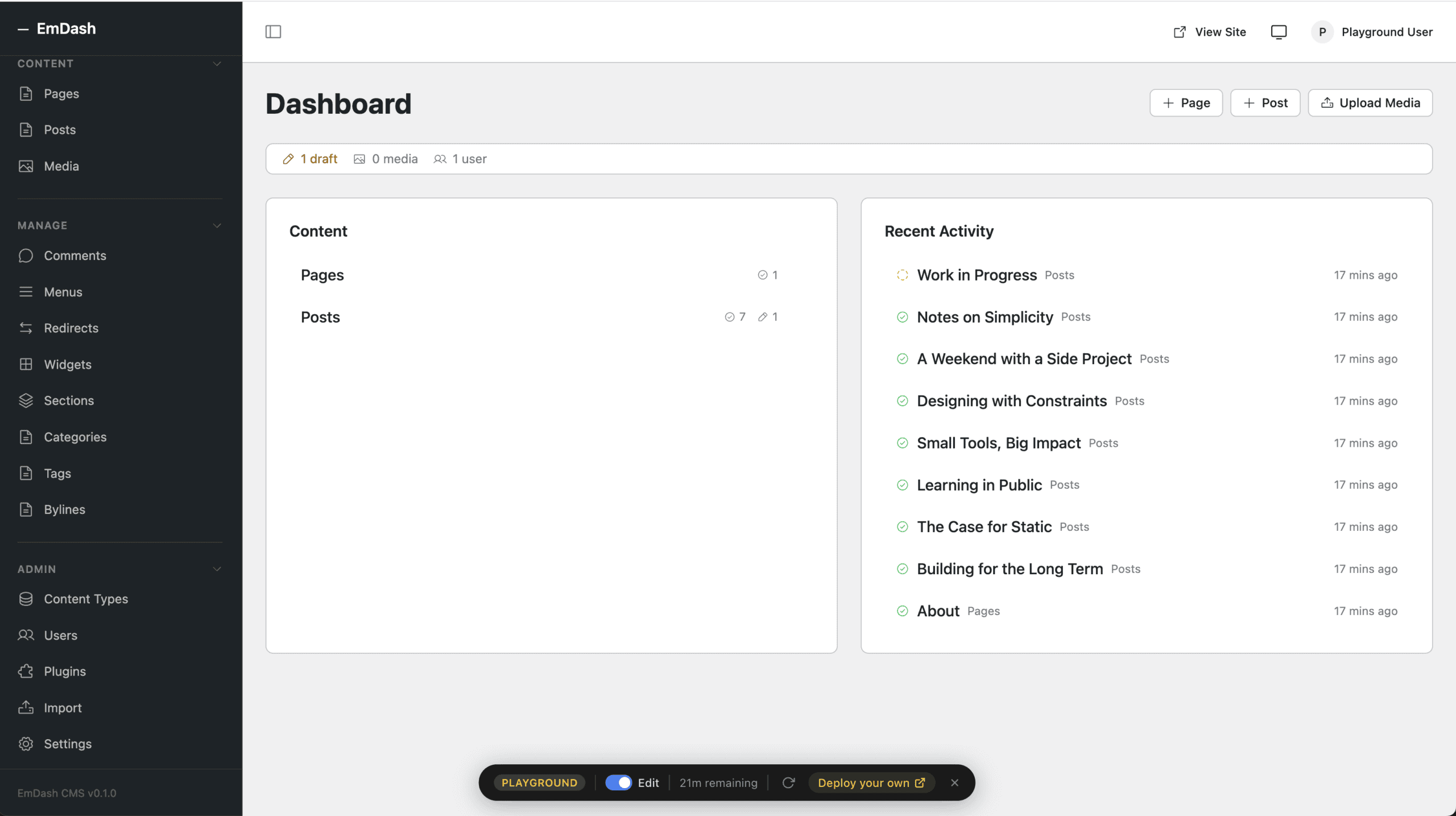
Next, I explore EmDash Playground for 3 min (because there’s nothing to explore). No login needed — full admin access instantly. I poked around the post editor, settings, and plugins section.
EmDash’s plugin system is really interesting. Unlike WordPress, each plugin has limited access. You literally check boxes like “content:read”, “email:send”, or “db:query” — and that’s ALL the plugin can touch.
Here’s the actual manifest you ship with a plugin (Copied from a friend):
// plugins/my-plugin/manifest.ts
export const pluginManifest = {
  name: "my-plugin",
  version: "0.1.0",
  capabilities: {
    "content:read": true,
    "content:write": { allowedTypes: ["post", "page"] },
    "content:delete": false,
    "email:send": { rateLimit: "10/min" },
    "db:query": { tables: ["posts", "custom_meta"], readOnly: true },
    "r2:put": { bucket: "media" },
    "mcp:expose": ["generateExcerpt", "autoTag"]  // AI agent hooks
  } as const,
  entrypoint: "index.ts",  // runs in its own isolate
  runtime: "workerd"
} satisfies PluginManifest;
How It Works: When EmDash needs a specific plugin, it spins up a separate isolated Worker. If the plugin tries anything sneaky, it gets blocked instantly. That’s the kind of security WordPress needs in the future (Matt said: “They can fix all WordPress plugin security in the next 18 months with AI.”)
Note: The EMDash plugin security only works on Cloudflare. It makes it hard for you to switch vendors in the future. In simple terms, EmDash is built to sell more Cloudflare services in future.
Site Migration Reality Check (Good, but very Limited)
I exported a small test WordPress site (just 8 posts + 20 images) using their official exporter plugin and uploaded the WXR file into the playground. Content, categories, tags, and featured images came across perfectly. It took about 4 minutes to complete the site migration.
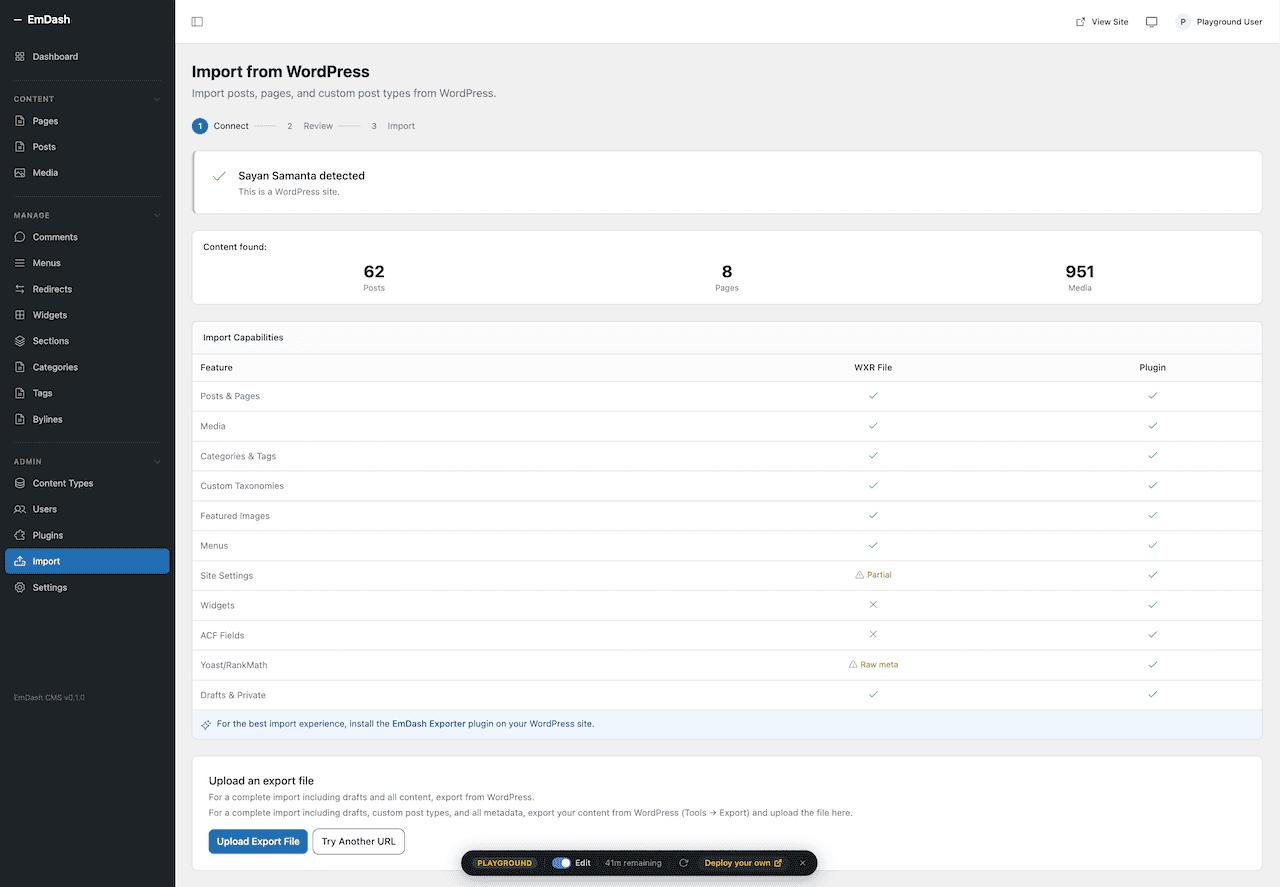
But here’s the brutal part: WordPress themes and plugins do not migrate at all. I had to start from scratch on the frontend site design, and everything became pure Astro components. If you have a complex WordPress setup with Elementor or WooCommerce, you’re basically rebuilding your site from scratch.
The importer is legitimately solid:
- Upload WXR export or install the official WP exporter plugin (it adds extra meta for custom post types).
- Content, taxonomies, featured images → R2, most meta fields map 1:1.
- WordPress themes and plugins are not portable. You rewrite themes as pure Astro components. Plugins must be re-implemented against the capability manifest.
- Early report shows 80-90% content fidelity on standard blogs; anything with heavy custom fields or WooCommerce needs manual work.
Bottom Line: Don’t import your live WordPress site (especially if you’re using WooCommerce or heavy Elementor-based sites)
Where EmDash Is Better Than WordPress?
- Security model: 96% of WordPress CVEs are plugin-driven because PHP has no isolated boundaries. EmDash’s per-plugin Dynamic Workers + manifest = provable least-privilege.
- Performance & cost: It’s serverless and edge-rendered. True scale-to-zero. D1 + R2 + Astro islands = sub-50 ms global TTFB at essentially zero cost until you hit serious traffic.
- Developer Experience: Full TypeScript end-to-end, Astro Content Collections for type-safe queries, built-in MCP for AI. The AI agent hooks (MCP) are actually useful if you use Claude.
- License: MIT license. Plugins can be closed-source, commercial, or GPL — no DRAMA.
Why You Should Stick With WordPress (The Brutal Truth)
After testing EMDash, I totally agree with Syed Balkhi’s X thread.
The ecosystem gap is massive. WordPress has over 60k plugins and 14k themes; every cheap hosting on Earth has 1-click WordPress installation + auto-updates + security plugins.
Non-technical users (my clients, marketers, small business owners) know WordPress UI cold. Switching would mean rewriting everything from scratch and retraining everyone. Not happening right now.
On the other hand, EmDash has zero mature ecosystem. No WooCommerce equivalent yet. No drag-and-drop page builder (Elementor) or Gutenberg blocks (GenerateBlocks) equivalent site builder. EmDash’s admin UI is clean but very basic — it feels like an early WordPress version with better fonts. Nothing that would impress my non-technical friends or clients.
Vendor reality: Full Dynamic Worker sandboxing only exists on Cloudflare’s runtime. If you deploy EmDash to Vercel/Netlify/AWS, and you lose the isolate plugin boundary, it becomes “just another Astro + headless CMS“. In the future, Cloudflare will inevitably push premium features to drive Workers/D1/R2 consumption.
Future Problems With EmDash Nobody Wants to Admit
- Ecosystem chicken-and-egg problem: Plugin authors won’t rewrite for EmDash until there’s a critical mass. Critical mass won’t appear until there are plugins. Cloudflare will have to subsidize heavily.
- Public company incentives: EmDash exists to sell more Workers, D1, R2, and Images. Expect pricing creep on the sandbox features or “Enterprise-only” MCP routing.
- Runtime overhead: Dynamic Worker spin-up adds ~10-30 ms latency on first plugin call. Fine for most sites, but high-traffic API-heavy sites may notice a delay in latency.
- AI-generated codebase: Parts of EmDash’s core were built with AI agents in weeks. Long-term maintainability and security audit surface are unknowns.
- Fragmentation risk: We already have plenty of CMS like Directus, Ghost, Sanity, and Strapi. EmDash is another shiny edge-native CMD option that could stay niche if the plugin marketplace doesn’t explode.
Bottom Line: Cloudflare EmDash vs WordPress
I had fun yesterday. I actually think EmDash is very solid.
EmDash is the most impressive modern CMS I’ve touched in a long time. The security model is genuinely next-level, edge-native performance, AI-agent readiness, zero PHP legacy, and the Astro + TypeScript foundation feels right for 2026.
But after spinning it up, trying the migration, and playing in the playground. I’m keeping all my live sites on WordPress. The WordPress ecosystem and ease of use still win for real-world use.
In my opinion, EmDash is not a WordPress replacement for 99% of production sites in 2026.
- Stick with WordPress if you value ecosystem maturity, hosting freedom, and non-technical usability.
- Kick the tires on EmDash: if you’re starting fresh, live in TypeScript/Astro land, and want to experiment with sandboxed plugins + MCP agents. It’s free and fun.
Watch the GitHub repo, wait for EmDash v1.0 and a real plugin marketplace, then decide which CMS is the best option for your site.
What about you? Did you test EmDash yet? Drop your experience in the comments — I’m reading every single one.
Thank You. Have a nice day.
— Sayan Samanta