
In a nutshell, Blog descriptions are short summaries that describe the overall content of your blog post. Blog descriptions are intended to give readers a brief idea of what the blog post is about and what you can expect when you visit.
These short descriptions are often displayed on a blog’s homepage or in the metadata of the blog’s web pages. In this post, we’ll take a closer look at the importance of a good blog description and how to craft one that will help you attract website visitors and engage readers.
They are typically displayed in the search results of a search engine, along with the title and URL of the page. Meta descriptions can be used to give readers an idea of what the content of a page is about and to encourage them to click on the link to read more.
A good blog description should be clear, concise, and to the point. It can help attract readers to a sense of what they can expect to find on your blog and why they should read it. They can also be used by search engines to understand the content of a blog and improve its ranking in search results. Here’s a good example of a Semrush blog post description:

It’s important to note that meta descriptions do not directly affect the ranking of a web page in search results. However, they can impact the click-through rate (CTR) of a page, which can indirectly affect its ranking. A high CTR can indicate to search engines that the page is relevant and useful, which can improve its ranking.
Top 8 Tips to Write an Effective Blog Description
According to Google’s SEO Starter Guide, “Adding meta description tags to each of your pages is always a good practice.” Even though most of the time, Google can override a good selection of text from your content to use in the snippet.
Everyone writes a description for their blog post and pages, but few of them are optimized for CTR. Here are the top 8 tips for a well-written blog meta description:
- Make it compelling: Use actionable language and make your blog description compelling to encourage users to click on your link in SERP (Search Engine Results Pages).
- Use Focus keywords: Include focus keywords in your blog post description to help search engines understand the content of your blog and to attract users who are searching for those keywords.
- Keep it concise: Keep your description concise and to the point, as longer descriptions may be truncated in search results. Keep it under 160 words for better results.
- Use numbers: Lists or descriptions that include numbers tend to perform well, as they are easy to scan and often make the content seem more specific and valuable. Like you can use “2025” to signify the latest updated blog post.
- Include a call to action word: Encourage users to visit your blog by including a call to action in your description, such as “Learn more,” “Top”, “Read now,” or “Get the full story.”
- Test different versions: Try writing multiple versions of your description and A/B test them to see which one performs the best in terms of CTR.
- Make it unique: Avoid using the same description for multiple pages or posts. Instead, write a unique description for each page to accurately reflect the content of that page. To check whether your meta description is unique, you can use Grammarly’s plagiarism tool.
- Avoid misleading words: Avoid using spammy or misleading words in your meta descriptions, as this can lead to a lower CTR and may even result in penalties from search engines.
Finally, remember to keep your blog description up-to-date; you can add the current year to look more updated. As your blog evolves and grows, your description should reflect the direction of your blog post. This will ensure that it continues to represent your blog content accurately and attract the right kind of readers through search engines.
How do you write blog descriptions on your website?
Writing a blog post description is very easy to do if you are using WordPress. In your WordPress website, install the RankMath or Yoast SEO plugin. Then open your blog post and click on the RankMath SEO plugin icon to edit your blog post title, permalink, & description. That’s all, after entering all details, you can publish your post.
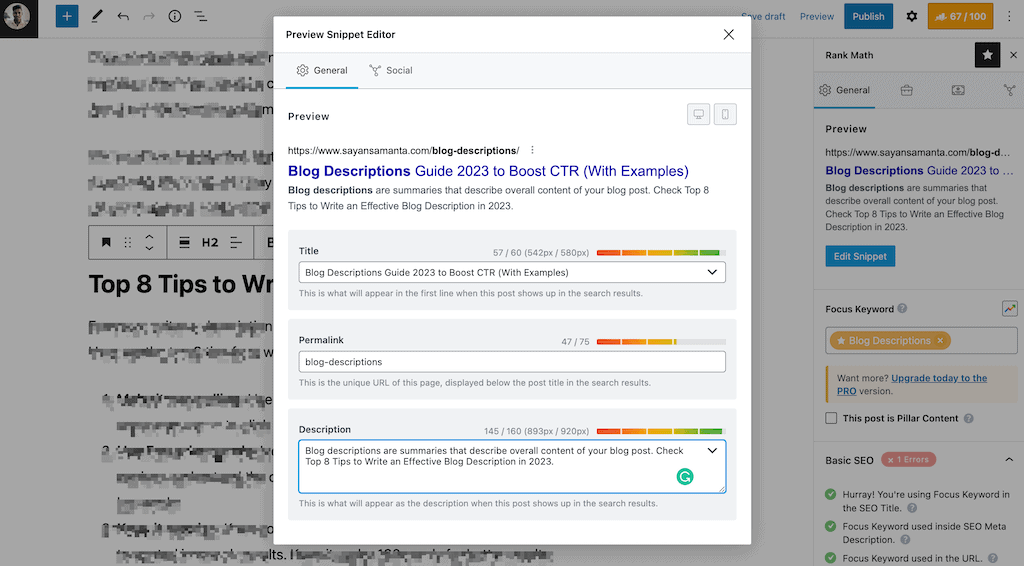
If you are not using WordPress, you can add with blog description using HTML code. In the HTML code of a web page, the meta description is placed in the meta element with the name attribute set to “description”.
Here is an example of what a meta description might look like in the HTML code of a page: <meta name=”description” content=” This is a blog post about the benefits of using meta descriptions on your website.”>
Final Thoughts
In conclusion, a good blog description is crucial for attracting and engaging readers. It should be clear, concise, and to the point, and should help readers to helping them understand the purpose of the blog and why they should read it.
By including relevant keywords and keeping your description up-to-date, you can help your blog stand out and reach more people.
That’s all. I hope I have cleared your doubts about Blog descriptions and how you can use your description to generate CTR on your post. If you have any other questions, let me know in the comments section.
Read more about:
- Google AdSense guide for Beginners.
- Grammarly Premium review.
- How to reduce server response time?
- Top 10 Fastest WordPress Themes.
Thank you. Have a nice day.