
A no-nonsense guide to the best alternatives for Solid Security, Solid Backups, and Solid Central after the Liquid Web merger. And why a private equity firm you’ve never heard of is the reason you’re reading this article.
You didn’t get a warning. You didn’t get a vote.
One day, SolidWP.com redirected somewhere new. Your plugin dashboard started showing a different logo. A renewal email arrived with different branding. Or worse, you searched for Solid Security support and found nothing but Kadence theme documentation.
This is what a private equity consolidation looks like from the customer’s side.
Not a press release, but a quiet redirect and a billing cycle that now locks you into a bundle you never agreed to buy.
SolidWP is gone. Not deprecated, it’s gone. Absorbed into the Kadence ecosystem and repackaged as part of a $299/year site builder bundle.
If you were paying $99/year for Solid Security on an Astra/GeneratePress site, or $199/year for the Solid Suite on client sites running Elementor, your equivalent product now costs more than twice as much.
It comes bundled with a premium theme and a block builder plugin you’ll probably never use.
In this article, I’ll explain exactly what happened with SolidWP and who made the call. Breaks down the slug-and-database mess that SolidWP rebrands leave behind.
And finally gives you a clear, honest SolidWP alternative that doesn’t owe its existence to a PE firm’s portfolio strategy.
SolidWP’s Identity Crisis: A Timeline
To understand why SolidWP disappeared, you need to understand who actually owns it.
Most SolidWP customers think they’re dealing with Liquid Web. A popular managed hosting company that accumulated a portfolio of WordPress plugins & theme.
But in April 2023, Liquid Web was itself acquired by One Equity Partners (OEP) – A private equity firm that spun out of JPMorgan.
Here’s something that doesn’t get said enough: SolidWP had already been through multiple identity crises before this one. The product you called SolidWP is the same product that was previously called iThemes Security, iThemes BackupBuddy, and iThemes Sync.
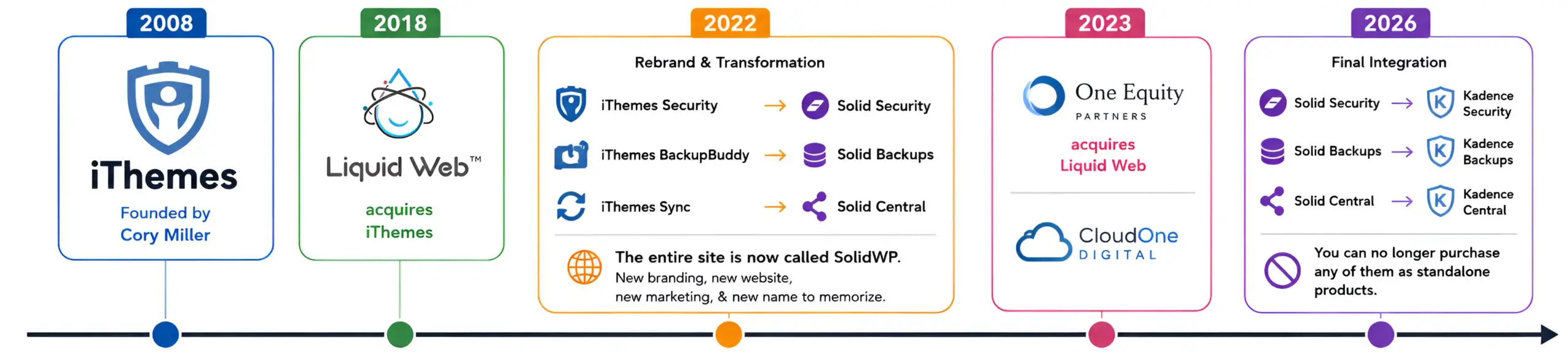
The full timeline:
- 2008: Cory Miller founds iThemes, and it becomes a well-known WordPress security plugin.
- 2018: Liquid Web acquires iThemes.
- 2022: iThemes Security is rebranded as Solid Security. iThemes BackupBuddy is rebranded as Solid Backups & iThemes Sync as Solid Central. The entire suite is now called SolidWP. New branding, new website, new marketing, & new name to memorize.
- 2023: One Equity Partners acquires Liquid Web, forming CloudOne Digital. The consolidation strategy is publicly stated.
- 2026: SolidWP brand is dissolved. Now, Solid Security becomes Kadence Security, Solid Backups becomes Kadence Backups, & Solid Central becomes Kadence Central. You can no longer purchase any of them as standalone products.
Count the rebrands: iThemes → Solid Security → Kadence Security. That’s the same security plugin wearing three different names in the span of five years. Every rebrand meant updated documentation, new plugin slugs, new portal logins, and new marketing promises about why this version was the real, permanent home for the plugins.
It wasn’t. None of them were.
The SolidWP product never had a completely stable identity because it kept changing hands. That’s the SolidWP identity crisis. And the customers paid for it in time, confusion, and now, in forced migration.
The Hidden Tech Debt Behind the SolidWP Rebrand
Most articles about this Liquid Web merger focus on pricing. This part is a bit more technical, and if you run client sites, custom hooks, or third-party integrations, it may be the section that matters most.
Every time a WordPress plugin changes its slug, it leaves behind wreckage.
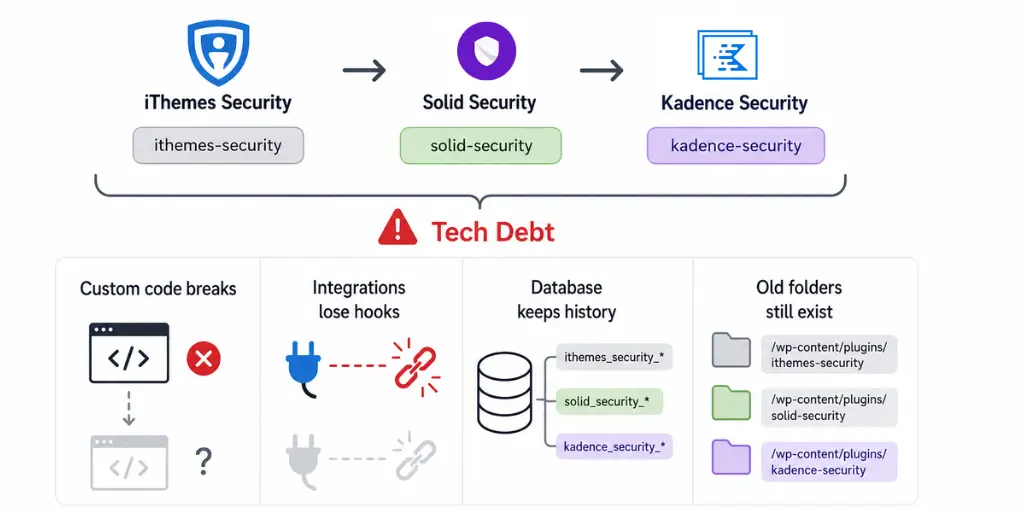
The iThemes Security plugin registered itself in WordPress as ithemes-security. When it became Solid Security, the slug changed to solid-security. When it becomes Kadence Security, the slug changes again. Same plugin, three different identities in the WordPress file system and database.
Here’s what that means in practice:
- Custom code & Third-party integration breaks silently.
- Your database carries the history: Every WordPress plugin writes to the options table using its own prefix,
ithemes_security_*options,solid_security_*options, and nowkadence_security_*options. All three sets of rows live in your database simultaneously if your website goes through every rebrand. They’re not cleaned up automatically. This doesn’t break things, but it bloats your database and creates confusion if you’re debugging. - Folder names persist: Plugin folders in
/wp-content/plugins/are named after their slug. If you’ve ever manually uploaded a plugin, whitelisted plugin directories, or set up file integrity monitoring (which Solid Security itself used to offer). After a slug change, your integrity monitoring may alert on what is actually a legitimate plugin update or miss it completely.
If you migrate to any of the alternatives below, part of the cleanup process is removing the old plugin cleanly and verifying that no custom code still references ithemes-security or solid-security slugs. Do it manually. No migration wizard will do it for you.
Trust vs. Bloat: Why the Kadence Bundle is a Poor Trade for the SolidWP Suite
Before getting into SolidWP alternatives, it’s worth being honest about what was lost.
SolidWP’s three products covered different but connected needs: Solid Security, Solid Backup, & Solid Central.
All three products at $199/year, Solid Suite was a genuinely fair deal for what it offered. That’s why people trusted it. That’s why this Liquid Web merger stings.
Liquid Web’s answer to losing SolidWP is Kadence Pro at $299/year.
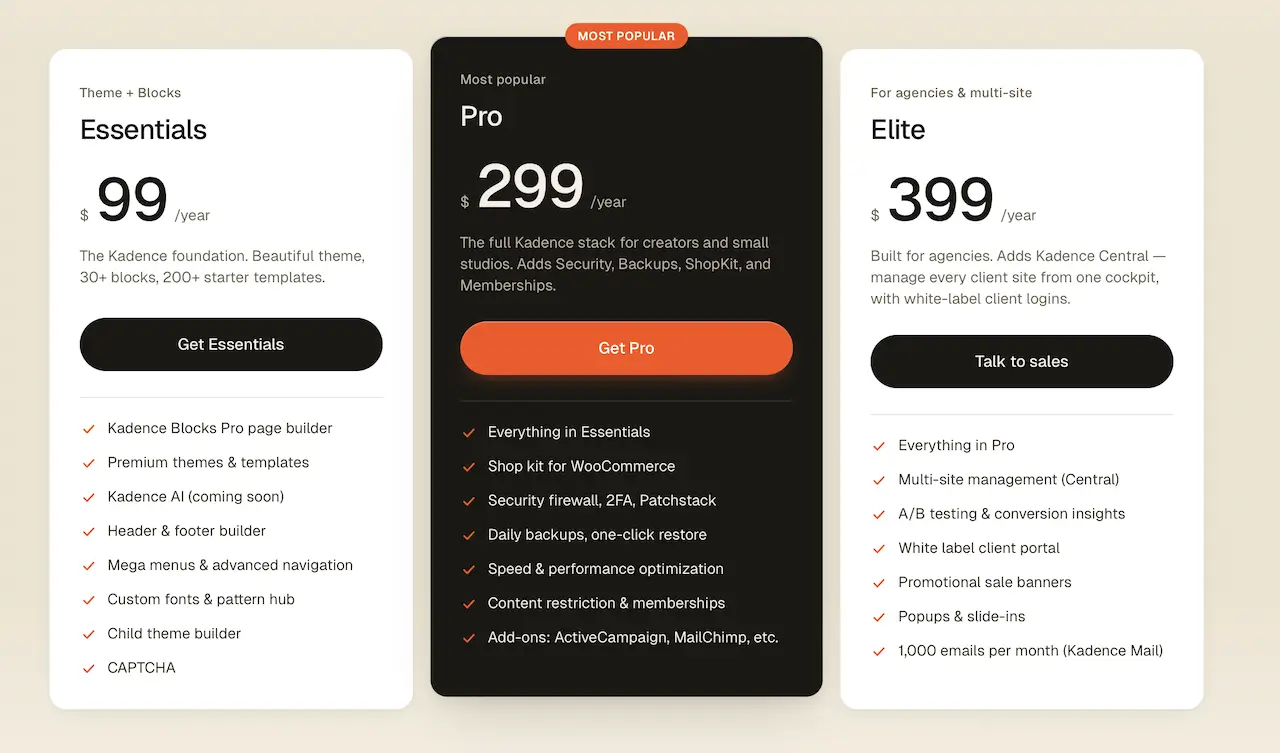
Kadence Pro bundles all SolidWP plugins, plus the full Kadence theme, Kadence Blocks, Kadence Shop Kit (IconicWP plugins), and Kadence Memberships (Restrict Content Pro).
Here’s the brutal math of what that means for non-Kadence users:
You used to pay $99/year for Solid security plugin.
Now you’re being asked to pay $299/year for security + backups + site management + a theme you won’t use + a block builder you won’t open + WooCommerce tools you don’t need + and a membership plugin you never asked for.
Liquid Web frames this as added value. But it isn’t added value if you don’t use what’s added.
It’s a forced bundle, and the underlying security, backup, and management plugins are no longer accessible outside of it.
The only people for whom “Kadence Pro plan” makes sense as a SolidWP replacement are people who were already Kadence users. For everyone else, I listed a few good alternatives below.
Solid Security Plugin Alternatives
Solid Security Pro was $99/year for one site, $199/year for five sites. Here are the two best standalone Solid security plugin replacements: Malcare & Wordfence.
1: Wordfence
Wordfence is the most used WordPress security plugin in the world- over 5 million sites use it.
The Wordfence free version is genuinely useful. It includes a working firewall, malware scanner, brute-force protection, login security, etc. For a small site with a simple threat profile, the Wordfence free version is more than enough.
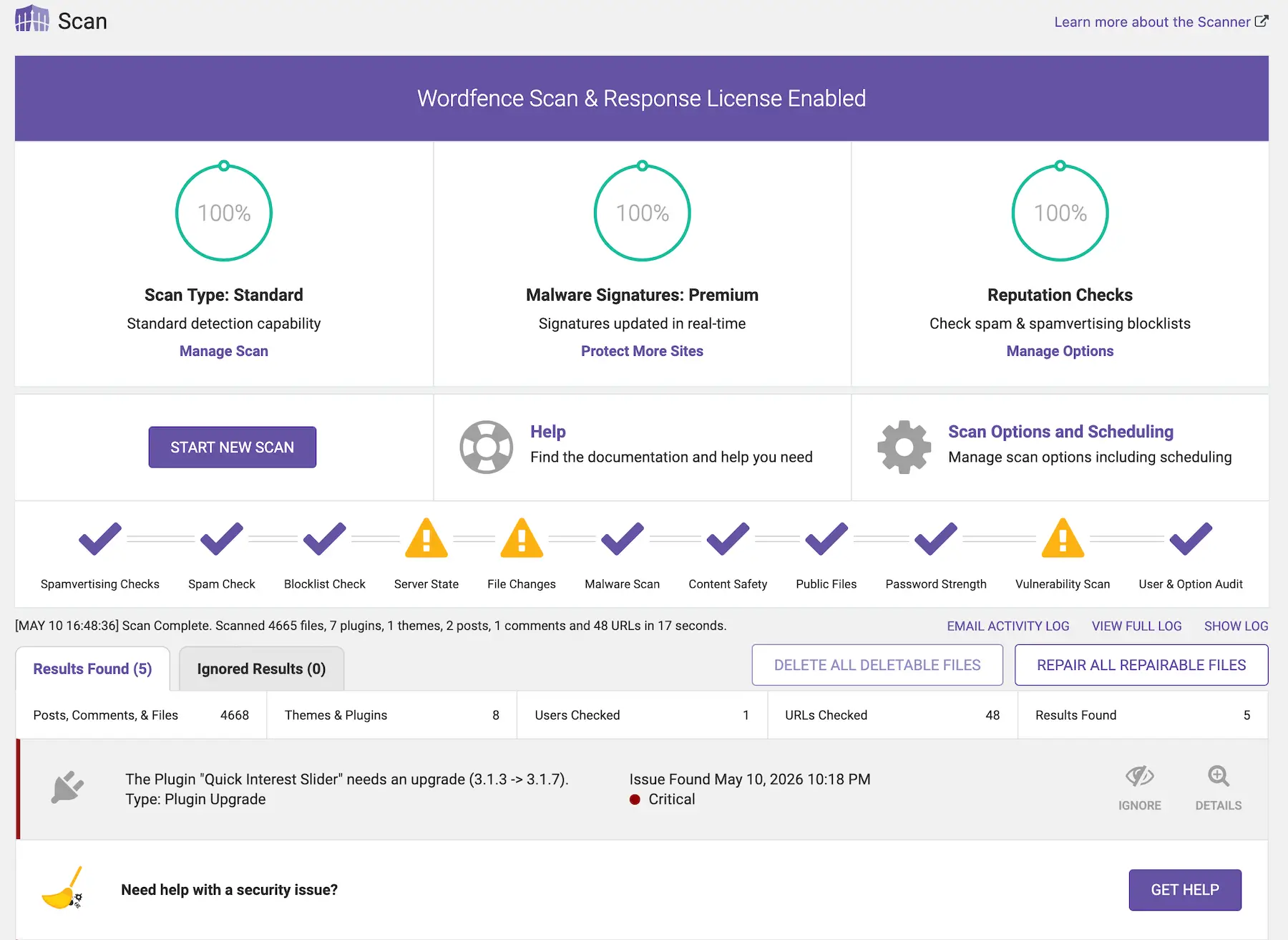
However, if you need a real-time firewall and vulnerability update, you need to use Worfence Premium. It costs $149/year per site – $50 more than Solid Security Pro used to cost.
The only problem with Wordfence is server load. Wordfence scans run directly on your hosting server. During malware scanning, it can slow your site down. There’s no way around it – it’s just how Wordfence is built.
Explore Wordfence Features & Plans2: Malcare
MalCare is another good cloud-based WordPress security plugin. The biggest difference from Wordfence is where the malware scanning happens.
MalCare does all scanning on its own cloud servers – not on yours. If you’re on shared hosting or a server that’s already stretched, your site doesn’t slow down during security scans.
The Malcare Protect plan costs $99/year for one site and includes a firewall, bot protection, geo-blocking, and automatic malware cleanup. All at the same price as Solid Security Pro used to cost.
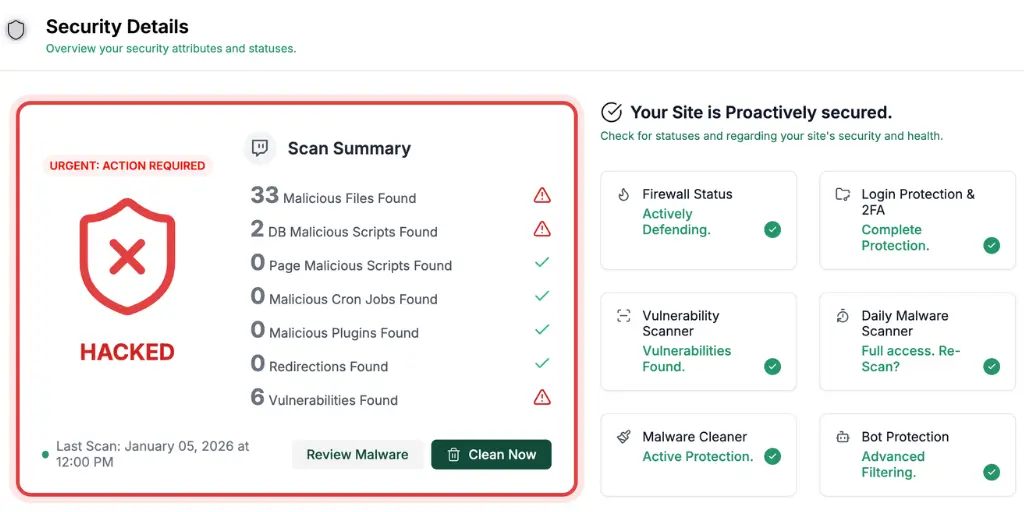
Malware cleanup being included is the real win for Malcare. With Wordfence, malware cleanup is either a separate charge. But MalCare cleans infected files with one click on its $99/year plan.
No extra fee, no support ticket escalation. You find a problem, you fix it with a few clicks.
The only weakness I noticed is multi-site flexibility. MalCare sells plans by site slots, and users have reported hitting limits even when they believed slots were available.
Also worth mentioning: if malware gets cleaned during the 14-day refund window, the refund won’t be issued. Reasonable policy, but know it before you buy.
Explore Malcare Features & PlansHere’s a comparison between Solid Security, Wordfence, & Malcare plugin:
| Feature | Solid Security Pro | Wordfence Premium | MalCare Protect |
|---|---|---|---|
| Price (1 site) | $99/year | $149/year | $99/year |
| Real-time firewall rules | ⚠️ (Basic rules) | ✅ | ✅ |
| Malware scanner | ✅ | ✅ on-server | ✅ offsite |
| Malware cleanup included | ❌ | ❌ | ✅ |
| Server load during scans | Low | ⚠️ High | ✅ None |
| 2FA authentication | ✅ | ✅ | ✅ |
| Brute-force protection | ✅ | ✅ | ✅ |
| Vulnerability patching | ✅ (Patchstack) | ✅ | ✅ |
| Country/geo-blocking | ❌ | ✅ | ✅ |
| Works on any theme | ✅ | ✅ | ✅ |
| Multi-site flexibility | ✅ (tiered plans) | ✅ per license | ⚠️ Slot limits |
Solid Backup Plugin Alternatives
Solid Backup Pro was $99/year for one site, $199/year for five sites. Here are the two best standalone Solid security plugin replacements: UpDraftPlus & BlogVault.
1: UpDraftPlus
The free UpDraftPlus plugin actually works well enough for most sites.
You get full site backups (database, themes, plugins, uploads) on a schedule time you set, sent backup files directly to your own Google Drive, Dropbox, Amazon S3, or FTP. No credit card required, no free trial timer. For most blogs, small business sites, and low-traffic WordPress installs, the free version covers everything you need.
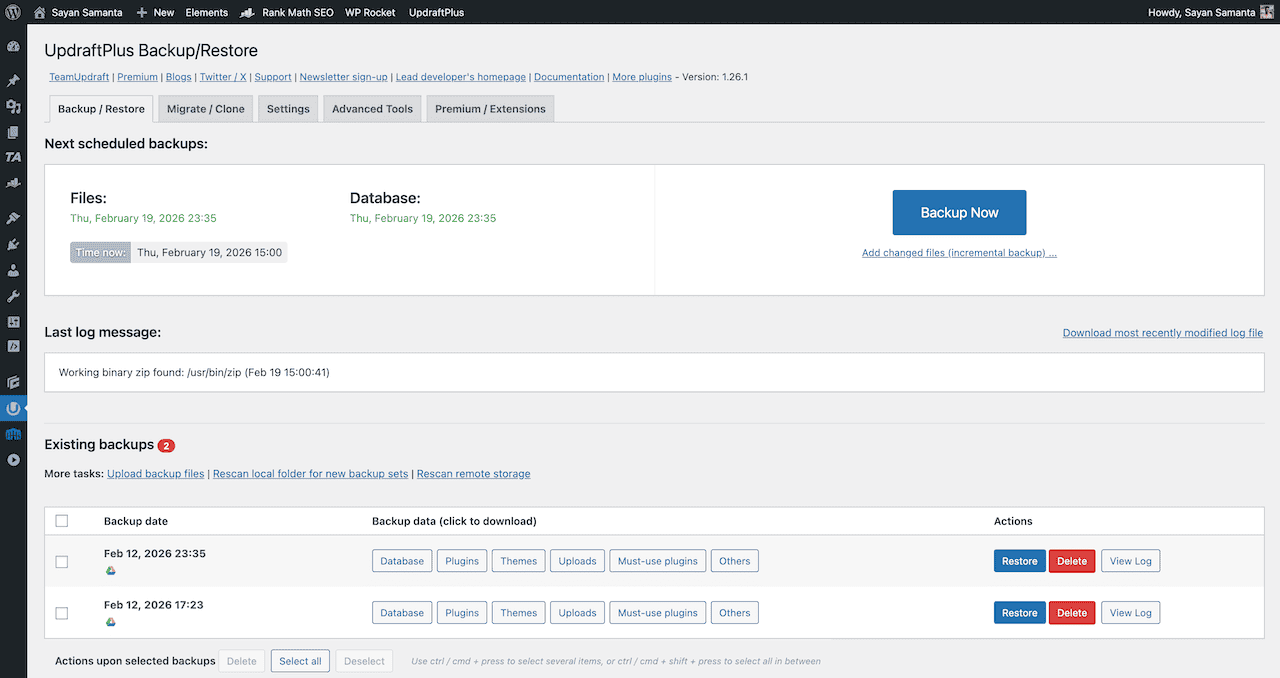
The critical advantage over BlogVault is that you own your backups. They sit in your Google Drive or Dropbox account. You can open the zip, inspect the contents, and restore files manually if you ever need to.
This is not a small thing – site backup portability and data sovereignty matter, and UpdraftPlus gives you both at no cost.
Where UpdraftPlus plugin falls short is in real-time backups and large sites.
UpdraftPlus works on a schedule – the best it offers is hourly. For WooCommerce stores with constant orders, that gap means potential data loss. If you need real-time backup coverage or manage a high-volume store, use BlogVault instead.
Explore UpDraftPlus Features & Plans2: BlogVault
BlogVault is a premium cloud-based backup service. There is no free plan.
Unlike UpDraftPlus or Solid backup, Everything runs on BlogVault’s servers – your site isn’t touched during the backup or restore process.
It comes with Real-time backups. Every change to your site – including WooCommerce orders – gets captured as it happens, not on an hourly or daily schedule.
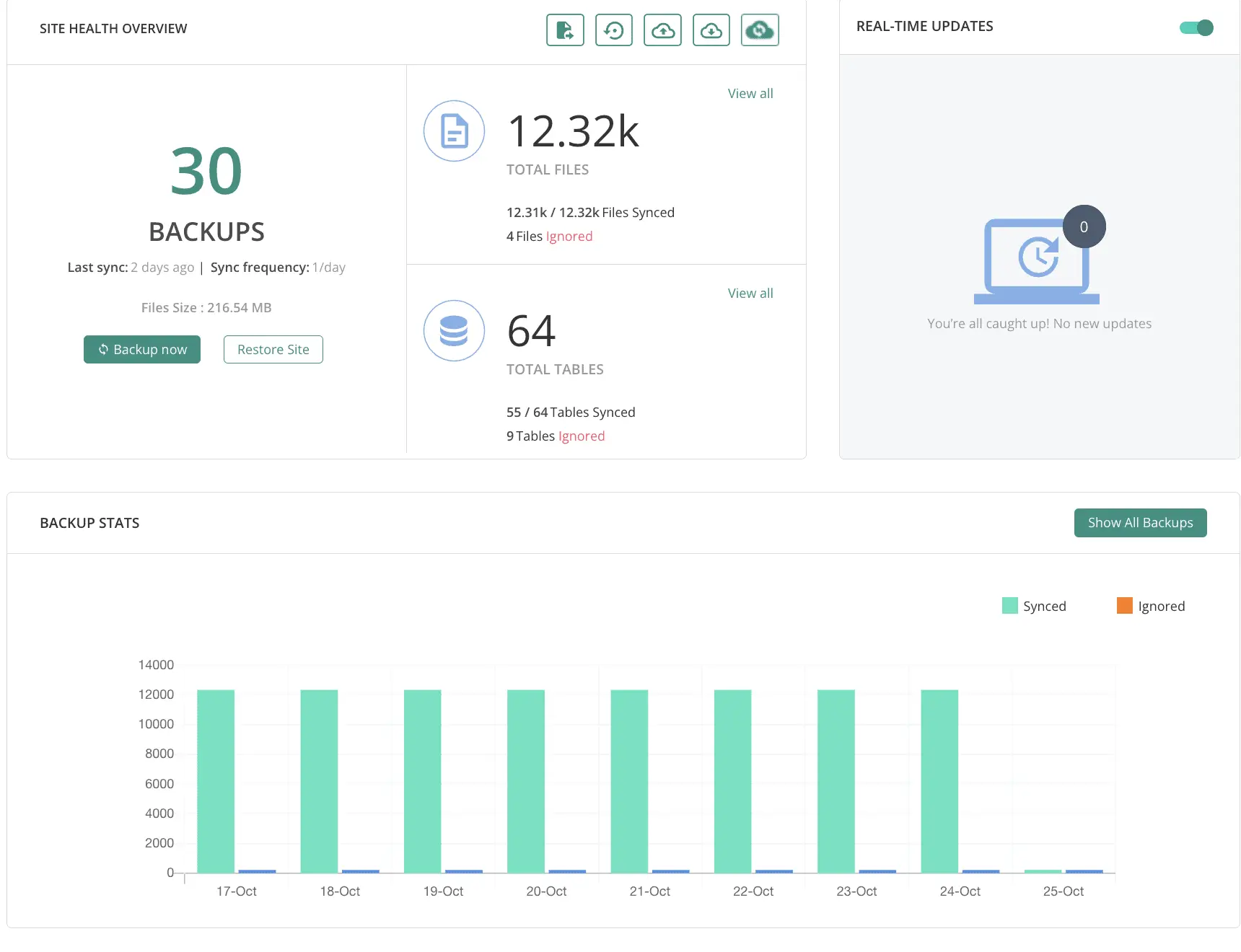
BlogVault also has a staging environment built in, so you can test plugin updates or theme changes before pushing them live.
The biggest thing BlogVault does that most backup plugins can’t: it restores your site even when WordPress is completely broken. Most backup plugins need a Working WordPress site to run a restore. But BlogVault has an emergency connector that bypasses that.
The serious downside with BlogVault is that you don’t own your backup files. BlogVault stores everything on its own cloud infrastructure. If you cancel your subscription, you lose access to all your backup files immediately – no grace period, no download option.
That vendor lock-in is real, and you should weigh it carefully before committing to use BlogVualt.
Explore BlogVault Features & PlansBelow is a comparison between Solid Backup, BlogVault, & UpDraftPlus plugin:
| Feature | Solid Backup | BlogVault Plus | UpdraftPlus Premium |
|---|---|---|---|
| Price (1 site) | $199/year (Suite) | $149/year | ~$70/year |
| You own backup files | ✅ | ❌ Vendor-held | ✅ |
| Works if site is fully down | ⚠️ Limited | ✅ Emergency connector | ❌ |
| Real-time backups | ❌ | ✅ | ❌ |
| Incremental backups | ✅ | ✅ | ✅ |
| WooCommerce real-time | ❌ | ✅ | ❌ |
| Staging environment | ❌ | ✅ (Pro plan) | ✅ (UpdraftClone) |
| Cloud storage choice | ✅ (multiple) | ❌ (BlogVault only) | ✅ (more destinations) |
| Free plan | — | ❌ (7-day trial only) | ✅ |
| Large site support (5GB+) | ✅ | ✅ | ✅ |
| Restore without WP access | ❌ | ✅ | ❌ |
Solid Central Alternatives
Solid Central was a WordPress multi-site management dashboard. The best Solid Central replacement is MainWP. It’s not just comparable, but better.
MainWP’s free version manages unlimited WordPress sites with full core functionality.
The Pro subscription at $199/year unlocks 33+ premium extensions, & most importantly, you manage unlimited sites from one dashboard.
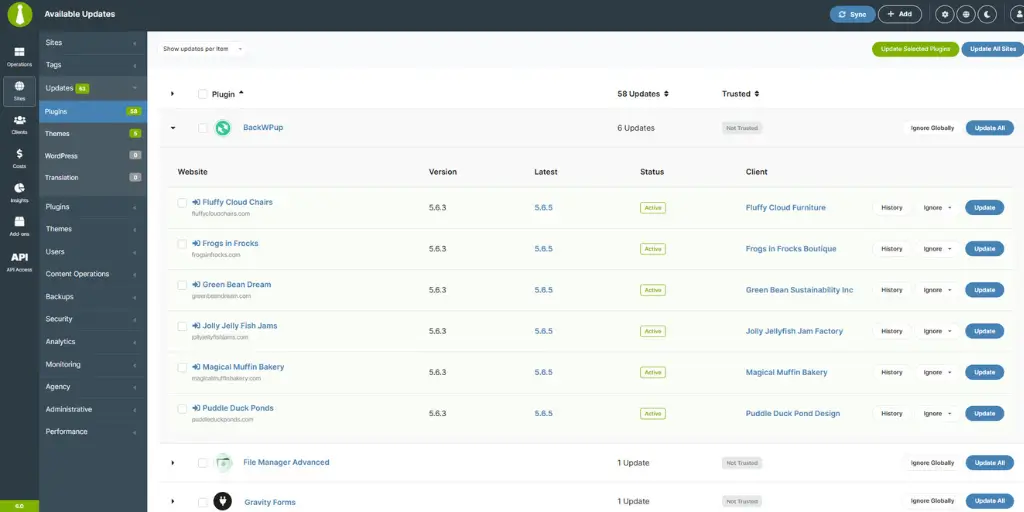
MainWP is open-source and self-hosted. You install the MainWP Dashboard on any WordPress site you control, and site data stays on your server. It never passes through MainWP’s servers; that’s a meaningful privacy advantage over any plugin.
Note: Individual extensions for backup integration, security scanning, and uptime monitoring are only included in the MainWP Pro plan.
What MainWP does that Solid Central didn’t:
- The free version covers unlimited site management permanently – not a free trial.
- Zero Per-Site Fees. The flat $199 annual pricing means it covers whether you manage 5 sites or 500. Solid Central’s pricing scaled up with more sites. MainWP Pro doesn’t.
- A $599 lifetime subscription option exists. Solid Central never had that.
Here’s the pricing comparison between Solid Central & MainWP.
| Scenario | Solid Central | MainWP | Verdict |
|---|---|---|---|
| Basic multi-site management | $199/year (Suite) | $0 (Free) | ✅ Free |
| Full management with Pro extensions | $199–$949/year | $199/year (Pro) | ✅ Much cheaper at scale |
| Long-term investment | Annual plans only | $599 lifetime plan | ✅ Lifetime option |
FAQs related to SolidWP & Liquid Web
Below are the common questions related to the SolidWP & Liquid Web merger.
Is SolidWP still available to purchase after the Liquid Web merger?
No. SolidWP is no longer sold as a standalone plugin. SolidWP plugins have been absorbed into the Kadence. Existing SolidWP subscribers keep their plans until renewal, but new purchases are not available.
What is the best free alternative to Solid Security Pro Plugin?
Wordfence. It’s the free & strongest WordPress security plugin available today. It includes a real firewall, malware scanner, and two-factor authentication at no cost.
Can I use Kadence Security without using the Kadence theme?
Yes. But to use Kadence security, you need to buy Kadence Pro bundle plan for $299/year. You cannot purchase just the security plugin alone.
Will my Solid Security settings carry over to Wordfence or MalCare automatically?
No. There are no automatic import options available for both plugins. Switching to Wordfence/Malcare requires manually reconfiguring your firewall rules, brute-force protection, malware scanning, 2FA settings, etc.
Does switching from SolidWP to Wordfence affect my site’s database?
Deactivating and removing the old plugin doesn’t automatically clean up its database entries. Database Options rows prefixed with solid_security_* remain in your wp_options table unless manually removed. Use a database cleaner or WP-CLI to remove them after switching.
Does the Solid Security to Kadence Security migration break existing WordPress hooks and custom code?
Yes. Plugin slug changes from solid-security to kadence-security break any custom code, snippets, or third-party integrations that referenced the old slug.
What happens to my SolidWP data if I don’t migrate?
SolidWP plugins will receive critical security patches until April 2027. After that date, the plugins receive no updates, no security patches, no compatibility fixes, and no feature development.
How much does it cost to replace the full SolidWP Suite ($199/year)?
MalCare for security + UpdraftPlus Free for backups + MainWP for site management: costs $99/year for a single site. That’s cheaper than the old $199/year Solid Suite. However, for a WooCommerce site with real-time backups, the cost rises to ~$169/year.
The Bottom Line
In my opinion, SolidWP didn’t fail because the product was bad.
It was absorbed because a private equity firm with an “aggressive consolidation strategy” bought the parent company. And bundling eight popular plugin brands into four products makes the portfolio simpler to manage (and eventually to sell).
The SolidWP identity crisis: iThemes Security to Solid Security to Kadence Security. Three names in five years – Every rebrand was someone else’s vision of what this plugin should be.
The customers who stuck through every rebrand have now been told: the product they used for your site protection is now just an add-on to a theme builder.
You don’t have to accept that.
The standalone SolidWP alternatives are excellent; they’re cheaper in most configurations, and they work with whatever theme you want to keep using. However, if you want to use the Kadence theme & blocks plugin, Liquid Web “Kadence Pro” plan is worth buying.
Explore Kadence Pro PlansNote: Your current SolidWP plan keeps working until it expires. Critical security patches continue until April 2027. But don’t wait until the last minute to migrate to different plugins.
The plugins above are all worth learning before an emergency forces you to learn them under pressure. There are plenty of step-by-step videos available on YouTube to learn how it works.
That’s all today. If you have any questions related to SolidWP alternatives, let me know in the comments section.
Thanks for reading. Have a nice day.
– Sayan Samanta